Executive Summary
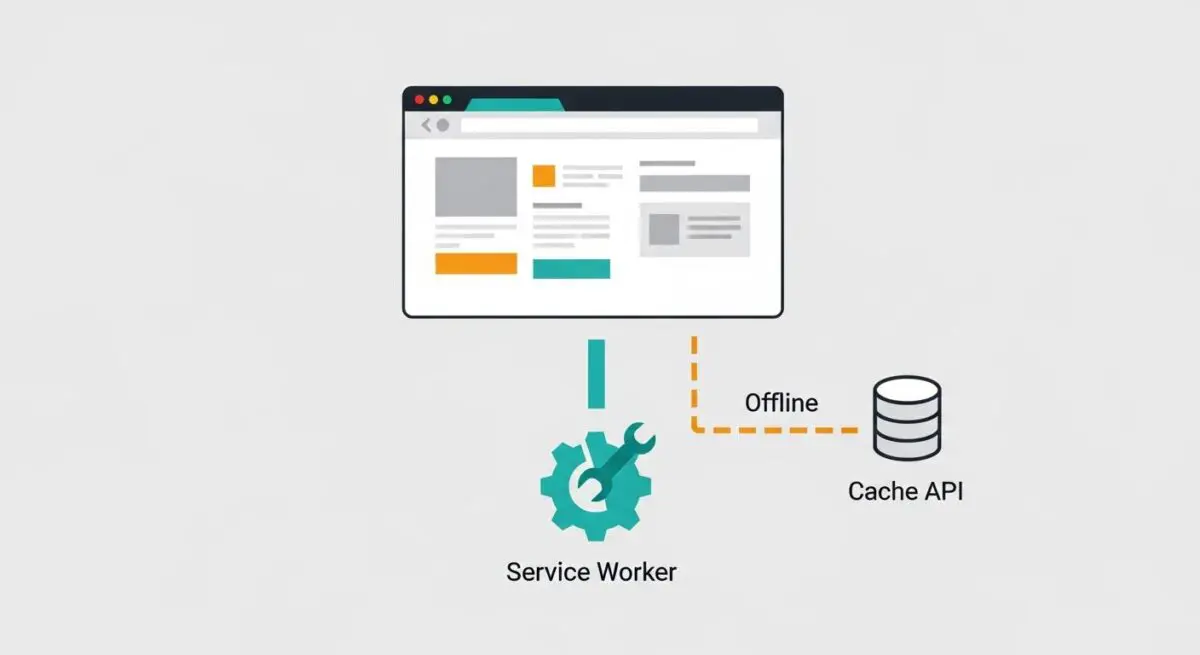
- Service Worker Integration: Offline capability relies on Service Workers acting as a programmable proxy between the browser and the network to intercept requests.
- Cache API Utilization: It leverages the Cache API to store and retrieve critical assets locally, ensuring immediate availability regardless of network status.
- Performance Resilience: Implementing offline features significantly improves perceived performance and reliability, mitigating the impact of high-latency or unstable connections.
What is Offline Capability?
Offline capability refers to the architectural design and technical implementation that allows a web application to remain functional when a user lacks a reliable internet connection. This is primarily achieved through Progressive Web App (PWA) technologies, specifically Service Workers and the Cache API. A Service Worker is a script that the browser runs in the background, separate from a web page, enabling features that do not require a web page or user interaction, such as push notifications and background synchronization.
From a technical standpoint, offline capability involves intercepting network requests and serving responses from a local cache. When the device is offline, the Service Worker detects the lack of connectivity and fetches the requested resources from the Cache Storage instead of the server. For data-heavy applications, IndexedDB is often utilized to store structured data locally, allowing for complex queries and data persistence that can be synchronized with the server once connectivity is restored.
The Real-World Analogy
Imagine a high-end restaurant that maintains a comprehensive physical recipe book and a fully stocked pantry on-site. Even if the restaurant’s telephone line and internet connection to their suppliers are severed, the chefs can still prepare the signature dishes because they have the instructions (the code) and the ingredients (the assets) already within the building. They don’t need to call the supplier for every single order. In this scenario, the restaurant continues to serve its customers (the users) without interruption, only needing to reconnect with suppliers (the server) later to restock what was used.
Why is Offline Capability Critical for Website Performance and Speed Engineering?
Offline capability is a cornerstone of modern speed engineering because it fundamentally alters the Critical Rendering Path. By serving assets from a local cache, the browser bypasses the network entirely, eliminating latency, DNS lookups, and TCP handshakes. This results in near-instantaneous Largest Contentful Paint (LCP) and First Contentful Paint (FCP) metrics, as the resources are retrieved at the speed of the local disk rather than the speed of the network.
Furthermore, offline capability enhances Reliability, a key component of user experience that indirectly influences SEO and conversion rates. In environments with intermittent connectivity—such as mobile users in transit—offline-enabled sites prevent the dreaded “No Internet” error page, maintaining session continuity. This resilience ensures that the application remains interactive (improving Interaction to Next Paint or INP) even when the network is congested or failing.
Best Practices & Implementation
- Implement a Cache-First Strategy: For static assets like CSS, JavaScript, and images, use a cache-first strategy to ensure immediate loading, only falling back to the network if the asset is missing.
- Utilize Stale-While-Revalidate: For content that updates frequently, serve the cached version immediately while simultaneously fetching an update from the network in the background to refresh the cache for the next visit.
- Provide a Custom Offline Fallback: Design and cache a dedicated offline.html page to provide a branded, helpful experience when a requested page is not in the cache and the network is unavailable.
- Version Your Cache: Use unique cache names (e.g., ‘v1’, ‘v2’) and implement a cleanup script within the activate event of the Service Worker to delete outdated caches and prevent storage bloat.
- Optimize Resource Selection: Only cache essential assets required for the core functionality of the site to avoid exceeding browser storage quotas and impacting device performance.
Common Mistakes to Avoid
One frequent error is over-caching, where developers attempt to store every single page and asset, leading to significant storage overhead on the user’s device and potential performance degradation. Another critical mistake is failing to handle Service Worker updates correctly; if the Service Worker script is cached too aggressively by the server, users may be stuck with an old version of the site indefinitely. Finally, neglecting to provide visual feedback to the user regarding their connection status can lead to confusion when dynamic features (like form submissions) fail without explanation.
Conclusion
Offline capability is no longer an optional feature but a technical requirement for high-performance web applications. By mastering Service Workers and strategic caching, engineers can deliver resilient, lightning-fast experiences that transcend the limitations of network connectivity.