Executive Summary
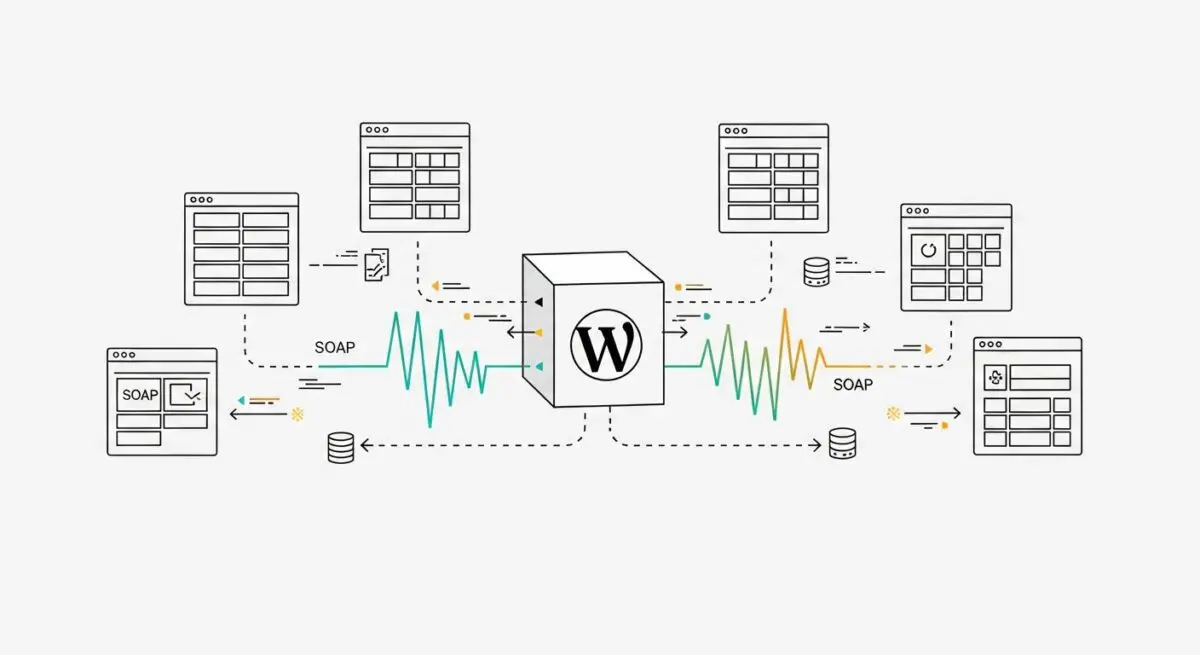
- SOAP (Simple Object Access Protocol) is an XML-based messaging protocol used for exchanging structured information in the implementation of web services.
- In WordPress architecture, SOAP is primarily utilized for legacy enterprise integrations with external ERP, CRM, and financial systems that require strict contract-based communication.
- Optimizing SOAP performance requires server-level configuration of the PHP SOAP extension, specifically focusing on WSDL caching and memory allocation.
What is SOAP?
SOAP, or Simple Object Access Protocol, is a highly structured, XML-based messaging protocol designed for exchanging information across decentralized, distributed environments. Unlike the more common REST (Representational State Transfer) architecture found in the WordPress REST API, SOAP relies strictly on XML for its message format and usually operates over HTTP, though it is independent of any specific transport protocol. It is governed by a formal contract known as the Web Services Description Language (WSDL), which defines the available methods, data types, and endpoints provided by the service.
In the context of WordPress and hosting environments, SOAP is frequently encountered when a website must interface with enterprise-grade legacy systems. While modern WordPress development favors the JSON-based REST API for its lightweight nature and ease of use with JavaScript, SOAP remains a critical component for secure, transactional communication where ACID (Atomicity, Consistency, Isolation, Durability) compliance is a priority. It provides built-in standards for security (WS-Security) and reliable messaging, making it the preferred choice for banking, insurance, and large-scale corporate data synchronization within a WordPress ecosystem.
The Real-World Analogy
To understand SOAP, imagine a high-stakes legal transaction involving a notarized contract sent via a secure, armored courier. In this scenario, the WSDL is the legal contract that both parties have signed, outlining exactly what can be requested and what will be delivered. The XML envelope is the armored briefcase, which contains specific compartments for the message header (metadata and security credentials) and the message body (the actual data). Unlike a casual text message (REST), which is quick but lacks formal verification, the SOAP process ensures that every piece of data is accounted for, verified against the contract, and delivered with a formal receipt. If even a single comma is out of place according to the contract, the entire delivery is rejected, ensuring total data integrity at the cost of speed and simplicity.
How SOAP Impacts Server Performance & Speed Engineering?
Integrating SOAP into a WordPress environment introduces specific overhead that can impact server response times and resource utilization. Because SOAP relies exclusively on XML, the server must perform intensive parsing and serialization tasks. XML is inherently more verbose than JSON, leading to larger payload sizes that consume more bandwidth and increase the time required for data to travel between the WordPress application and the external API endpoint. This verbosity also translates to higher CPU and memory usage during the processing of the `SoapClient` requests in PHP.
From a speed engineering perspective, the primary bottleneck often lies in the retrieval and parsing of the WSDL file. If the WordPress server is configured to fetch a remote WSDL file on every request, it introduces significant latency. Furthermore, SOAP requests are typically synchronous, meaning the PHP execution thread may hang while waiting for a response from the remote service, potentially leading to PHP-FPM worker exhaustion under high traffic. To mitigate these impacts, developers must implement aggressive caching of WSDL files and utilize asynchronous processing or background jobs (via Action Scheduler or WP-Cron) for non-critical SOAP communications to prevent render-blocking delays for the end-user.
Best Practices & Implementation
- Enable WSDL Caching: Ensure that the `soap.wsdl_cache_enabled` setting is active in the `php.ini` configuration. This prevents the server from downloading the WSDL file for every request, significantly reducing latency and external network calls.
- Implement Robust Error Handling: Use `try-catch` blocks specifically targeting `SoapFault` exceptions. This allows the WordPress application to fail gracefully and log technical details without exposing sensitive XML structure to the front-end user.
- Optimize PHP Memory Limits: Large SOAP responses can quickly consume available memory. Monitor the memory usage of scripts interacting with SOAP and adjust the `memory_limit` in the hosting environment to accommodate the overhead of XML DOM parsing.
- Use WS-Security for Sensitive Data: When transmitting sensitive information, leverage the WS-Security headers to ensure message integrity and confidentiality, rather than relying solely on the transport layer (HTTPS).
- Offload to Background Processes: For data synchronization tasks that do not require an immediate UI update, offload SOAP calls to a background queue to ensure that the WordPress front-end remains performant and responsive.
Common Mistakes to Avoid
One frequent error is failing to verify the presence of the PHP SOAP extension (`ext-soap`) on the server before deployment. Many managed WordPress hosts do not enable this extension by default, leading to fatal errors when the `SoapClient` class is instantiated. Another common mistake is neglecting to set appropriate timeouts for SOAP connections. Without a defined `connection_timeout`, a slow third-party service can cause the WordPress site to hang indefinitely, eventually resulting in a 504 Gateway Timeout error. Finally, developers often overlook the importance of validating the XML schema before transmission, which leads to rejected requests and difficult-to-debug integration issues.
Conclusion
While SOAP is often viewed as a legacy protocol, its role in enterprise WordPress architecture remains vital for secure, contract-based data exchange. By implementing proper WSDL caching and server-side optimizations, developers can maintain high performance while ensuring the integrity of complex system integrations.