Executive Summary
- Distributes incoming HTTP/HTTPS traffic across multiple web nodes to ensure horizontal scalability and prevent server bottlenecks.
- Implements automated health checks to reroute traffic away from degraded WordPress instances, ensuring 100% application uptime.
- Enables SSL/TLS termination at the edge, offloading cryptographic processing from origin servers to improve PHP execution speed.
What is a Load Balancer?
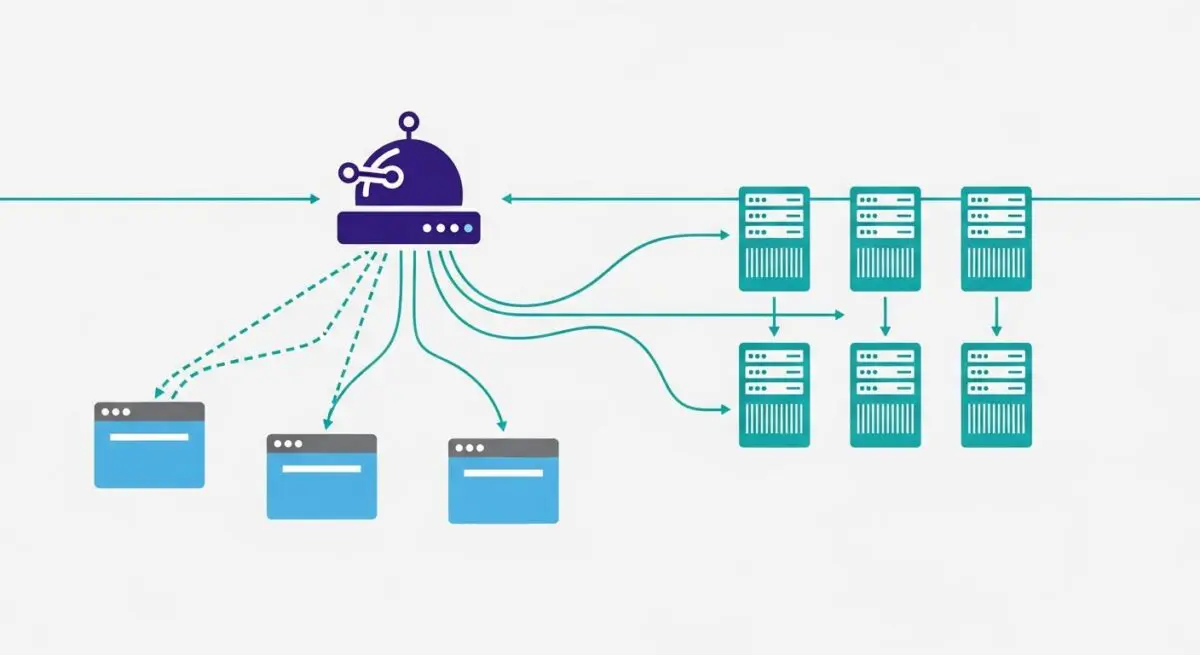
A load balancer is a critical infrastructure component that acts as a reverse proxy, distributing incoming network or application traffic across a group of backend servers, often referred to as a server farm or server pool. In the context of enterprise WordPress environments, a load balancer sits between the public internet and the web server nodes (typically running Nginx or Apache). Its primary function is to optimize resource utilization, maximize throughput, reduce latency, and ensure fault-tolerant configurations. By spreading the request load, it prevents any single server from becoming a performance bottleneck or a single point of failure (SPOF). Without a load balancer, a WordPress site is limited by the vertical scaling capacity of a single machine, which introduces significant risk during traffic spikes or hardware failures.
Technically, load balancers operate at different layers of the Open Systems Interconnection (OSI) model. Layer 4 (Transport Layer) load balancers route traffic based on IP address and TCP/UDP ports, which is highly efficient but lacks content awareness. Conversely, Layer 7 (Application Layer) load balancers—more common in sophisticated WordPress stacks—make routing decisions based on the content of the HTTP request, such as headers, cookies, or URL paths. This allows for advanced traffic management, such as directing traffic to specific server pools based on whether the user is accessing the WordPress admin dashboard (wp-admin) or the front-end site. Modern cloud solutions like AWS Elastic Load Balancing (ELB), Google Cloud Load Balancing, and software-based solutions like HAProxy or Nginx Plus are the industry standards for managing these high-concurrency environments.
The Real-World Analogy
Imagine a high-end, multi-room restaurant during the busiest hour of the week. If every customer tried to enter through a single door and wait for the same single waiter, the system would collapse, leading to long wait times and unhappy guests. A load balancer is like a professional maître d’ standing at the entrance. As guests arrive, the maître d’ assesses the capacity of each dining room and the current workload of every waiter. They then direct each party to the specific table and server that can provide the fastest service. If one dining room is closed for maintenance or a waiter is overwhelmed, the maître d’ seamlessly redirects new guests to other available areas without the guests ever realizing there was a potential delay. In this scenario, the guests are the website visitors, the waiters are the web servers, and the maître d’ is the load balancer ensuring the entire operation runs smoothly.
How Load Balancer Impacts Server Performance & Speed Engineering?
In a single-server WordPress setup, the CPU and RAM must handle every aspect of the request lifecycle: SSL/TLS negotiation, PHP-FPM processing, database queries, and static file delivery. As traffic scales, these resources are quickly exhausted, leading to increased Time to First Byte (TTFB) and eventual server crashes. A load balancer transforms this architecture into a horizontally scalable system. By offloading SSL/TLS termination, the load balancer handles the computationally expensive task of decrypting and encrypting traffic, allowing the backend WordPress nodes to dedicate 100% of their CPU cycles to executing PHP code and processing the WordPress Loop. This separation of concerns is a fundamental principle of high-performance speed engineering.
Furthermore, load balancers significantly improve global performance through sophisticated distribution algorithms. Algorithms such as “Least Connections” ensure that requests are sent to the server with the lowest active load, while “Weighted Round Robin” allows architects to direct more traffic to servers with higher hardware specifications. For WordPress specifically, this architecture supports high-concurrency events—such as product launches or viral news cycles—by allowing administrators to spin up additional web nodes (Auto-scaling) that the load balancer automatically integrates into the rotation. This ensures that the Largest Contentful Paint (LCP) and other Core Web Vitals remain stable even under extreme stress, as the workload is distributed evenly across an elastic pool of resources.
Best Practices & Implementation
- Implement Session Affinity (Sticky Sessions): Ensure that a user’s session remains tied to a specific backend node during their visit. This is crucial for WordPress because, without centralized session management (like Redis or Memcached), a user might be logged out if their next request is routed to a different server that doesn’t recognize their session cookie.
- Configure Robust Health Checks: Define specific health check paths, such as a lightweight
health-check.phpfile, that verify both the web server’s responsiveness and the database connectivity. The load balancer must automatically drop any node that fails these checks to maintain 100% uptime. - Utilize SSL Offloading: Terminate SSL certificates at the load balancer level. This simplifies certificate management (one place to renew) and reduces the cryptographic overhead on your WordPress application servers, leading to faster PHP execution.
- Centralize Media and Database: In a load-balanced environment, all WordPress nodes must be stateless. Use a managed database service (like AWS RDS) and a shared file system (like Amazon EFS or an S3-based plugin) to ensure that an image uploaded to Node A is immediately available on Node B.
- Enable Proxy Protocol: Ensure the load balancer passes the original client IP address to the backend nodes using the
X-Forwarded-Forheader. This is essential for security logging, firewalls, and personalized content delivery.
Common Mistakes to Avoid
One frequent error is failing to synchronize the wp-content/uploads directory across all nodes. If a user uploads an image to one server and the load balancer sends the next visitor to a different server, the image will appear as a 404 error. Another common mistake is neglecting the “X-Forwarded-For” header configuration; without this, WordPress will see the load balancer’s IP address instead of the actual visitor’s IP, which breaks security plugins like Wordfence, analytics, and geo-targeting logic. Finally, many organizations forget to load balance the load balancer itself (using DNS-level failover or VRRP), creating a new single point of failure at the entry point of their stack.
Conclusion
A load balancer is the cornerstone of enterprise WordPress hosting, providing the necessary infrastructure for horizontal scaling, redundancy, and high-performance traffic management. By decoupling the entry point from the processing nodes, architects can ensure a resilient and lightning-fast user experience regardless of traffic volume.