Executive Summary
- Reduces database CPU utilization by storing the results of expensive SQL queries in high-speed RAM (Redis or Memcached).
- Extends the lifecycle of the WordPress Object Cache API beyond a single page load, enabling data persistence across multiple user sessions.
- Critical for scaling high-traffic WooCommerce environments and complex dynamic sites where page caching is not feasible.
What is Persistent Object Cache?
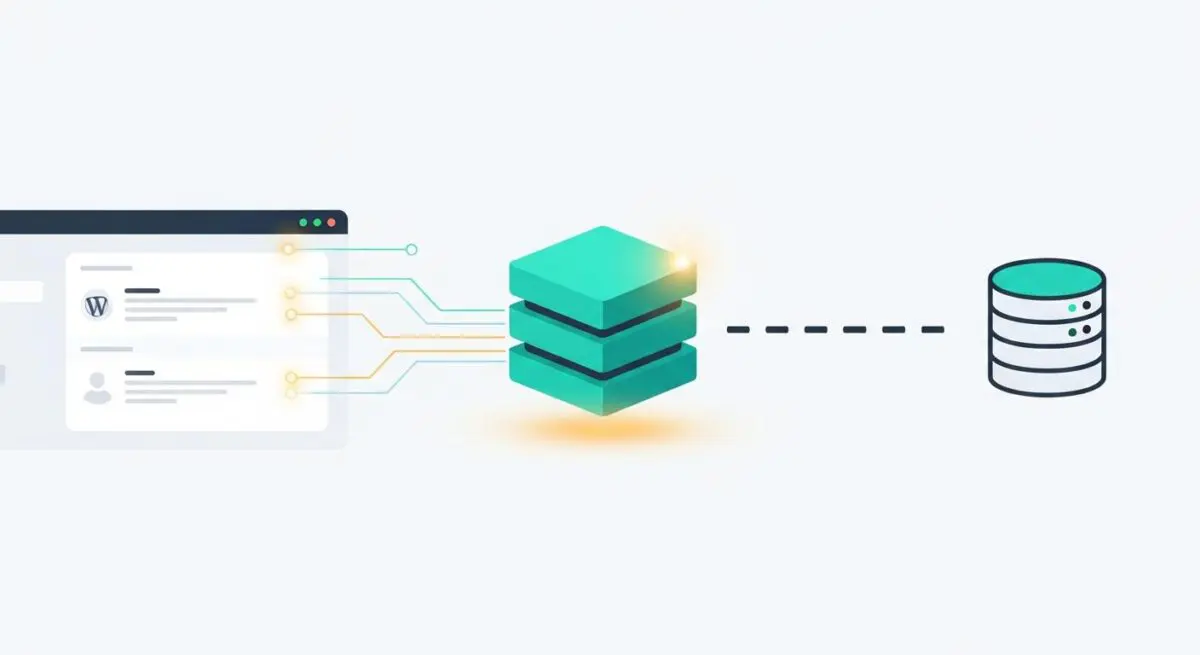
Persistent Object Cache is a server-side optimization layer that stores the results of complex database queries and PHP computations in a high-speed memory store. In the default WordPress architecture, the WP_Object_Cache class provides a non-persistent caching mechanism. This means that any data cached during the execution of a PHP script is discarded as soon as the request ends. A persistent object cache solution, typically powered by Redis or Memcached, allows this data to persist across multiple requests, significantly reducing the need for the server to query the MySQL or MariaDB database repeatedly for the same information.
Technically, implementing a persistent object cache involves adding a drop-in script, object-cache.php, to the /wp-content/ directory. This script intercepts calls to the standard WordPress caching functions—such as wp_cache_get(), wp_cache_set(), and wp_cache_add()—and redirects them to the external memory store. By offloading the retrieval of site options, metadata, and taxonomy terms to RAM, the system achieves sub-millisecond data retrieval speeds. This is a fundamental requirement for enterprise-level WordPress hosting environments where database latency is the primary bottleneck for performance.
The Real-World Analogy
Imagine a high-end restaurant where the chef needs specific ingredients for a signature dish. In a standard setup without a persistent cache, every time an order comes in, a runner must go all the way down to a deep-storage warehouse in the basement (the database), search through thousands of crates, find the ingredient, and bring it back up. This process is repeated for every single customer, exhausting the runner and delaying the meal. With a Persistent Object Cache, it is like having a high-speed prep station right next to the chef. The most frequently used ingredients are already chopped, measured, and sitting on the counter in clear containers (RAM). The chef reaches out and grabs what they need instantly, the runner stays rested, and the customer receives their meal in a fraction of the time.
How Persistent Object Cache Impacts Server Performance & Speed Engineering?
The primary impact of Persistent Object Cache is the drastic reduction in Time to First Byte (TTFB) for dynamic requests. In a typical WordPress request, the core engine may execute dozens or even hundreds of SQL queries to assemble the page—fetching site options, user permissions, post content, and plugin configurations. Each query introduces latency and consumes database CPU cycles. By intercepting these requests via the Object Cache API, the system serves the data from memory, bypassing the database’s disk I/O and query parsing overhead. This is particularly impactful for the wp_options table, which is queried on every single page load.
Furthermore, Persistent Object Cache is vital for the efficiency of the WordPress Loop and the REST API. For high-traffic WooCommerce stores, the cache stores product variations, shipping zones, and price calculations that would otherwise require complex table joins. In a speed engineering context, this reduces the ‘Processing’ time of the server, allowing the web server (Nginx or Apache) to deliver the HTML payload much faster. It also prevents ‘database bloat’ from impacting front-end performance, as the most accessed rows are mirrored in the memory layer, ensuring that the database only handles unique, write-heavy operations.
From a resource allocation perspective, implementing a persistent cache allows a server to handle significantly more concurrent users with the same hardware. Since the database is no longer the bottleneck, the CPU can focus on executing PHP logic and serving requests rather than waiting for disk reads. This is a cornerstone of High-Availability (HA) architectures where multiple web nodes share a centralized Redis cluster to maintain state and cache consistency across the entire stack, ensuring that a user’s session data is available regardless of which web server handles their request.
Best Practices & Implementation
- Prioritize Redis over Memcached: While both are effective, Redis offers superior data persistence options, better handling of large datasets, and advanced data structures that align better with modern WordPress requirements and object-cache drop-ins.
- Monitor Cache Hit Ratios: Use tools like Redis-CLI or specialized WordPress performance plugins to ensure your hit ratio is high (ideally above 90%). A low hit ratio indicates that the cache is either too small or the data is being evicted too frequently due to memory constraints.
- Configure Proper Eviction Policies: Set your memory store to use an ‘allkeys-lru’ (Least Recently Used) eviction policy. This ensures that when the RAM limit is reached, the system automatically removes the oldest, least-accessed data to make room for new entries, preventing cache failures.
- Implement Cache Tagging and Groups: For complex enterprise sites, utilize caching backends that support grouping. This allows for selective purging of specific data sets (e.g., only purging product cache when inventory changes) without clearing the entire object store, which would cause a performance dip.
Common Mistakes to Avoid
One frequent error is failing to account for ‘Cache Stampedes.’ This occurs when a heavily accessed cache key expires, and hundreds of concurrent requests all attempt to regenerate that data by hitting the database simultaneously, potentially crashing the server. Implementing ‘probabilistic early expiration’ or ‘locking’ can mitigate this risk. Another mistake is using Persistent Object Cache on low-traffic sites with extremely limited RAM; if the memory store is constantly full and evicting data, the overhead of managing the cache can actually exceed the performance benefits. Finally, developers often forget to flush the object cache during manual database migrations or staging-to-production pushes, leading to ‘ghost’ data or outdated configurations appearing on the live site.
Conclusion
Persistent Object Cache is a critical architectural component for any WordPress site requiring enterprise-grade scalability and sub-second response times. By shifting the data retrieval burden from the database to high-speed RAM, it ensures the CMS remains performant under heavy concurrent loads and complex query requirements.