



Key Points
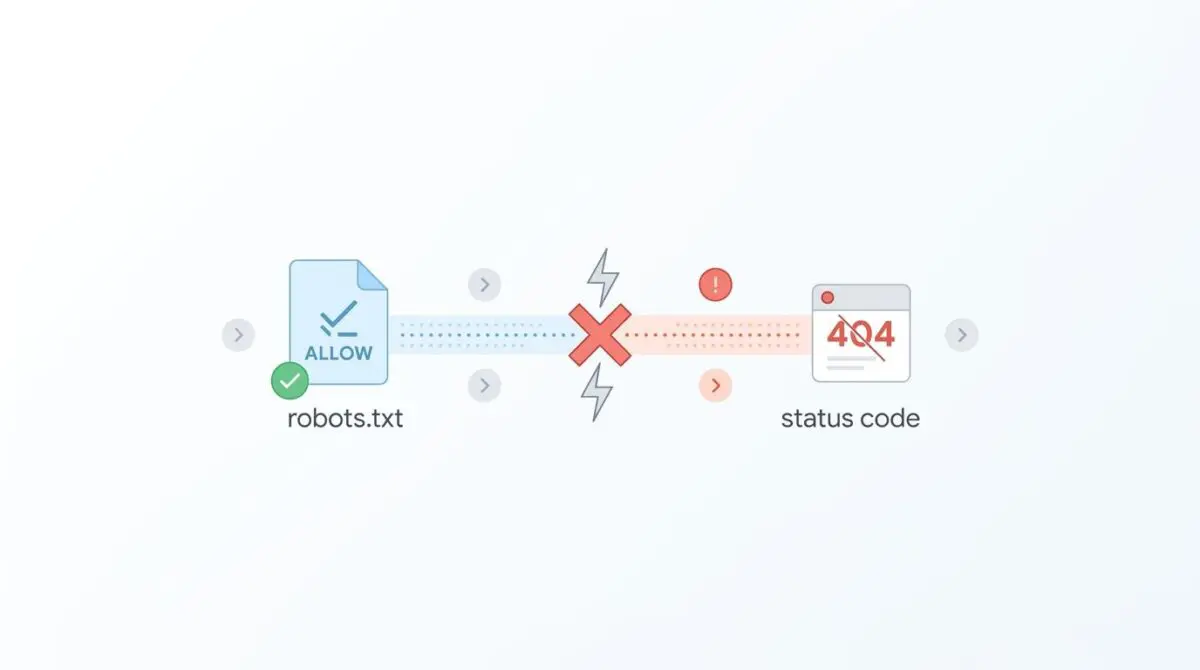
- Path Length Precedence: Googlebot resolves overlapping robots.txt directives based on the longest matching path string, meaning longer Disallow rules can override shorter Allow rules.
- Edge-Layer Desynchronization: Caching on CDNs like Cloudflare frequently serves stale robots.txt files, requiring strict NGINX cache-control headers to force live origin revalidation.
- Encoding Failures: Improper UTF-8 BOM encoding or fragmented User-Agent blocks can cause parsers to ignore critical Allow directives entirely, leading to GSC block errors.
Table of Contents
The Core Conflict: When Allowed URLs Get Blocked
Recent technical SEO studies indicate that nearly 18% of enterprise domains contain ‘Allow’ directives neutralized by overlapping path logic. This subtle misconfiguration leads to a significant loss in crawl efficiency across large-scale e-commerce sites. The root cause of this anomaly is a robots.txt directive precedence conflict.
This conflict occurs when the syntax of a robots.txt file contains overlapping Allow and Disallow rules. Crawlers like Googlebot resolve this conflict by prioritizing the directive with the longest path length. In modern SEO architectures, this error is frequently triggered by complex regex patterns or path-prefixing.
A broad Disallow unintentionally overrides a specific Allow due to character count logic rather than the order of appearance in the file. When Googlebot encounters these contradictory signals, it defaults to the most restrictive state to avoid crawling sensitive data. This leads to a ‘Blocked by robots.txt’ status in Google Search Console for URLs explicitly intended for indexing.
This conflict has a direct, catastrophic impact on both crawl budget and Generative Engine Optimization (GEO). Crawl budget is wasted when the bot repeatedly hits blocked paths while trying to discover nested assets. For GEO, the consequences are even more severe in the modern search landscape.
If an LLM-based crawler cannot access these allowed but technically blocked pages, the site’s content is excluded from Retrieval-Augmented Generation (RAG) pipelines. These pipelines power AI-generated search summaries across all major search engines. Erasing your site from these pipelines effectively erases your brand from zero-click search results.
Diagnostic Checkpoints for Directive Precedence
Resolving this issue requires a systematic breakdown of how crawlers interpret text files versus how servers deliver them. This error is rarely a simple typo. It is usually a desynchronization across your tech stack.
Diagnostic Checkpoints
Path Length Precedence Conflict
Longest matching path string wins over shorter Allow directives.
Edge-Layer Cache Inconsistency
Stale robots.txt cache at CDN level blocks access.
BOM (Byte Order Mark) and Encoding Issues
Invisible BOM characters cause parser to ignore first directive.
Conditional User-Agent Grouping
Specific bot blocks override general wildcard Allow permissions.
Server and Edge Layer Desynchronization
Path length precedence is often the most misunderstood aspect of crawler behavior. Google’s parser adheres strictly to the RFC 9309 longest match rule. If you have an Allow directive of eight characters and a Disallow directive of fourteen characters, the Disallow rule wins.
This occurs because the parser views the longer string as more specific to the requested URL path. This frequently happens in WordPress environments when SEO plugins generate automated rules for core directories. A manual Disallow added to the physical file can easily cause a conflict where specific scripts are inadvertently blocked.
Furthermore, edge-layer cache inconsistency exacerbates the problem significantly. Content Delivery Networks often apply a high Time-To-Live (TTL) to the robots.txt file to reduce origin load. If an SEO update adds an Allow directive, but the CDN serves a cached version from yesterday, Googlebot will honor the stale cached version.
Parsing and Encoding Failures
Beyond path lengths and caching, file encoding plays a critical role in parser success. If the robots.txt file is saved with UTF-8 BOM encoding, Google’s parser may fail to read the first line of the file. The Byte Order Mark (BOM) consists of invisible hex characters that confuse standard text parsers.
In fact, search engine parsers typically ignore the Unicode Byte Order Mark, but improper handling by basic text editors can inject invisible characters that break the parser entirely. If that first line is a User-agent or an Allow directive, it is ignored completely. This causes the bot to default to more restrictive wildcard rules found later in the file.
Conditional User-Agent grouping is another common failure point in complex setups. Googlebot ignores directives in the wildcard block if there is a more specific Googlebot block present anywhere in the file. If the Allow directive is placed in the wildcard block but forgotten in the specific block, the crawler follows the restrictive block only.
The Engineering Resolution Roadmap
Fixing a robots.txt directive precedence conflict requires precision at the directive level and aggressive cache management at the edge layer. You must align your syntax with crawler logic.
Engineering Resolution Roadmap
Audit Directive Specificity
Verify that the ‘Allow’ directive is longer (more characters) than any competing ‘Disallow’ directive for the same path. For example, change ‘Allow: /directory/’ to ‘Allow: /directory/index.php’ if a ‘Disallow: /directory/’ exists.
Force CDN Cache Purge
Manually purge the cache for the /robots.txt URL in your CDN dashboard (Cloudflare/Fastly). Verify the purge by running ‘curl -I https://yourdomain.com/robots.txt’ and checking the ‘x-cache’ or ‘cf-cache-status’ headers.
Sanitize File Encoding
Re-save the robots.txt file using ‘UTF-8 without BOM’ encoding. Ensure no invisible control characters or non-standard spaces are present using a code editor like VS Code or Vim.
Consolidate User-Agent Blocks
Move all critical ‘Allow’ directives into the ‘User-agent: *’ block unless you specifically need to block a certain bot. Ensure no ‘User-agent: Googlebot’ block exists that lacks the necessary ‘Allow’ lines.
Specificity and Caching Interventions
Auditing directive specificity is the critical first step in resolving this conflict. You must verify that your Allow directive contains more characters than any competing Disallow directive for the same path. By appending specific file extensions or trailing slashes, you can artificially increase the character count to win the precedence battle.
For example, changing an Allow rule to target a specific index file adds critical length to the string. Once the directives are corrected, forcing a CDN cache purge is mandatory to propagate the changes. You must manually purge the cache for the robots.txt URL in your CDN dashboard.
Verifying this purge via cURL ensures the edge node is serving the updated origin file. Sanitizing file encoding prevents invisible character corruption from recurring. Always re-save the robots.txt file using UTF-8 without BOM encoding via a professional code editor.
Finally, consolidate your User-Agent blocks to ensure Googlebot receives all necessary Allow permissions. Move all critical Allow directives into the wildcard block unless you specifically need to isolate a certain bot. Ensure no rogue Googlebot blocks exist that lack the necessary Allow lines.
Executing the Resolution at the Server Level
While correcting the text file resolves the parsing conflict, preventing edge-layer cache desynchronization requires server-level intervention. Relying on manual CDN purges is not a scalable enterprise solution. You must automate the cache bypass.
Fixing via NGINX Configuration
To ensure Googlebot always receives the most current robots.txt file, you must configure your origin server to serve strict cache-control headers. These headers must be targeted specifically for this endpoint. This forces edge nodes to bypass the cache and fetch the live file directly from the origin.
Implement the following configuration block in your NGINX server block to disable caching for the robots.txt file.
location = /robots.txt {
    allow all;
    log_not_found off;
    access_log off;
    add_header Cache-Control "no-cache, no-store, must-revalidate";
    add_header Pragma "no-cache";
    add_header Expires "0";
}
This directive explicitly instructs any proxy, CDN, or browser to revalidate the file upon every single request. The no-store command prevents the file from being saved to disk by intermediate caching layers. By setting the Expires header to zero, you eliminate the risk of serving a stale Disallow directive to Googlebot.
Additionally, disabling the access log for this specific file reduces disk I/O overhead on high-traffic servers. This ensures that frequent crawler hits to the robots.txt file do not bloat your server logs unnecessarily. Apache users can achieve similar results using FilesMatch directives within their configuration files.
Validation Protocol and Edge Cases
Deploying the fix is only half the battle when dealing with directive precedence. Rigorous validation is required to confirm crawler access has been fully restored across all network layers.
Validation Protocol
- Perform a Live Test in GSC URL Inspection to verify ‘Crawl allowed? Yes’.
- Execute ‘curl -A “Googlebot” -L’ to view the raw crawler response.
- Use the Robots.txt Tester tool to identify the exact blocking line.
Headless Architecture Anomalies
Standard validation protocols might fail in complex, decoupled environments. In a headless architecture, the frontend server may fetch the robots.txt content from a backend REST API. This introduces an entirely new layer of potential failure.
If the API response includes an X-Robots-Tag: noindex header in the JSON response, Googlebot will report a block. This occurs even if the admin panel shows a perfectly valid Allow directive in the UI. The HTTP header will always override the text file payload.
Furthermore, edge middleware might inject a dynamically generated robots.txt that differs from the origin. You must inspect the raw HTTP headers returned by the edge node, not just the text content of the file. Using cURL with the header flag is the only way to expose these hidden edge-layer directives.
Autonomous Monitoring and Prevention
Preventing directive conflicts requires moving beyond reactive troubleshooting and implementing proactive CI/CD safeguards. Implementing a pre-deployment robots.txt validator in your pipeline is highly recommended. This ensures syntax integrity before code reaches production.
This allows you to programmatically test your directives against exact parsing logic. By catching precedence errors early, you protect your crawl budget from unintended restrictions. You can configure deployment pipelines to fail the build if a critical Allow directive is overridden by a longer Disallow.
For enterprise environments, integrating advanced automation through custom API alerts provides real-time monitoring of entity integrity. You can set up scheduled scripts to ping the robots.txt file and alert the engineering team if the file size or character count changes unexpectedly.
Utilizing Andres SEO Expert for these custom architectural solutions ensures your server environment remains optimized. We build systems that cater to both traditional web crawlers and emerging AI models. Proactive monitoring is the only way to guarantee continuous visibility in a generative search landscape.
Conclusion
A robots.txt directive precedence conflict is a silent killer of crawl budget and AI search visibility. By understanding path length logic, enforcing proper file encoding, and strictly controlling edge-layer caching, you can eliminate these false-positive blocks in Google Search Console. Proper directive hygiene is foundational to technical SEO success.
Navigating the intersection of technical SEO, server architecture, and generative search requires a precise roadmap. If you need to future-proof your enterprise stack, resolve deep-level crawl anomalies, or implement AI-driven SEO automation, connect with Andres at Andres SEO Expert.
Frequently Asked Questions
What is a robots.txt directive precedence conflict?
A directive precedence conflict occurs when a robots.txt file contains overlapping Allow and Disallow rules. Googlebot resolves these conflicts by prioritizing the directive with the longest character path length, which can lead to specific URLs being unintentionally blocked if the Disallow string is longer than the corresponding Allow string.
How does path length affect Google’s robots.txt parsing?
Following the RFC 9309 longest match rule, Google’s parser selects the directive that matches the greatest number of characters in a URL path. This means that a Disallow rule with 14 characters will override an Allow rule with 8 characters, regardless of their position or order within the file.
How do robots.txt blocks impact Generative Engine Optimization (GEO)?
If robots.txt conflicts prevent LLM-based crawlers from accessing pages, those pages are excluded from RAG (Retrieval-Augmented Generation) pipelines. This effectively removes your site’s content from AI-generated search summaries and zero-click search results across modern generative engines.
Can CDN caching cause robots.txt errors in Google Search Console?
Yes. Edge-layer cache inconsistency occurs when a CDN (like Cloudflare or Akamai) serves a stale version of the robots.txt file. Even if you update the file on your origin server, Googlebot may still follow the cached, restrictive version until the CDN cache is manually purged.
Why should I avoid UTF-8 BOM encoding for robots.txt files?
UTF-8 BOM (Byte Order Mark) encoding inserts invisible hex characters at the beginning of the file. These characters can confuse standard parsers, causing Googlebot to ignore the first line of the file. If that line contains a critical User-agent or Allow directive, it can lead to massive crawling errors.
How can I ensure Googlebot always receives the most current robots.txt?
You can force crawlers to bypass the cache by configuring your origin server to serve specific headers for the robots.txt file. Implementing “Cache-Control: no-cache, no-store, must-revalidate” in your NGINX or Apache configuration ensures that edge nodes fetch the live file for every request.