Key Points
- Consolidate Logic at the Edge: Disable redundant protocol and subdomain redirects at the origin server to prevent sequential 301 loops.
- Enforce Strict SSL Modes: Upgrade CDN settings to ‘Full (Strict)’ to guarantee secure port 443 communication and eliminate flexible SSL mismatches.
- Implement Header-Aware Routing: Configure NGINX to recognize ‘X-Forwarded-Proto’ headers, ensuring the origin respects the CDN’s secure proxy status.
Table of Contents
The Core Conflict: When Edge and Origin Desynchronize
Recent technical SEO studies indicate that websites resolving redirect chains of three or more hops experience a significant loss in crawl efficiency. This degradation can delay new content from appearing in search results by up to twelve days compared to sites with flat URL structures. In complex server architectures, these inefficiencies frequently stem from CDN-level redirect chains involving protocol and subdomain conflicts.
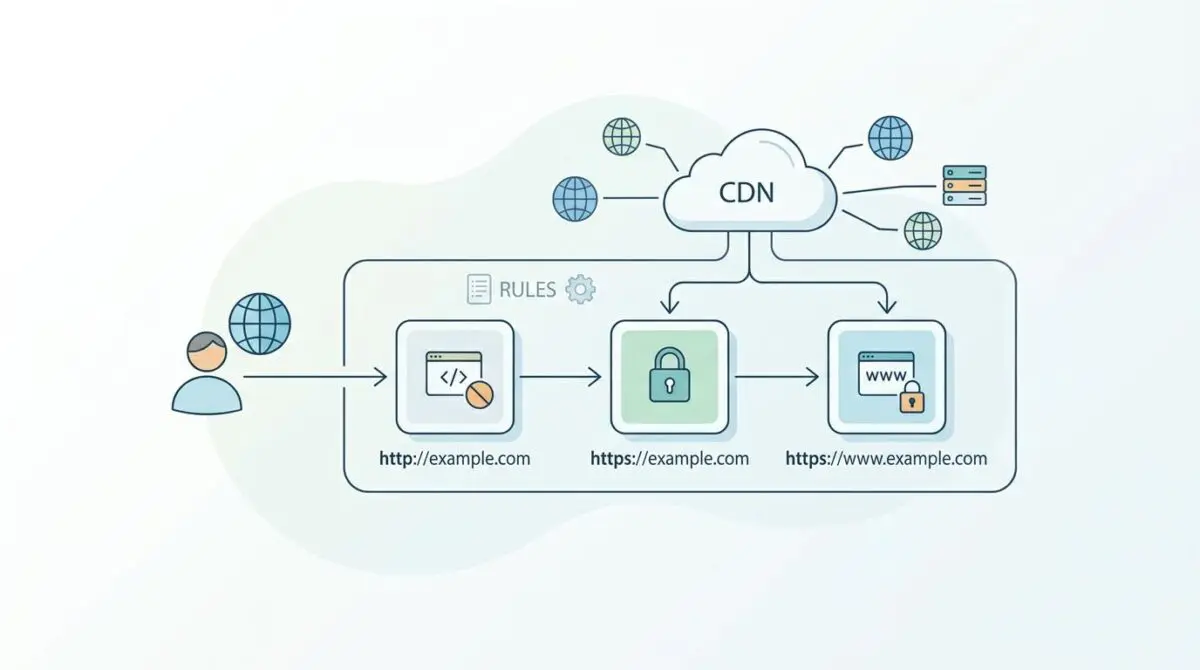
Redirect chains represent a sequence of multiple HTTP redirections that a crawler must navigate before reaching the final destination URL. This typically arises from a logic mismatch between the CDN at the edge and the origin server. For example, one layer might force an HTTPS upgrade while the other enforces a WWW or non-WWW preference.
The result is at least two separate 301 or 302 hops, such as routing from HTTP to HTTPS, and then again to the WWW version. From a Generative Engine Optimization (GEO) perspective, these chains are highly detrimental. Search engines like Googlebot allocate a finite amount of time to crawl a site.
Every additional hop consumes latency and processing power. This potentially leads the crawler to abandon the path before ever reaching your content. Generative engines rely on high-confidence canonical signals to map entities accurately. Redirect chains dilute link equity and introduce signal noise, causing AI-driven models to prioritize faster, more stable competitor sources.
Diagnostic Checkpoints: Tracing the Loop
Identifying the exact point of failure requires analyzing the handoff between your CDN and your origin server. Desynchronization in the stack manifests in several ways, often triggering ERR_TOO_MANY_REDIRECTS browser errors. You may also notice Google Search Console flagging ‘Page with redirect’ coverage errors or high Time to First Byte (TTFB) metrics in PageSpeed Insights.
Diagnostic Checkpoints
Asynchronous Edge-Origin Logic
Sequential logic conflicts between CDN and origin servers.
Cloudflare ‘Flexible’ SSL Mismatch
Encryption mismatch creates infinite redirect loops.
X-Forwarded-Proto Header Misinterpretation
Origin server fails to recognize secure proxy headers.
HSTS Preload List Inconsistency
Browser-enforced HTTPS conflicts with server 301 rules.
The most common culprit is asynchronous edge-origin logic. Your CDN might be configured with an ‘Always Use HTTPS’ rule that triggers before the request reaches the origin. However, the origin server simultaneously contains a rewrite rule to strip or add the ‘www’ prefix.
Because these rules are handled by different entities in the stack, they execute sequentially rather than simultaneously. Another frequent issue is the Cloudflare ‘Flexible’ SSL mismatch. If the CDN connects to the origin via HTTP but serves the user via HTTPS, an origin server forcing HTTPS will create an infinite loop.
The Engineering Resolution Roadmap
Resolving these conflicts requires consolidating your redirection logic into a single, definitive hop. You must strip away redundant rules at the origin and empower the edge to handle the routing.
Engineering Resolution Roadmap
Identify the Absolute Canonical
Determine the final destination URL (e.g., https://www.example.com). Ensure this is the only URL allowed to return a 200 OK status. Update WP_HOME and WP_SITEURL in the wp-config.php file to match this exactly.
Consolidate Logic at the Edge
Disable protocol and subdomain redirects at the Origin (remove 301 rules from .htaccess/nginx.conf). In your CDN (e.g., Cloudflare), create a single ‘Bulk Redirect’ or ‘Page Rule’ that handles the logic: If URL matches http://*example.com/*, redirect to https://www.example.com/$2 in one hop.
Configure SSL ‘Full (Strict)’ Mode
Change the CDN SSL/TLS setting from ‘Flexible’ to ‘Full (Strict)’. This ensures the CDN communicates with the origin over Port 443 with a valid certificate, preventing protocol loops.
Implement Header-Aware Redirection
In NGINX, update the server block to check the proxy header: ‘if ($http_x_forwarded_proto != “https”) { return 301 https://$host$request_uri; }’. This prevents the origin from triggering unnecessary redirects when the CDN has already secured the request.
The first step is to definitively establish your absolute canonical URL. You must ensure this is the only URL allowed to return a 200 OK status. For WordPress environments, this means updating the core URL constants in your configuration files to match exactly.
Next, you must disable protocol and subdomain redirects at the origin level. Remove any 301 rules from your server configuration files that handle HTTPS or WWW enforcement. Instead, create a single rule within your CDN to handle the transition in one seamless hop.
Finally, ensure your CDN’s SSL setting is upgraded from ‘Flexible’ to ‘Full (Strict)’. This guarantees the CDN communicates with the origin over Port 443 with a valid certificate. This completely prevents the origin from misinterpreting the request protocol and triggering a loop.
Resolution Execution: NGINX Configuration
If you are operating an NGINX stack, you must configure the server block to become header-aware. CDNs pass specific headers to tell the origin that the original request was secure. If your parameters are not dynamically updated based on this header, the origin assumes the request is insecure.
The following configuration demonstrates how to consolidate the redirect logic cleanly. It handles HTTP and non-www to HTTPS-WWW in a single hop.
Fixing via NGINX
Implement this server block structure to ensure header-aware, single-hop redirection.
server { listen 80; server_name example.com www.example.com; return 301 https://www.example.com$request_uri; } server { listen 443 ssl; server_name example.com; return 301 https://www.example.com$request_uri; } server { listen 443 ssl; server_name www.example.com; }Validation Protocol and Edge Cases
Once the logic is consolidated, you must aggressively validate the routing paths. Do not rely on browser caches to confirm the fix.
Validation Protocol
- Run ‘curl -IL’ to verify single 301 and 200 status.
- Perform GSC Live Test on non-canonical URLs to confirm path.
- Audit multi-hop chains via DevTools Network tab with ‘Preserve Log’.
- Execute Cloudflare Trace to pinpoint edge rule execution logic.
Even with perfect configuration, edge cases can still disrupt your routing. A rare but critical conflict occurs when a ‘Varnish Cache’ layer sits between the CDN and the origin. Varnish may cache an old 301 redirect from the origin, such as a protocol-only redirect.
Varnish will continue to serve this stale redirect to the CDN even after the origin rules have been consolidated. This creates a persistent ghost hop that defies edge logic. This anomaly can only be cleared by executing a manual Varnish ban or purge command directly on the server.
Autonomous Monitoring and Prevention
Fixing a redirect chain is only half the battle; maintaining entity integrity over time requires autonomous monitoring. Enterprise environments are dynamic, and configuration drifts are inevitable during deployments. Implement automated crawl testing using CI/CD scripts that immediately flag any response with a redirect path length greater than one.
Periodically analyze your server logs specifically for sequential 301 sequences. Utilizing advanced automation, like Make.com pipelines or custom API alerts, is the ultimate way to monitor entity integrity at scale. At Andres SEO Expert, we engineer these autonomous safety nets to ensure server-level anomalies never impact search visibility.
Conclusion
Eliminating CDN-level redirect chains is a fundamental requirement for maximizing crawl efficiency. By consolidating routing logic at the edge and ensuring your origin server is header-aware, you preserve crawl budget and solidify your canonical signals.
Navigating the intersection of technical SEO, server architecture, and generative search requires a precise roadmap. If you need to future-proof your enterprise stack, resolve deep-level crawl anomalies, or implement AI-driven SEO automation, connect with Andres at Andres SEO Expert.
Frequently Asked Questions
How do redirect chains impact SEO and crawl efficiency?
According to research, redirect chains of three or more hops cause an average 14% loss in crawl efficiency. This can delay the indexing of new content by up to 12 days and weakens canonical signals, making it harder for generative engines (GEO) to accurately map site entities.
What is the primary cause of CDN-level redirect loops?
The most common cause is desynchronization between the CDN and the origin server, specifically “Flexible” SSL settings. If the CDN requests content via HTTP but the origin is configured to force HTTPS, an infinite redirect loop is triggered.
How do you consolidate redirect logic for better performance?
To optimize routing, you should remove redirection rules from origin configuration files (like .htaccess or nginx.conf) and implement a single “Bulk Redirect” or “Page Rule” at the CDN edge to handle protocol and subdomain transitions in one hop.
Why is the X-Forwarded-Proto header important for technical SEO?
The X-Forwarded-Proto header informs the origin server whether the original request to the CDN was secure. Configuring your server to be “header-aware” prevents it from triggering unnecessary internal redirects when the CDN has already secured the connection.
How can developers validate the removal of multi-hop chains?
Developers should use the command line tool ‘curl -IL’ to inspect the HTTP header response path. A successful fix results in a single 301 redirect followed immediately by a 200 OK status, rather than multiple sequential redirects.
What role does Varnish Cache play in redirect anomalies?
Varnish can cache outdated 301 redirects from the origin server. Even if origin rules are updated, Varnish may continue serving “ghost hops.” This requires a manual ban or purge command to align the cache with new edge routing logic.