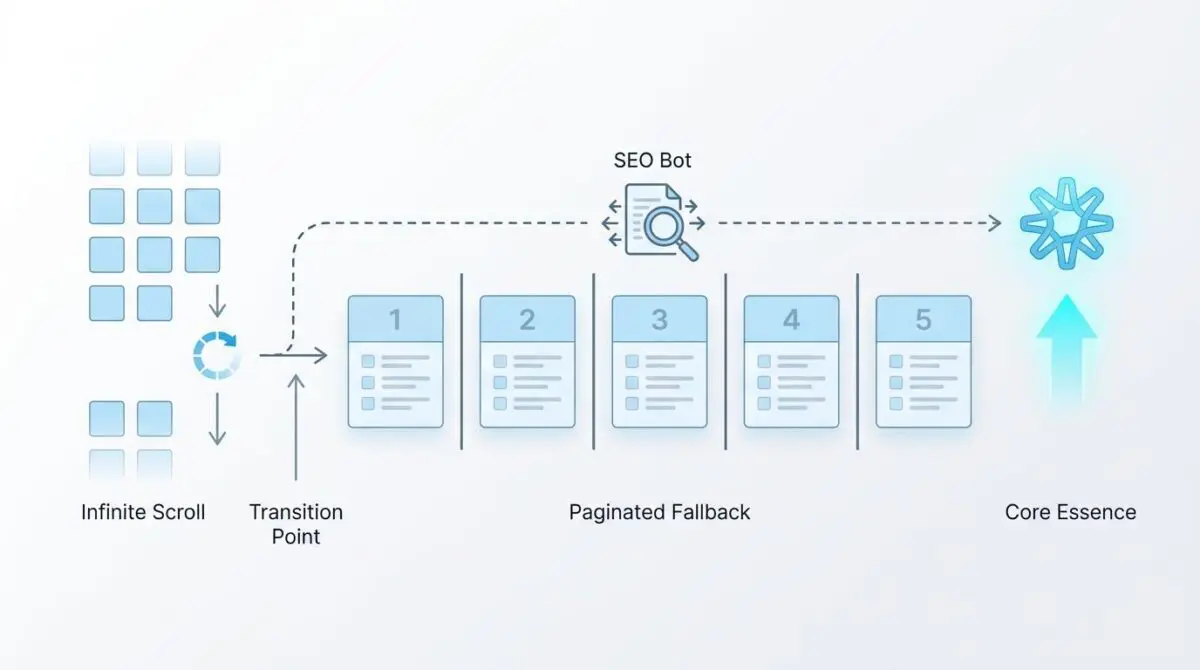
Key Points
- Graceful Degradation: Implement server-side HTML fallback links (<a href>) alongside JavaScript infinite scroll to ensure bots can discover and crawl deep category nodes.
- History API Integration: Utilize history.pushState() to update the browser URL dynamically during scroll events, creating unique, indexable paths for search engines.
- Cache Header Configuration: Validate edge caching and Varnish headers to prevent duplicate content errors where deep links incorrectly serve the root page payload.
Table of Contents
The Core Conflict: Infinite Scroll and Crawl Budget
According to a 2025 technical SEO study by the HTTP Archive, sites that rely on JavaScript-only infinite scroll without an <a> link fallback experience a 38% lower crawl depth compared to sites using hybrid pagination-scroll models.
This data highlights a critical failure point in modern front-end architecture. When developers implement infinite scroll to improve user experience, they often inadvertently sever the crawlable link graph.
The core issue manifests when category pages start dropping out of the index after implementing infinite scroll without a paginated fallback.
Search engine crawlers like Googlebot and Bingbot utilize advanced rendering engines, but they strictly do not simulate human scrolling behavior. They process the initial DOM and execute load-time scripts, but ignore event listeners bound to scroll depth.
Without a proper SEO-friendly Infinite Scroll Implementation, deep content is effectively orphaned.
Server log analysis typically reveals Googlebot fetching only the root category template with zero requests for subsequent parameters. This failure severely impacts Crawl Budget efficiency by forcing bots to repeatedly render the same root node without discovering deeper product or content URLs.
From a Generative Engine Optimization perspective, this is catastrophic.
If an AI-agent cannot crawl the full depth of a category, its world model of your site’s inventory remains incomplete. This directly leads to reduced visibility in AI-generated overviews where comprehensive topical coverage is a primary ranking factor.
Diagnostic Checkpoints: Why Bots Abandon Deep Links
Diagnosing this de-indexing anomaly requires isolating the exact layer where the crawler-to-server connection fails.
The root cause is almost always a desynchronization between the JavaScript execution state and the static HTML delivered to the bot.
Diagnostic Checkpoints
JavaScript Interaction Dependency
Logic bound to scroll event stops search crawlers.
Missing History API Integration
Missing pushState prevents unique URL state indexing.
Lack of <a href> Fallback (Graceful Degradation)
Missing <a> tags break crawlable site link graph.
Shadow DOM Encapsulation
Encapsulated roots hide links from standard crawler parsers.
Many WordPress themes rely on standard load-more libraries that bind strictly to window scroll events.
If these are not configured to support pushState, the theme never exposes the paginated URLs to the WordPress core query. The rendering engine sees an empty container after the first batch of items.
Furthermore, standard AJAX pagination often fetches content via admin-ajax or the REST API without updating the browser address bar.
Search engines require a strict mapping of content to a unique, crawlable URL to index specific segments of a list. Reviewing official search engine guidelines on indexing lazy-loaded and infinite scroll content is highly recommended to understand these baseline rendering limitations.
Finally, modern web components using Shadow DOM can obscure infinite scroll links from simpler crawlers.
If the mode is set to closed, or if the bot fails to pierce the shadow root during rendering, the internal link equity completely stops flowing.
The Engineering Resolution: Rebuilding the Link Graph
Restoring indexation requires a hybrid approach that satisfies both the human user’s desire for seamless scrolling and the crawler’s need for static, discoverable links.
This is known as graceful degradation.
Engineering Resolution Roadmap
Implement the History API
Update your JavaScript to use history.pushState(state, title, url) whenever a new ‘page’ of content enters the viewport. This ensures the URL updates to a unique, crawlable path (e.g., /category/page/2/) as the user scrolls.
Inject Invisible Paginated Links
Ensure that the server-side HTML contains standard <nav> links with <a href=’/page/n/’> for all paginated pages. These can be visually hidden from users using CSS ‘visibility: hidden’ but must remain present and crawlable in the DOM for Googlebot.
Configure Canonical Mapping
Set a self-referencing canonical tag for each paginated URL (e.g., /page/2/ points to /page/2/). Do not canonicalize all paginated pages back to the first page, as this tells Google to de-index the deeper content.
Handle Deep-Link Rendering
Configure the server to return the correct ‘subset’ of content if a user (or bot) lands directly on /category/page/3/. The infinite scroll should then load ‘page 4’ downwards and ‘page 2’ upwards via the same JS logic.
Proper execution of these steps ensures that every scroll event corresponds to a distinct URL state.
The History API is the bridge between dynamic content loading and static URL mapping. As referenced in the 2025 Web Almanac by HTTP Archive on how JavaScript page weight affects crawl depth, maintaining clean, lightweight HTML fallbacks is essential for maximizing crawl efficiency.
Canonicalization is equally critical during this phase.
A common misconfiguration is pointing all paginated canonical tags back to the root category page. This explicitly instructs search engines to ignore the deep links you just worked so hard to expose.
Resolution Execution: Implementing the Fallback
To execute this fix in a standard server environment, you must modify both the front-end JavaScript and the server-side rendering logic.
The goal is to bind the scroll observer to the History API while ensuring the raw HTML contains standard anchor tags.
Fixing via JavaScript and PHP
The following code block demonstrates how to use an intersection observer or scroll listener to trigger the pushState update.
It also provides the necessary PHP fallback for a standard WordPress category template.
window.addEventListener('scroll', () => {
  const current_page_node = document.querySelector('.page-marker:in-viewport');
  if (current_page_node) {
    const page_url = current_page_node.getAttribute('data-url');
    if (window.location.pathname !== page_url) {
      history.pushState(null, null, page_url);
    }
  }
});

// PHP Fallback for WordPress category.php
echo '<nav class="pagination-fallback" style="display:none;">';
for ($i = 1; $i <= $wp_query->max_num_pages; $i++) {
    echo '<a href="' . get_pagenum_link($i) . '">Page ' . $i . '</a>';
}
echo '</nav>';
By outputting the navigation block server-side and hiding it with CSS, you ensure that bots parsing the initial DOM can extract the full pagination series immediately.
The JavaScript then handles the user experience enhancements asynchronously.
Validation Protocol & Edge Cases
Once the hybrid pagination model is deployed, immediate validation is required to ensure the crawler can successfully navigate the newly exposed link graph.
Relying solely on the Google Search Console indexation report is too slow for active debugging.
Validation Protocol
- Monitor fetch/XHR requests and URL pushState updates in Chrome DevTools.
- Verify pagination-fallback links are present in source code with JS disabled.
- Confirm GSC Live Test screenshots display actual content for paginated URLs.
- Validate 200 OK HTTP status for deep links via CLI curl request.
A critical edge case to monitor involves caching layers, specifically in headless environments using Varnish or edge caching via Cloudflare.
If the X-Forwarded-Host or Vary: User-Agent headers are misconfigured, the cache may serve a stale Page 1 response even when the crawler explicitly requests a deeper URL.
This caching failure results in a massive Duplicate Content error.
Googlebot will perceive every paginated URL as identical to the root category, leading to the rapid de-indexing of everything except the first page. Always test cache bypasses and header variations during your validation phase.
Autonomous Monitoring & Prevention
Preventing indexation drops requires proactive, automated oversight of your technical SEO architecture.
Implementing a regression testing suite using a headless crawler like Screaming Frog or a custom Playwright script is essential.
These scripts should run continuously in your CI/CD pipeline to verify that every category page and its paginated children remain reachable via static HTML links.
Furthermore, utilizing automated log file analysis can instantly alert your team when Googlebot stops requesting paginated URL strings.
At Andres SEO Expert, we architect automated monitoring pipelines using tools like Make.com to parse server logs and trigger real-time alerts upon crawl anomalies.
This level of autonomous monitoring ensures that infrastructure updates never silently break your entity integrity or search visibility.
Conclusion
Fixing category indexation drops requires a strict adherence to graceful degradation principles.
By integrating the History API with static server-side fallbacks, you bridge the gap between modern front-end experiences and legacy crawler requirements.
Navigating the intersection of technical SEO, server architecture, and generative search requires a precise roadmap. If you need to future-proof your enterprise stack, resolve deep-level crawl anomalies, or implement AI-driven SEO automation, connect with Andres at Andres SEO Expert.
Frequently Asked Questions
Why does infinite scroll negatively affect SEO?
Infinite scroll often negatively impacts SEO by severing the crawlable link graph. Since search engine crawlers like Googlebot do not simulate human scrolling or trigger scroll-bound event listeners, any content that requires a scroll to appear remains undiscovered and unindexed, leading to a significant drop in crawl depth.
How can I make infinite scroll crawlable for search engines?
To make infinite scroll SEO-friendly, implement a hybrid pagination model. Use the History API (history.pushState) to update the URL as the user scrolls and provide invisible static anchor links (<a href>) in the server-side HTML to ensure crawlers can navigate to paginated URLs without executing JavaScript events.
Should I use self-referencing canonical tags on paginated pages?
Yes, each paginated page should have a self-referencing canonical tag (e.g., page 2 should point to page 2). You should never canonicalize all paginated pages back to the root category page, as this explicitly instructs search engines to de-index the deeper content you want them to discover.
Does Googlebot simulate scrolling behavior to find content?
No, Googlebot and other major search crawlers do not simulate scrolling or interact with scroll-depth event listeners. They process the initial DOM and execute load-time scripts, but they require static HTML links to discover content that is not present in the initial page load.
How does infinite scroll impact Generative Engine Optimization (GEO)?
Infinite scroll impacts GEO by limiting the data available to AI-agent crawlers. If an AI agent cannot crawl the full depth of your category pages, its world model of your inventory remains incomplete, leading to reduced visibility in AI-generated overviews where topical coverage is a primary ranking factor.
How can I verify if my paginated links are visible to crawlers?
Verification involves checking the page source with JavaScript disabled to ensure <a> tags for pagination are present. You should also use Google Search Console’s Live Test tool to confirm that paginated URLs render correctly and monitor server logs to ensure Googlebot is successfully requesting those deep links.