Key Points
- Canonicalization failure occurs when Google’s heuristic analysis overrides the user-defined canonical hint due to conflicting internal signals.
- Forcing the canonical tag via HTTP response headers provides a protocol-level directive that precedes raw HTML parsing.
- Consolidating variant content and pruning parameterized URLs from the XML sitemap prevents crawl budget exhaustion and entity fragmentation.
Table of Contents
The Core Conflict: Variant Cannibalization
According to data from the HTTP Archive, nearly 32% of enterprise e-commerce sites experience ‘Canonical Mismatch’ errors where Google ignores the user-defined canonical in favor of a variant URL. This occurs primarily due to conflicting signals in the internal link graph.
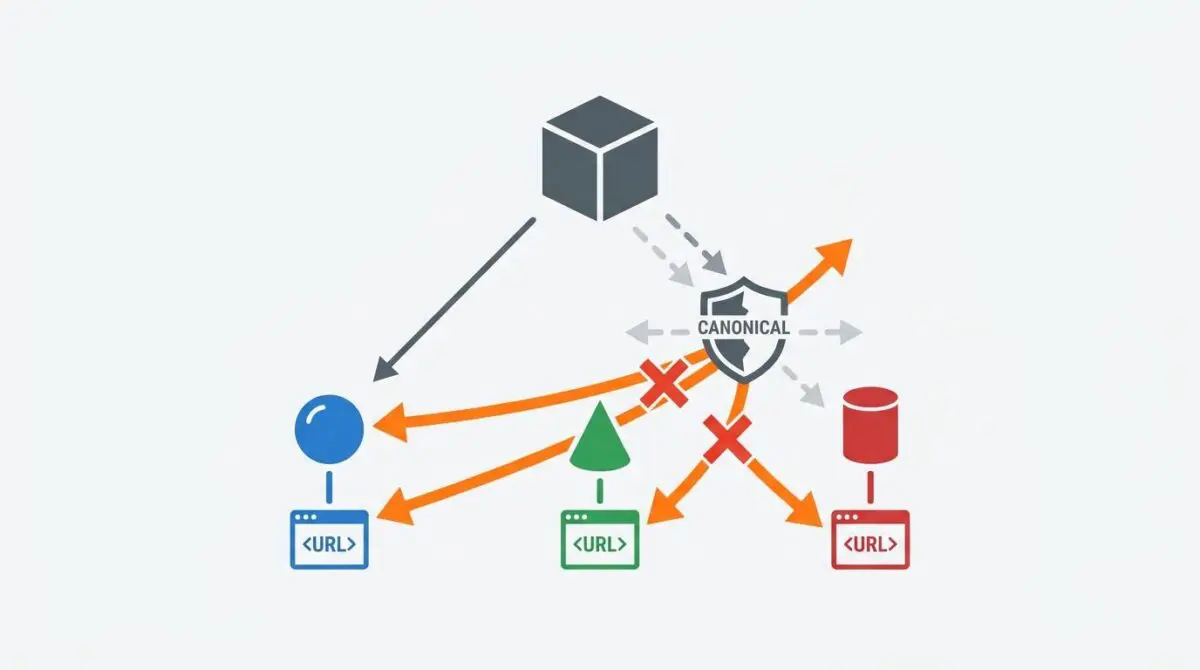
When this happens, you are experiencing a Canonicalization Failure (Google-selected Canonical). This technical anomaly occurs when Googlebot’s heuristic analysis overrides your explicit rel=”canonical” hints.
Instead of indexing the root product, the search engine selects a product variant URL—often differentiated by parameters like color, size, or material—as the authoritative version. This creates a split in the page’s PageRank and dilutes the relevance of the primary entity.
In Google Search Console, this failure manifests clearly in the ‘Page indexing’ report. You will typically see the main product URL flagged under ‘Duplicate, Google chose different canonical than user’ while the variant URL sits under ‘Indexed, not submitted in sitemap.’
From a Crawl Budget perspective, this failure is catastrophic for large e-commerce catalogs. Googlebot spends excessive resources crawling and rendering nearly identical variant pages, leading to severe crawl exhaustion.
Furthermore, in the era of Generative Engine Optimization (GEO), inconsistent canonical signals create ‘Entity Fragmentation.’ The AI model cannot confidently identify the primary source of truth for a product’s attributes, often resulting in the product being omitted from AI-generated shopping recommendations.
Diagnostic Checkpoints and Root Causes
Diagnostic Checkpoints
Internal Link Signal Inconsistency
Internal navigation signals often override contradictory canonical tag hints.
Metadata and Content Divergence
Unique variant content causes Google to reject duplication claims.
JavaScript-Injected Canonical Tags
Initial raw HTML crawls may miss deferred client-side canonicals.
Sitemap and XML Signal Conflict
Sitemap inclusion frequently takes precedence over canonical directive hints.
Understanding why Google rejects your canonical hint requires a deep dive into your server and application layers. The canonical tag is merely a hint, not a strict directive.
When diagnosing these issues, you must look beyond the basic HTML head. Internal navigation signals often override contradictory canonical tag hints, especially if your site architecture relies heavily on faceted navigation.
For example, WordPress themes utilizing AJAX-based product filters frequently update the browser URL to a variant-specific string. These URLs are then cached in ‘Recently Viewed’ transients, causing the database to serve internal links to variants site-wide.
Another major culprit is metadata and content divergence across variant pages. If plugins like WooCommerce are configured with heavily populated individual variation descriptions, it creates a unique content profile.
This uniqueness triggers Google’s algorithm to treat the variant as a standalone entity. When you are troubleshooting the “Duplicate, Google chose different canonical than user” status, identifying these content discrepancies is paramount.
Finally, modern ‘Headless’ setups or themes using heavy frontend frameworks often fail to include the rel=”canonical” in the server-side rendered header. If the tag is only injected via client-side JavaScript, the initial raw HTML crawl misses it entirely.
Engineering Resolution Roadmap
Engineering Resolution Roadmap
Audit Internal Link Architecture
Crawl the site using Screaming Frog or a similar tool. Identify all internal links pointing to variant parameters. Modify the theme’s functions.php or template files to ensure that all internal product links point to the clean root URL regardless of the user’s selected filters.
Implement HTTP Header Canonicals
Inject the canonical tag into the HTTP response header via PHP. This ensures that Google sees the canonical signal at the protocol level before the HTML is even parsed, which is a stronger signal than the <head> tag.
Consolidate Variant Content
Use ‘Canonicalize by Attribute’ logic. Ensure that variant pages do not have unique Meta Titles or H1s. Use a shared description field for all variants and keep variant-specific details inside a technical specification table that remains consistent across all versions.
Update Robots.txt and Sitemap Directives
Explicitly Disallow query parameters in robots.txt if those variants should never be indexed. Ensure the XML sitemap only contains the primary URL and verify that ‘Product Variations’ are excluded from the sitemap settings in the SEO plugin.
Resolving canonicalization failures requires a multi-layered engineering approach. You must align your internal link graph, server headers, and XML sitemap directives to present a unified signal.
The first step is auditing your internal link architecture. You must ensure that navigation menus, related product widgets, and recently viewed modules link directly to the clean root URL.
If internal links point to parameterized variant URLs more frequently than the root URL, Google perceives the variant as the true canonical. You must modify your template files to strip these parameters from internal anchor tags.
Next, you must consolidate variant content using ‘Canonicalize by Attribute’ logic. Ensure that variant pages do not possess unique Meta Titles or H1 tags that differentiate them from the parent product.
By utilizing a shared description field for all variants, you prevent Google from crossing the uniqueness threshold. This is a critical step in consolidating duplicate content signals and link equity across your catalog.
Finally, you must explicitly disallow query parameters in your robots.txt if those variants should never be indexed. Ensure your XML sitemap only contains the primary URL to prevent conflicting indexation directives.
Resolution Execution: Forcing HTTP Headers
While HTML-based canonical tags are standard, they are often parsed too late in the indexing pipeline. To enforce strict canonicalization, you must inject the signal at the protocol level.
Implementing the canonical tag via the HTTP response header ensures that Googlebot processes the directive before the HTML document is even downloaded or rendered.
This approach provides a significantly stronger signal to the indexing engine. It is highly recommended when specifying a canonical URL using the HTTP response header to combat aggressive variant cannibalization.
Fixing via PHP and WordPress
To execute this fix in a WordPress environment, you will hook into the template redirect action. The following code snippet injects the canonical header directly into the server response for product pages.
add_action('template_redirect', 'force_canonical_http_header');
function force_canonical_http_header() {
    if (is_product()) {
        global $post;
        $canonical_url = get_permalink($post->ID);
        header("Link: <$canonical_url>; rel=\"canonical\"");
    }
}
This function intercepts the server response before the page loads. It dynamically fetches the clean permalink of the current product and appends it to the HTTP headers.
Validation Protocol & Edge Cases
Validation Protocol
- Run a ‘Live Test’ in Google Search Console to verify the Google-selected canonical.
- Execute ‘curl -I’ in terminal to confirm the Link rel=’canonical’ HTTP header.
- Inspect the Chrome DevTools Network tab to match the Link header to the root URL.
- Validate that Schema.org Product markup references the primary URL as the canonical property.
Once the HTTP headers and internal links are corrected, immediate validation is required. You must ensure the new signals are actively propagating to search engine crawlers.
Begin by running a Live Test in Google Search Console on the variant URL. Inspect the Indexing section to confirm that the Google-selected canonical now matches your user-declared URL.
However, in high-traffic enterprise environments, standard validation may reveal lingering issues due to aggressive caching layers. Edge cases frequently arise when utilizing Content Delivery Networks.
Cloudflare Edge Workers or Varnish Cache can inadvertently hold stale versions of the HTML where the canonical tag is missing. They might also cache outdated HTTP response headers.
If your cache key does not account for the canonical header, Googlebot may receive a stripped version of the page. This leads to persistent re-indexing of variant URLs despite your origin-level fixes.
Always bypass the cache during testing using terminal commands like cURL. Verify that the cache invalidation protocols are triggering correctly when product URLs are updated.
Autonomous Monitoring & Prevention
Fixing the immediate canonicalization failure is only half the battle. Enterprise architectures require automated safeguards to prevent future entity fragmentation.
Implement a Canonical Enforcement automated test within your CI/CD pipeline. This test should programmatically check for the presence of the correct rel=”canonical” header in the raw response of all product pages during deployment.
Furthermore, regularly perform log file analysis using tools like the ELK stack or Graylog. You must monitor your server logs to ensure Googlebot is not spending more than 10% of its crawl budget on URLs containing query parameters.
At Andres SEO Expert, we engineer custom API alerts that notify server administrators the moment crawl anomalies are detected. Proactive monitoring is the only way to maintain strict entity integrity at scale.
Conclusion
Resolving variant cannibalization requires a definitive shift from basic on-page SEO to advanced server-side signal management. By enforcing HTTP headers and aligning your internal link graph, you reclaim your crawl budget and solidify your primary product entities.
Navigating the intersection of technical SEO, server architecture, and generative search requires a precise roadmap. If you need to future-proof your enterprise stack, resolve deep-level crawl anomalies, or implement AI-driven SEO automation, connect with Andres at Andres SEO Expert.
Frequently Asked Questions
What is a Google-selected canonical error in e-commerce?
A Google-selected canonical error occurs when Googlebot overrides a website’s explicit rel=”canonical” tag and chooses a different URL—often a product variant like a specific color or size—as the authoritative version to index. This typically happens due to conflicting signals like internal link patterns, sitemap inclusions, or unique content on variant pages.
Why does Google ignore my canonical tag in favor of a variant URL?
Google treats the canonical tag as a hint rather than a directive. If your internal navigation links point to variant URLs more frequently than the root URL, or if variant pages have unique H1 tags and Meta Titles, Google’s heuristic analysis may determine the variant is more relevant or unique than the declared canonical.
How does variant cannibalization impact SEO crawl budget?
Variant cannibalization forces Googlebot to spend excessive resources crawling and rendering thousands of nearly identical variant URLs. This leads to crawl exhaustion for large e-commerce catalogs, preventing the search engine from discovering or updating more important primary product pages.
How can I fix the “Duplicate, Google chose different canonical than user” status?
To fix this status, you must align your technical signals by implementing HTTP response header canonicals, auditing internal links to ensure they point only to root URLs, and using “Canonicalize by Attribute” logic to ensure variant pages do not have unique metadata that triggers indexation.
What is the advantage of using HTTP header canonicals over HTML tags?
HTTP header canonicals are processed at the protocol level before the HTML is parsed or rendered. This provides a significantly stronger signal to search engines and is especially effective for Headless setups or JavaScript-heavy sites where traditional on-page tags might be missed during the initial crawl.
How does entity fragmentation affect AI-generated shopping recommendations?
In Generative Engine Optimization (GEO), inconsistent canonical signals create “Entity Fragmentation.” When an AI model cannot identify a single authoritative source for a product’s attributes, it may omit the product from AI-generated shopping results due to a lack of data confidence.