Key Points
- Crawl Capacity Reset: Migrating to a new server IP triggers a safety mechanism that resets Googlebot’s Host Load threshold to prevent infrastructure crashes.
- Security Layer Conflicts: Unoptimized Web Application Firewalls (WAF) and TCP stack latency frequently misidentify multi-threaded indexing as Layer 7 DDoS attacks.
- Dynamic Allowlisting: Restoring crawl velocity requires explicit NGINX and Firewall allowlisting of verified Googlebot IP ranges alongside PHP-FPM concurrency optimization.
Table of Contents
The Core Conflict: Server Migration and Crawl Desynchronization
Googlebot uses an adaptive crawling algorithm designed to be polite. It automatically reduces its crawl rate if your server slows down or shows errors, preventing it from crashing your host.
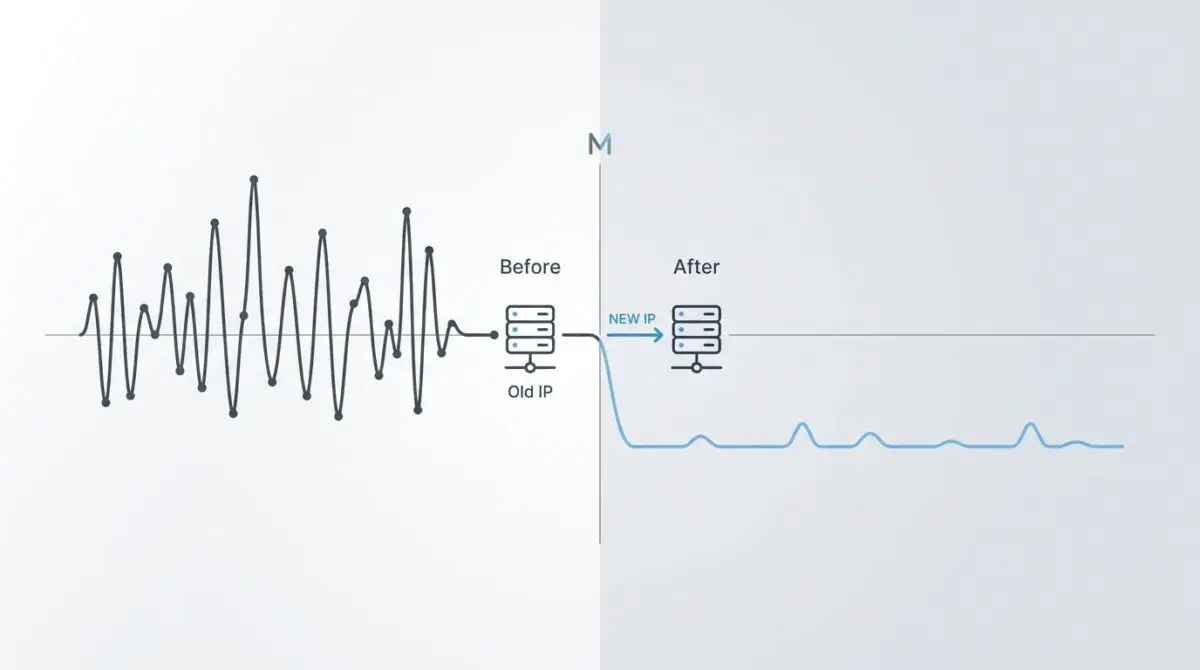
When you move your website to a new server with a different IP address, this safety mechanism triggers immediately.
Googlebot resets its internal metrics because it has no past performance data for your new setup.
This metric is called the Host Load and Crawl Capacity Limit. It sets the maximum number of simultaneous requests the search engine can safely make to your server.
A sudden drop in crawl rate is easy to spot in Google Search Console under the Crawl Stats report. You will see a clear decrease in total crawl requests right after your migration date.
Diagnostic Checkpoints: Identifying the Bottleneck
Server migrations create several potential points of failure across your DNS, Edge, and Application layers.
This mismatch between Google’s scheduler and your new server requires careful troubleshooting.
Diagnostic Checkpoints
Cold Start IP Reputation and Throttling
New IPs default to conservative crawl limits.
WAF and Firewall Misconfiguration
Security layers misidentify crawlers as DDoS attacks.
DNS TTL and Propagation Latency
High TTL and slow resolution reduce crawl capacity.
TCP Stack and Handshake Latency
Misconfigured TCP stacks increase connection establishment time.
A cold start IP reputation is the most common issue when moving to a shared or lower-tier VPS environment. Googlebot uses strict limits at first to test the new network.
Security tools like ModSecurity or fail2ban often mistake fast crawling for a DDoS attack. This leads to aggressive blocking and 429 or 403 error codes.
DNS delays also play a big role during transitions. High Time To Live values can cause a split-brain scenario where Googlebot hits both your old and new IPs at the same time.
Engineering Resolution Roadmap
Restoring your normal crawl speed requires a multi-layered technical approach.
You must prove to Googlebot that your new server can handle heavy traffic without slowing down.
Engineering Resolution Roadmap
Verify Host Status in GSC
Navigate to Google Search Console > Settings > Crawl Stats. Open the ‘Host Status’ report and check for ‘Server reachability’ or ‘Robots.txt fetch’ failures. If failures exist, the server is rejecting Googlebot requests at the network level.
Allowlist Googlebot IP Ranges
Update the server firewall (iptables/ufw) and NGINX config to allowlist Google’s IP ranges. Use the ‘Googlebot’ user-agent verification or the published list of Google IP ranges to ensure no throttling is applied to legitimate search crawlers.
Optimize TTFB and PHP-FPM
Ensure the new server uses PHP 8.2+ and that the PHP-FPM pool is configured with ‘pm.max_children’ high enough to handle concurrent crawl requests. Implement Object Caching (Redis/Memcached) to reduce server load during the recrawl.
Request Crawl Rate Increase
If the site is critical, use the ‘Crawl Rate Settings’ tool in the legacy GSC interface (though deprecated, it can sometimes still be accessed via direct URL) or submit a sitemap update to signal new content availability and prompt a re-evaluation of the host capacity.
Your main goal is to expand the crawl capacity limit safely. This starts with checking your server reachability in Google Search Console.
Next, you must ensure your firewall and web server explicitly trust Google’s network. Relying only on user-agent strings is risky because they can be easily faked.
Instead, use strict reverse DNS lookups or rely on Google’s published IP ranges for verifying Googlebot.
Finally, optimize your Time To First Byte. Upgrading to PHP 8.2+ and tuning your PHP-FPM settings will greatly reduce server load during recrawls.
Execution Protocol: NGINX and Firewall Configuration
Creating a bypass for Googlebot at the web server level ensures real crawlers do not get blocked by aggressive rate limits.
The following NGINX configuration uses the geo module to map Google’s specific IP addresses.
When a match is found, the rate limit is bypassed, allowing full access for the search engine.
geo $is_googlebot { default 0; 66.249.64.0/19 1; 209.85.128.0/17 1; } server { location / { if ($is_googlebot) { set $limit_rate 0; } limit_req zone=one burst=5 nodelay; } }Validation Protocol and Edge Cases
Deploying the fix is only the first step. You must test the connection pathway from the outside in.
Use external network requests to confirm your server responds with a 200 OK status and low delay.
Validation Protocol
- Run GSC URL Inspection Live Test to verify real-time response.
- Execute curl -I with Googlebot User-Agent to verify 200 OK status.
- Confirm green OK status in GSC Host Status infrastructure report.
Complex enterprise setups often introduce rare edge cases that bypass standard checks.
A common conflict happens when using Cloudflare’s Bot Management in Enterprise mode. Changing the origin IP alters the underlying security fingerprint.
This mismatch can trigger a security flag at the Edge. Cloudflare might block the crawler with a 403 error before it reaches your server, even if the IP is listed among their verified bots.
Autonomous Monitoring and Prevention
Preventing future crawl drops requires shifting from reactive fixes to proactive monitoring.
Use a warm-up phase during any server move by keeping the old environment active while DNS updates.
Deploy log analysis software to check Googlebot response codes daily. This gives you immediate visibility into 503 or 429 errors before they hurt your indexing.
Automate the syncing of your server’s firewall allowlists with Google’s official IP list using custom API pipelines.
At Andres SEO Expert, we build these automated monitoring systems to protect your website at the enterprise level.
Conclusion
Restoring crawl rates after a migration is a precise exercise in server optimization and trust building.
By removing speed bottlenecks and configuring clear network allowlists, you can quickly reset Googlebot’s capacity limits.
Navigating technical SEO and server architecture requires a precise roadmap. If you need to future-proof your enterprise stack, resolve deep-level crawl issues, or implement AI-driven SEO automation, connect with Andres at Andres SEO Expert.
Frequently Asked Questions
Why does Google’s crawl rate decrease after a server migration?
Googlebot’s adaptive algorithm reduces crawl rates during migrations to prevent overloading new infrastructure. Since the new server lacks historical performance data, Google resets its Host Load metrics, defaulting to a conservative crawl capacity until it verifies server stability and response times.
What is Host Load and how does it impact crawl budget?
Host Load, or Crawl Capacity Limit, is the maximum number of concurrent requests Googlebot can execute without crashing a host. Following a migration, Google limits these requests to assess the new environment’s reputation and response speed, often resulting in a visible dip in Crawl Stats.
How can I prevent a WAF or firewall from blocking Googlebot?
To prevent security layers like ModSecurity or fail2ban from misidentifying crawlers as DDoS attacks, you should explicitly allowlist Googlebot’s IP ranges. This can be done by configuring NGINX or your firewall to trust Google’s published IP list and performing reverse DNS lookups.
What are the most common technical bottlenecks during a server move?
Key bottlenecks include cold start IP reputation, misconfigured WAF/security layers, high DNS TTL values causing propagation latency, and TCP stack handshake delays. Each of these can lead to 429 or 403 errors that throttle crawling.
How do I optimize PHP-FPM and TTFB for better crawling?
Improving Time To First Byte (TTFB) is critical for expanding crawl capacity. Upgrading to PHP 8.2+, tuning the pm.max_children directive in PHP-FPM, and implementing object caching like Redis ensures the server can handle high concurrency during Google’s re-evaluation phase.
How can I verify that my new server is accessible to Google?
You can verify connectivity by checking the Host Status report in Google Search Console’s Crawl Stats. Additionally, using the GSC URL Inspection tool for a live test and running a curl command with the Googlebot User-Agent will confirm if the server returns a 200 OK status.