Key Points
- Root Cause Identification: Robots.txt Environment Leakage occurs when CDN edge caching or NGINX server block collisions erroneously serve staging directives to production domains.
- Dynamic Configuration: Implement dynamic PHP-based robots.txt generation bound to the HTTP_HOST variable to completely eliminate environment cross-talk.
- Validation Protocol: Verify resolution using strict cURL header inspection, CDN global purge protocols, and Google Search Console’s Live Test tool.
Table of Contents
The Core Conflict: Environmental Bleed
According to a 2025 technical SEO study by Ahrefs, over 12% of enterprise-level domains suffer from ‘Environmental Bleed.’ This occurs when staging directives or metadata inadvertently impact production indexing, leading to an average 30% loss in crawl efficiency.
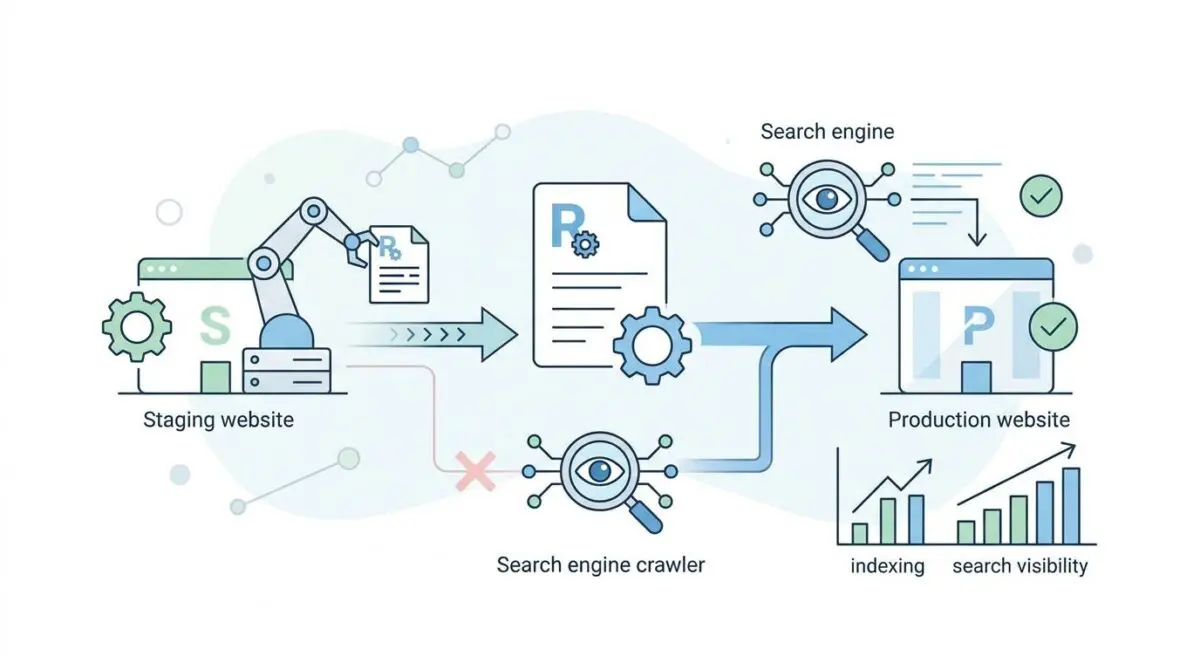
This catastrophic failure often manifests when Google indexes the staging site robots.txt file and applies its restrictive rules directly to the production site. Technically classified as Robots.txt Environment Leakage, it represents a critical breakdown in server architecture and environment isolation.
Robots.txt Environment Leakage occurs when a search engine crawler, such as Googlebot, erroneously applies development environment directives to a live domain. The result is an unintended global block on organic search visibility.
A simple staging directive intended for internal eyes only becomes a lethal weapon against your production site. This ultimately leads to massive de-indexing of organic search results across the entire domain.
In the context of modern Search Engine Optimization and Generative Engine Optimization, this error is highly destructive. Modern LLM-based crawlers rely on frequent, unhindered access to the robots.txt file to determine accessible training data.
If a staging block is inherited, the production site goes completely dark to these generative models. The brand will vanish from AI-generated answers, citations, and product recommendations in real-time search modules.
Server log files will typically reveal the extent of the damage. You will see Googlebot requesting the robots.txt file and receiving a restrictive directive, even if the physical file on the production filesystem is completely empty.
The Google Search Console Crawl Stats report will also show a massive spike in fetch errors. Alternatively, you might see unexpected 200 OK responses returning staging-specific rules.
Diagnostic Checkpoints & Root Causes
Understanding the exact layer where the environment desynchronization occurs is the first step in troubleshooting. The issue rarely originates from a single point of failure.
Instead, it is usually a complex combination of caching layers, proxy routing, and automated deployment scripts.
Diagnostic Checkpoints
Edge Cache Pollution
Shared cache keys leak staging robots.txt to production.
NGINX Default Server Block Collision
Missing host header matches first available server block.
CI/CD Pipeline Artifact Overwrite
Deployment scripts overwrite production with staging file versions.
Reverse Proxy Header Passthrough
Backend sees internal staging hostname instead of public.
Edge Cache Pollution is the most frequent offender in modern web architectures. When using a Content Delivery Network, aggressive caching rules may fail to account for the Host header properly.
Because Cloudflare caches robots.txt files by default, a shared cache key can easily cause a staging response to be served to a production request. This happens when a crawler hits the staging site first, and the CDN caches that response globally.
NGINX Default Server Block Collisions occur at the origin server level. If the production and staging sites share an IP address and the incoming request lacks a specific Host header match, NGINX defaults to the first loaded server block.
If the staging block is alphabetically first in the configuration directory, its specific robots.txt logic is served to the public. This remains a common flaw in poorly configured managed hosting environments.
CI/CD Pipeline Artifact Overwrites represent a critical failure in deployment automation. Automated deployment scripts via GitHub Actions or Jenkins are often configured to sync an entire directory structure indiscriminately.
If the staging robots.txt is included in the build artifact without an environment-specific exclusion, it overwrites the production file on every push. As industry experts note, misconfigured robots.txt files can act as an SEO landmine when deployed recklessly.
Reverse Proxy Header Passthrough is a complex routing issue found in enterprise headless setups. In architectures where a frontend server proxies to a backend application, the backend might only see the internal staging hostname.
This causes the backend application to dynamically generate and serve the private robots.txt variant. The frontend then caches and serves this private file to public crawlers.
Engineering Resolution Roadmap
Resolving this issue requires a systematic approach that addresses both the caching layers and the origin server configuration. You must isolate the environments and ensure that directives are generated dynamically based on the exact request context.
Engineering Resolution Roadmap
Identify Origin Source
Run ‘curl -Iv https://example.com/robots.txt’ to inspect headers. Look for ‘X-Cache’ (Miss/Hit), ‘CF-Cache-Status’, and the ‘Server’ header to determine if the response is coming from the CDN, a proxy, or the origin server.
Implement Dynamic robots.txt Logic
Delete the physical robots.txt file and add a rewrite rule to handle it via PHP. This ensures the file is generated based on the current ‘HTTP_HOST’ variable, preventing environment cross-talk.
Configure NGINX Explicit Host Matching
Update NGINX server blocks to use explicit ‘server_name’ directives and ensure no catch-all block exists that could serve staging content. Add ‘add_header X-Robots-Tag “noindex, nofollow”;’ specifically inside the staging server block only.
Purge Global Edge Cache
Navigate to your CDN dashboard (Cloudflare/Fastly) and perform a ‘Purge by URL’ for ‘https://example.com/robots.txt’. If using a shared cache, a ‘Purge Everything’ may be required to clear potential namespace collisions.
The first step is always diagnostic verification using command-line tools. By inspecting the HTTP response headers, you can pinpoint exactly which layer of your stack is holding the poisoned file.
A cache hit on the CDN level requires a completely different immediate action than a direct origin response.
Moving away from static text files is the most robust long-term solution. Static files are inherently unaware of their environment and are easily overwritten during flawed deployments.
By generating the file dynamically, you force the server to evaluate the incoming Host header before serving any directives.
Server block configuration must be explicit and unforgiving. Relying on default fallbacks in NGINX or Apache is a severe security and SEO risk.
Every virtual host must explicitly declare its server name. Furthermore, staging environments must utilize HTTP headers to block indexing, rather than relying solely on a text file.
Finally, cache invalidation must be comprehensive. Purging the specific URL is mandatory, but in cases of severe namespace collision, a global cache purge might be necessary.
This aggressive approach ensures that edge nodes across the globe drop the poisoned asset simultaneously.
Dynamic Robots.txt Logic Execution
To implement the dynamic generation, you must first delete the static file from your root directory. Leaving the physical file in place will cause the web server to serve it directly, bypassing your new dynamic logic entirely.
Once the static file is deleted, you will route all incoming requests for this file to a custom PHP script.
The script evaluates the incoming request host and serves the appropriate directives. This guarantees that even if the code is deployed to the wrong server, the logic will adapt to the environment it finds itself in.
Below is the exact implementation required for this dynamic routing.
<?php
// Place in your WordPress root and use NGINX/Apache to rewrite robots.txt to this file
header('Content-Type: text/plain');
$host = $_SERVER['HTTP_HOST'];
if (strpos($host, 'staging.') !== false || strpos($host, 'dev.') !== false) {
    echo "User-agent: *\nDisallow: /";
} else {
    echo "User-agent: *\nAllow: /\nSitemap: https://$host/sitemap_index.xml";
}
exit;
After placing this file in your root directory, you must configure your web server to rewrite requests. For NGINX, this involves adding a specific location block that rewrites the request to your new PHP handler.
For Apache, a simple RewriteRule in your configuration file will achieve the exact same result.
This dynamic approach completely neutralizes CI/CD artifact overwrites. Because the logic is contained within the application code itself, pushing the entire repository to production is much safer.
It will no longer overwrite a static file with dangerous staging directives, effectively making the code self-aware.
Validation Protocol & Edge Cases
Implementing the fix is only half the battle. You must rigorously validate the resolution across all layers of your infrastructure.
Search engines cache robots directives heavily, so forcing a recrawl and verifying the live response is critical to restoring visibility.
Validation Protocol
- Use ‘curl -I’ to ensure the ‘X-Robots-Tag’ is not present on production.
- Open the Google Search Console ‘Robots.txt Tester’ and click ‘Request Recrawl’.
- Run a Google Search Console ‘Live Test’ on the homepage to see if the ‘Crawl allowed?’ status changes to ‘Yes’.
- Check the ‘Rich Result Test’ to verify that Googlebot can render the page without being blocked.
Even with dynamic logic in place, complex edge cases can still trigger intermittent failures. A rare but severe conflict occurs when Cloudflare Edge Workers are utilized for A/B testing or localization routing.
If an Edge Worker is programmed to fetch assets from a fallback origin when the primary origin experiences high latency, routing errors can easily occur.
If that fallback origin happens to be the staging server, the robots request might be routed to staging only during specific high-load periods. This creates an intermittent block that is notoriously difficult to debug because it only appears under stress.
Standard cURL tests will pass, but Googlebot will randomly encounter the staging directives during crawl spikes.
To mitigate this, Edge Workers must be programmed with strict environment isolation rules. Fallback origins must never point to development or staging environments.
Furthermore, staging environments should be protected by basic HTTP authentication or IP whitelisting. This ensures they cannot serve public requests under any circumstances.
Autonomous Monitoring & Prevention
Preventing Environmental Bleed requires shifting from reactive troubleshooting to proactive, autonomous monitoring. Relying on manual checks during deployment cycles is insufficient for enterprise-level operations.
You must implement Pre-Flight checks in your CI/CD pipeline. These should automatically grep for restrictive directives before any code is pushed to production.
Advanced log analysis tools like Datadog or Splunk should be configured to alert engineering teams immediately. You can set up custom triggers that fire whenever a 200 OK response for the robots file contains specific staging strings.
This provides real-time visibility into what crawlers are actually receiving at the edge layer.
Furthermore, staging environments should always enforce an HTTP header block at the server level. Relying solely on a text file for environment protection is a fundamentally flawed architecture.
By enforcing strict header rules, you ensure that even if the file leaks, the environment remains de-indexed.
At Andres SEO Expert, we engineer automated entity monitoring pipelines using tools like Make.com to validate server responses continuously.
By integrating API alerts directly into Slack or Microsoft Teams, technical SEOs and server architects can maintain absolute control over crawl budget and indexation integrity. Automation is the only way to safeguard enterprise search visibility.
Navigating the intersection of technical SEO, server architecture, and generative search requires a precise roadmap. If you need to future-proof your enterprise stack, resolve deep-level crawl anomalies, or implement AI-driven SEO automation, connect with Andres at Andres SEO Expert.
Frequently Asked Questions
What is robots.txt environment leakage (environmental bleed)?
Robots.txt environment leakage, also known as environmental bleed, occurs when search engine crawlers erroneously apply directives intended for a staging or development environment to a live production domain. This often leads to critical SEO failures, including the total de-indexing of a website from organic search results.
How does edge cache pollution cause production indexing issues?
Edge cache pollution happens when a Content Delivery Network (CDN) uses shared cache keys that do not properly distinguish between hostnames. If a crawler hits the staging robots.txt first, the restrictive “Disallow: /” directive can be cached and served to the production domain, blocking search engines globally.
Why is dynamic robots.txt logic better than using static files?
Dynamic logic uses server-side scripts (such as PHP) to evaluate the incoming Host header before serving directives. Unlike static files, which can be accidentally overwritten during CI/CD deployments, dynamic scripts are environment-aware and ensure that restrictive rules are only ever served on staging or dev subdomains.
How can I diagnose if my site is suffering from environmental bleed?
You can diagnose this by using the “curl -Iv” command to inspect the HTTP headers of your robots.txt file, looking specifically for X-Cache hits from your CDN. Additionally, the Google Search Console Robots.txt Tester and Crawl Stats report can reveal if Googlebot is encountering unexpected staging rules on your production URL.
Does robots.txt leakage affect brand visibility in AI search and LLMs?
Yes. Modern LLM-based crawlers and generative engines rely on unhindered access to site directives to gather training data. If a staging block is inherited by the production site, the brand will vanish from AI-generated answers, citations, and product recommendations in real-time search modules like Google SGE or ChatGPT.
What are the primary causes of NGINX-related robots.txt errors?
The primary cause is a Default Server Block Collision. If NGINX receives a request that does not match an explicit host header, it defaults to the first loaded server block. If your staging configuration is alphabetically first in the directory, its restrictive robots.txt logic will be served to production traffic.