Key Points
- Bidirectional Symmetry: Every localized PDF must return an HTTP Link header that explicitly references all other language variants, including a self-referencing link, to prevent cluster invalidation.
- Server-Level Execution: Hreflang directives for static binary assets must be injected via NGINX or Apache configurations, as WordPress PHP hooks cannot process direct file requests.
- Edge Cache Normalization: CDNs like Cloudflare often strip non-standard headers or cache files before Link headers are applied, requiring strict Transform Rules and edge purges.
Table of Contents
The Core Conflict: Broken PDF Hreflang Clusters
Recent industry data indicates that over 67% of international websites fail to implement reciprocal hreflang links correctly. This oversight often leads to a 34% slower indexation rate for localized content clusters. At the heart of this indexation failure is the missing return tags error within HTTP headers.
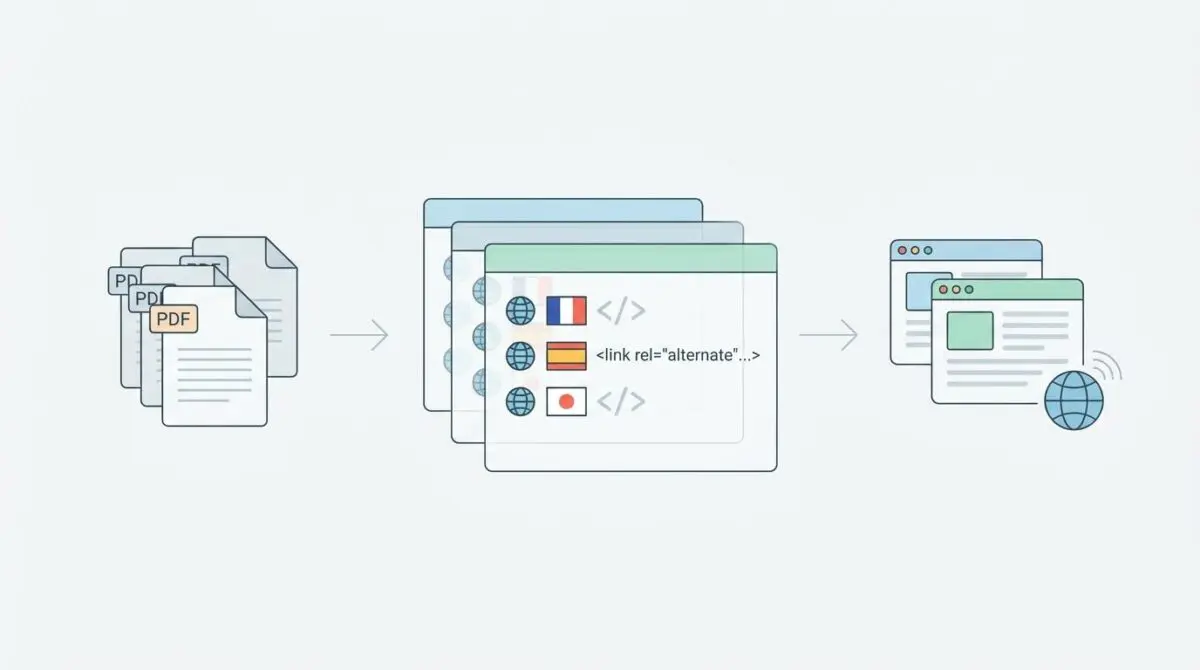
This error triggers when a bidirectional relationship between localized versions of a resource is fundamentally broken. Standard HTML tags cannot be used for non-HTML assets like PDF files. Instead, hreflang directives must be executed directly through the HTTP response header.
Googlebot demands strict reciprocity across document clusters to validate international targeting. If an English PDF points to a French alternate, the French document must point back via an identical header. Failing to maintain this symmetry leads to massive crawl budget waste.
Search crawlers will repeatedly revisit these clusters to verify signals before eventually ignoring the directives entirely. This is catastrophic for Generative Engine Optimization. AI models and search engines rely heavily on these explicit signals to retrieve the correct localized document.
Without explicit HTTP headers, search engines might serve an English PDF to a French-speaking user. This significantly degrades the trust score and indexing priority of the entire document cluster. Modern retrieval systems are particularly sensitive to these missing metadata signals.
Understanding the Crawl Budget Impact
Crawl budget management becomes a primary engineering concern when dealing with localized PDF files. Search engines allocate a finite amount of time and resources to crawl any given domain. When hreflang signals break down, this valuable allocation is rapidly depleted.
Googlebot processes standard HTML documents efficiently, but binary files require significantly more processing power. When a missing return tag error occurs, the crawler assumes the cluster is incomplete. It will continuously schedule re-crawls for these localized assets to find the missing reciprocal links.
This repetitive crawling prevents search engines from discovering new content across your domain. Instead of indexing fresh articles, the crawler gets stuck in a loop verifying broken PDF relationships. Over time, the algorithm will actively deprioritize the domain’s overall crawl frequency.
The absence of bidirectional headers also forces search engines to guess the intended audience for a document. Ambiguity is heavily penalized in the era of AI-driven search. Ensuring explicit and machine-readable connections between localized files is non-negotiable for enterprise visibility.
Diagnostic Checkpoints for HTTP Headers
When Google Search Console flags specific PDF URLs with missing return tags, it indicates a severe desynchronization in your server stack. This is rarely a simple typo within a CMS interface. It usually points to a deeper failure at the server, edge, or application layer.
Diagnostic Checkpoints
Asymmetric Reciprocity Logic
Server fails to provide reciprocal alternate links across clusters.
CDN Header Normalization
Edge nodes stripping headers from static binary assets.
Self-Referencing Header Omission
Every resource must include a link to itself.
206 Partial Content Response Stripping
Headers lost during segmented range requests on server.
Many developers mistakenly rely on WordPress plugins to handle these international directives. However, static files bypass PHP entirely and are served directly by NGINX or Apache. This means custom PHP functions hooking into template redirects will fail to inject the necessary headers.
Edge platforms often treat PDFs as static binary assets and apply aggressive caching rules. These rules can strip non-standard HTTP headers to optimize bandwidth and reduce payload sizes. Understanding the nuances of server-side directives is critical, as detailed in the Ahrefs guide on hreflang tags.
Another common failure point involves partial content responses. When Googlebot fetches large PDFs, it frequently uses range requests to download the file in chunks. If your server only attaches headers to standard successful responses, the hreflang signals disappear during these segmented crawls.
Developers also frequently forget the self-referencing rule. Every resource in a cluster must include a self-referencing link header. If a document omits a link to itself within its own response, search engines will flag it as an incomplete cluster.
Engineering Resolution Roadmap
Resolving this issue requires a systematic approach to header injection and edge cache invalidation. You must ensure that the headers are applied at the lowest possible server level. Relying on application-level routing for static assets is a known anti-pattern.
Engineering Resolution Roadmap
Map Document Cluster and Audit Headers
Generate a CSV of all localized PDF pairs. Use ‘curl -I -H “User-Agent: Googlebot” https://example.com/file-en.pdf’ to verify the presence of ‘Link’ headers on every cluster member. Ensure all URLs are absolute and use HTTPS.
Implement NGINX Map for Bidirectional Headers
Modify the NGINX configuration to use a ‘map’ block that identifies the PDF path and assigns the correct Link header string. This is more scalable than individual ‘location’ blocks and ensures headers are applied even for static assets outside of WP-Core.
Force Edge Purge and Header Whitelisting
In the CDN dashboard (e.g., Cloudflare), create a ‘Transform Rule’ to ensure the ‘Link’ header is preserved. Purge the cache for all PDF extensions to ensure the new server-side headers are propagated to the edge nodes.
Submit for Live Validation
Use the GSC ‘URL Inspection’ tool on the PDF URL. Click ‘Test Live URL’ and verify the ‘Response Headers’ section in the ‘View Tested Page’ tab to confirm Google sees the reciprocal Link headers.
Mapping the document cluster is the foundational step of this technical fix. You must identify every localized pair and ensure absolute URLs are utilized. Relative URLs in HTTP headers will trigger immediate validation failures in search consoles.
Implementing an NGINX map block is significantly more efficient than writing individual location directives. It centralizes the routing logic and prevents configuration bloat. This approach ensures the server evaluates the URI before the request hits any caching layers.
You must also force an edge purge to ensure stale files are flushed from CDN nodes. Edge platforms will hold onto the initial binary payload until the time-to-live expires. Manually invalidating the cache forces the edge node to fetch the new headers directly from the origin server.
Resolution Execution: NGINX Configuration
We will utilize an NGINX map block to execute this fix at the server layer. This method intercepts the request URI and dynamically assigns the correct bidirectional header string based on the file path. It remains the most robust way to handle static asset metadata.
Fixing via NGINX Map Blocks
Open your primary NGINX configuration file and define the map block outside of your server block. This placement ensures the variable is globally available for evaluation across all server blocks and virtual hosts.
Inside the server block, apply the header using the always parameter. This critical addition ensures the header persists even during partial content responses triggered by range requests. Without this parameter, NGINX drops custom headers on non-standard responses.
map $request_uri $pdf_hreflang {
    ~*^/en/guide\.pdf$ '<https://site.com/en/guide.pdf>; rel="alternate"; hreflang="en", <https://site.com/fr/guide.pdf>; rel="alternate"; hreflang="fr"';
    ~*^/fr/guide\.pdf$ '<https://site.com/en/guide.pdf>; rel="alternate"; hreflang="en", <https://site.com/fr/guide.pdf>; rel="alternate"; hreflang="fr"';
}

server {
    location ~* \.pdf$ {
        add_header Link $pdf_hreflang always;
    }
}
Notice the use of regular expressions within the map block. The tilde and asterisk denote a case-insensitive match for the incoming request. This ensures the correct hreflang headers are appended even if a user requests the file with mixed casing.
The string assigned to the variable contains multiple URLs separated by commas. This is the exact syntax required for valid HTTP link headers. Any deviation from this comma-separated format will result in parsing errors by search engine crawlers.
Validation Protocol & Edge Cases
You must immediately validate the HTTP responses once the server configuration is deployed. Do not wait for search consoles to update, as this reporting delay can take weeks. Proactive validation ensures your crawl budget is not wasted on broken configurations.
Validation Protocol
- Execute ‘curl -I’ for all cluster members to confirm identical Link header output.
- Inspect ‘Response Headers’ in GSC Live Test to confirm Googlebot visibility.
- Audit with Screaming Frog ‘Crawl Hreflang’ to eliminate ‘Missing Return’ errors.
For absolute compliance, cross-reference your header syntax against official search engine guidelines to ensure all language codes are valid. Even a perfectly configured server will fail if the regional codes are malformed or unrecognized.
Be aware of complex edge cases involving serverless functions. A rare conflict occurs when edge workers are used for dynamic PDF watermarking. The worker script may modify the response body, causing the CDN to regenerate the headers entirely.
If the worker script is not programmed to pass the origin headers through to the client, the hreflang signals are dropped at the edge. Always bypass workers for static testing to isolate the point of failure. You can achieve this by using specific command-line flags to resolve directly to the origin IP.
Autonomous Monitoring & Prevention
Manual validation is sufficient for a single deployment, but enterprise environments require autonomous monitoring. You must implement a header validation script within your deployment pipeline. This guarantees that future updates do not overwrite your server maps.
Using automated testing tools or custom scripts, you can continuously verify status codes and reciprocal link headers. Set these scripts to run whenever a new PDF is uploaded to the media library. This prevents regressions caused by routine server maintenance or CDN rule changes.
Log file analysis serves as another critical preventative measure. By monitoring server logs, you can track exactly which headers are being served to search engine crawlers. Look for discrepancies between the headers served to standard user agents versus automated bots.
At Andres SEO Expert, we architect automated pipelines that monitor entity integrity around the clock. By ingesting server logs and running daily synthetic crawls, you can detect asymmetric reciprocity early. Enterprise SEO requires this level of engineering precision to protect crawl budgets.
Conclusion
Resolving missing return tags for static assets is a critical component of international technical SEO. By shifting the hreflang logic from the application layer to the server layer, you guarantee consistent signal delivery. This approach effectively bypasses the limitations of standard CMS plugins.
Ensure your edge caching rules respect these new headers, and always validate with command-line tools before submitting to search engines. Strict adherence to bidirectional symmetry is the only way to protect your localized content clusters. Safeguard your crawl budget by enforcing rigorous server-side directives.
Navigating the intersection of technical SEO, server architecture, and generative search requires a precise roadmap. If you need to future-proof your enterprise stack, resolve deep-level crawl anomalies, or implement AI-driven SEO automation, connect with Andres at Andres SEO Expert.
Frequently Asked Questions
Why are my PDFs showing ‘No return tags’ in Google Search Console?
This error occurs because PDFs are non-HTML assets that cannot use traditional HTML link tags. Instead, they require bidirectional hreflang signals implemented via HTTP response headers. If one localized PDF points to another but the second does not point back, Googlebot flags it as a broken cluster, leading to indexation failure and crawl budget waste.
How do I implement hreflang for PDF files correctly?
Hreflang for PDFs must be configured at the server level (such as NGINX or Apache) using the Link HTTP header. Every file in the language cluster must include a self-referencing link and absolute URLs to all other localized versions. For NGINX, using a map block to assign these headers is the most efficient and scalable method for static assets.
Why does Googlebot ignore my PDF hreflang headers during partial downloads?
Googlebot often uses range requests (HTTP 206 Partial Content) to fetch large PDFs in segments. If your server is configured to only attach the Link header to standard 200 OK responses, the hreflang signals are stripped during these segmented crawls. In NGINX, you must include the ‘always’ parameter in your add_header directive to ensure headers persist.
Can CDN caching or Edge Workers cause hreflang return tag errors?
Yes. Many CDNs strip non-standard HTTP headers like ‘Link’ to optimize bandwidth. Furthermore, edge scripts or watermarking functions can inadvertently regenerate headers and drop original hreflang signals. You must whitelist the Link header in your CDN settings and perform a full edge purge after any server-side configuration changes.
How does broken PDF reciprocity affect Generative Engine Optimization (GEO)?
LLMs and Retrieval-Augmented Generation (RAG) systems rely on explicit machine-readable metadata to serve the correct localized document for a user prompt. Without bidirectional HTTP headers, these systems may retrieve an incorrect language version, significantly degrading the trust score and indexing priority of your entire document cluster.
How can I verify that Googlebot sees my PDF hreflang headers?
You should use the command-line tool cURL with a Googlebot User-Agent to inspect the raw response headers. Additionally, use the URL Inspection tool in Google Search Console to run a ‘Live Test’ on the PDF URL; the ‘View Tested Page’ tab will show the specific Response Headers that Googlebot successfully processed.