Executive Summary
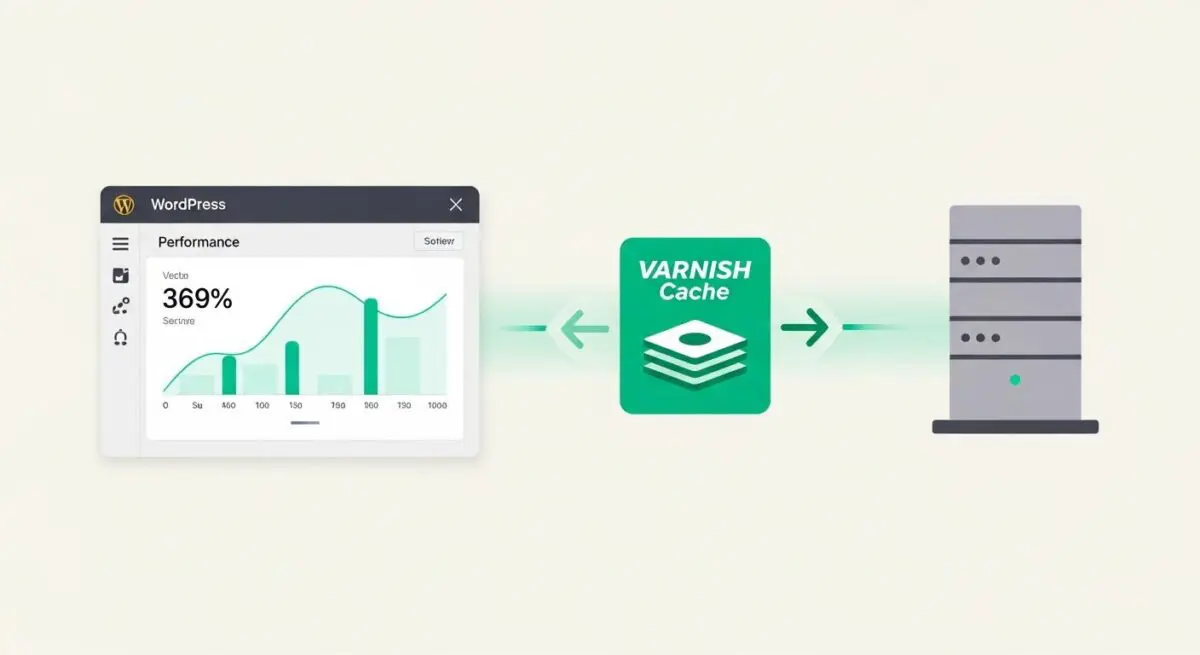
- Varnish Cache operates as a high-performance HTTP reverse proxy that stores pre-rendered WordPress pages in system RAM to eliminate PHP and database overhead.
- The implementation requires a dedicated SSL termination layer, such as Nginx or HAProxy, as Varnish does not natively support the TLS/SSL protocol.
- Advanced Varnish Configuration Language (VCL) allows for granular control over cookie handling and cache invalidation, ensuring high hit rates even for complex WordPress sites.
What is Varnish Cache?
Varnish Cache is an open-source, high-performance HTTP accelerator designed for content-heavy dynamic websites. Functioning as a reverse proxy, it is positioned between the client and the backend web server, typically Nginx or Apache running the WordPress PHP environment. Its primary objective is to intercept incoming HTTP requests and serve cached responses directly from the server’s Physical Random Access Memory (RAM), thereby bypassing the resource-intensive process of executing PHP scripts and querying the MySQL or MariaDB database. In the context of WordPress architecture, Varnish acts as a sophisticated middleman that significantly reduces the computational load on the origin server.
Unlike traditional file-based caching mechanisms used by many WordPress plugins, Varnish operates at the network level and utilizes the Varnish Configuration Language (VCL). VCL allows system administrators to define complex policies for how requests are handled, how long content remains in the cache (TTL), and under what conditions the cache should be bypassed or invalidated. This level of control is essential for maintaining the balance between high-speed delivery and content freshness in enterprise-grade WordPress deployments. By storing the entire HTTP response in memory, Varnish can deliver content at speeds that are orders of magnitude faster than traditional disk-based storage systems.
The Real-World Analogy
Imagine a high-volume restaurant where every customer orders a complex, multi-course meal. In a standard WordPress environment, the chef (the CPU) must cook every single dish from scratch (PHP execution) every time an order comes in, even if 1,000 people order the exact same burger. This leads to long wait times and a stressed kitchen. Varnish Cache is like a high-speed heated display case at the front of the restaurant. When the first customer orders a burger, the chef makes it, but a perfect copy is immediately placed in the heated case. For the next 999 customers, the server simply grabs the burger from the case and hands it over instantly. The chef is free to focus on unique, custom orders, and the customers receive their food in seconds rather than minutes.
How Varnish Cache Impacts Server Performance & Speed Engineering?
The integration of Varnish Cache into a WordPress hosting stack fundamentally alters the performance profile of the CMS. The most immediate impact is observed in the Time to First Byte (TTFB). In a standard environment, the server must process the request, initialize the WordPress environment, execute database queries, and render the HTML before the first byte is sent. With Varnish, the pre-rendered HTML is served directly from RAM, often reducing TTFB from several hundred milliseconds to under 20 milliseconds. This is a critical factor for Core Web Vitals, specifically Largest Contentful Paint (LCP), as it accelerates the entire rendering pipeline.
Furthermore, Varnish significantly enhances server scalability. By offloading the delivery of static and semi-dynamic content, the backend PHP-FPM workers are reserved for tasks that truly require dynamic processing, such as processing form submissions, handling WooCommerce checkout logic, or managing administrative tasks in the wp-admin dashboard. This separation of concerns prevents the ‘Thundering Herd’ problem, where a sudden spike in traffic exhausts the available PHP worker pool, leading to 504 Gateway Timeout errors. Varnish also supports Edge Side Includes (ESI), which allows for the fragmentation of a web page into different caching policies, enabling dynamic elements like user-specific greetings to be injected into an otherwise static cached page.
Best Practices & Implementation
- Implement SSL Termination: Since Varnish does not natively support TLS/SSL, it must be deployed behind a termination proxy like Nginx or HAProxy. This proxy handles the decryption of HTTPS traffic before passing the plain HTTP request to Varnish, ensuring secure delivery without sacrificing performance.
- Optimize VCL for WordPress Cookies: WordPress sets various cookies that can inadvertently disable caching. A technical best practice is to configure the VCL to strip all non-essential cookies, preserving only those required for functionality, such as wordpress_logged_in_* and WooCommerce session cookies.
- Configure Proactive Cache Invalidation: Utilize the PURGE and BAN methods within Varnish to clear specific URLs or patterns when content is updated. This can be automated using WordPress plugins that send HTTP PURGE requests to the Varnish management port upon post publication or comment submission.
- Utilize Grace Mode: Configure Varnish to serve ‘stale’ content from the cache if the backend server becomes unresponsive. This provides a layer of high availability, ensuring that visitors can still access the site even during brief periods of backend maintenance or failure.
Common Mistakes to Avoid
One frequent error is the failure to properly handle the Vary header. If the backend server does not correctly specify Vary: Accept-Encoding, Varnish may serve a compressed version of a page to a browser that does not support it, leading to broken layouts. Another critical mistake is caching the Set-Cookie header. If Varnish caches a response that includes a Set-Cookie header from the backend, it may inadvertently serve that same session cookie to all subsequent visitors, leading to severe security vulnerabilities and session hijacking. Finally, many administrators forget to exclude the WordPress administrative dashboard (/wp-admin/) and the login page (wp-login.php) from the cache, which can lead to broken functionality and data leakage.
Conclusion
Varnish Cache is an indispensable component of high-performance WordPress architecture, providing the scalability and speed required for enterprise-level traffic. When correctly configured with SSL termination and precise VCL rules, it transforms server efficiency and user experience.