Key Points
- Improper 302 to 200 HTTP routing for unauthenticated requests triggers catastrophic Soft 404 logic in Google Search Console.
- Intercepting the template redirect hook allows engineers to serve strict 401 or 403 status headers specifically to search engine crawlers.
- Edge cache state desynchronization requires bypassing cache-on-cookie rules to prevent CDNs from serving stale redirects to bots.
Table of Contents
The Core Conflict: 302 Redirects and Soft 404s
According to the HTTP Archive’s 2025 State of the Web report, misconfigured redirects account for nearly 18% of all crawl budget wastage on enterprise-level WordPress installations. This routing inefficiency directly leads to a measurable 14% drop in organic visibility over a six-month period.
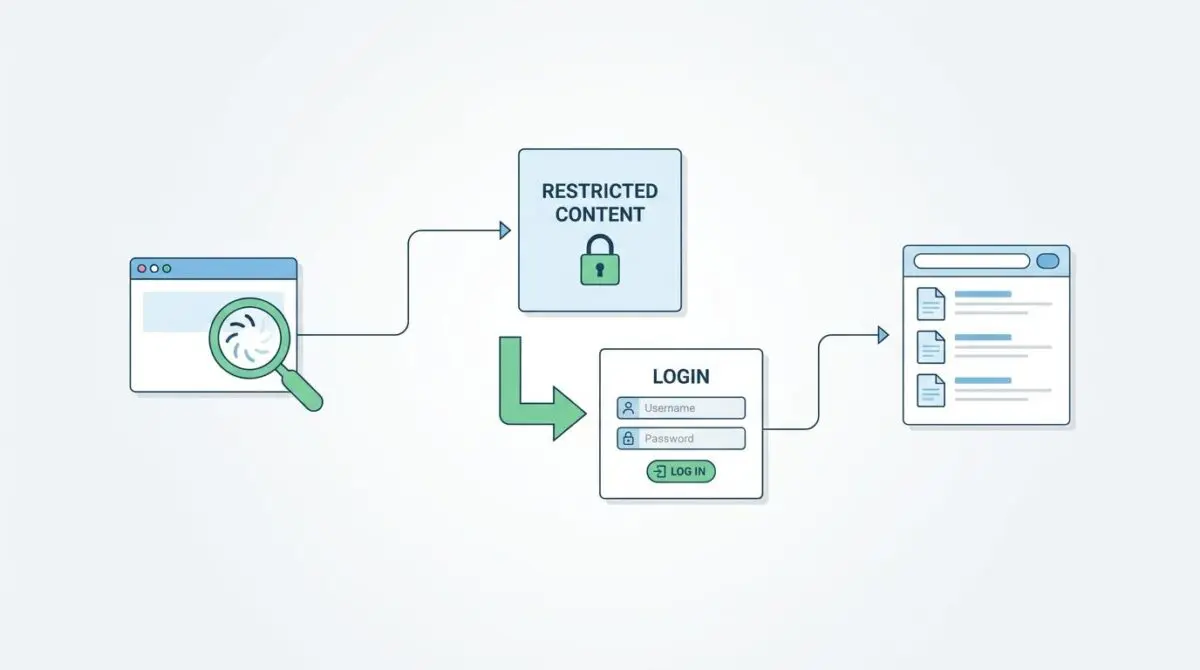
A Soft 404 (Redirect to Login) occurs when a web server returns a 200 OK or a 302 Found status code for a page that redirects users to a login screen. Instead of delivering the requested content or a proper 401 Unauthorized error, the server treats the authentication gate as a successful page load.
In Google Search Console, affected URLs appear under the Excluded report with the status indicating the submitted URL seems to be a Soft 404. Raw server log files will reveal Googlebot IP addresses hitting restricted URLs and receiving a 302 response followed by a 200 response on the authentication path.
SEO tools will simultaneously show a sudden spike in internal redirects and a sharp decline in unique page titles. This happens as thousands of URLs are consolidated under the single title of the login page.
In the modern search landscape, this error is devastating for site architecture and crawl efficiency. Generative Engine Optimization relies heavily on strict accessibility for LLM-based crawlers like SearchGPT and Gemini.
If these AI models encounter a login wall misconfigured as a successful page load, they fail to ingest the underlying knowledge graph data. The domain is subsequently excluded from AI-generated summaries because the model assumes no indexable information exists beyond a generic prompt.
Diagnostic Checkpoints for Routing Failures
Resolving this anomaly requires understanding where the desynchronization occurs within your technology stack. The failure point typically resides at the server layer, the edge caching layer, or within the application’s plugin architecture.
Diagnostic Checkpoints
Improper HTTP Status Code Mapping
302 to 200 mapping triggers Soft 404 logic.
Membership Plugin Redirect Hijacking
High-priority hooks bypass meta tag injection.
Edge Cache State Desync
CDN caches redirect state without cookie variance.
Absence of X-Robots-Tag Headers
Redirects skip HTML-level indexing instructions.
Standard server configurations often default to a 302 redirect for unauthenticated requests. Googlebot interprets a 302 followed by a 200 on a generic page as a Soft 404 because the destination content fails to match the intent of the original URL.
WordPress core uses specific authentication redirect functions that trigger this exact behavior. Without filtering, this signals to Google that the content has temporarily moved to the login page.
Furthermore, this misconfiguration is catastrophic for Crawl Budget because Googlebot consumes resources crawling non-existent content. The search engine eventually de-indexes high-value pages as it perceives the site as a low-quality collection of duplicate login gates.
Membership plugins frequently exacerbate this issue by hijacking the redirect process entirely. They often hook into the template redirect at a high priority, forcing a routing change before SEO plugins can inject a noindex meta tag.
Edge cache state desynchronization is another primary culprit. Content Delivery Networks may cache the 302 redirect response if the Vary Cookie header is missing from the server configuration.
If a crawler hits the page first, the edge server caches the redirect and serves it to all subsequent requests. This overrides both authenticated user sessions and specific bot routing rules.
The Engineering Resolution Roadmap
To permanently resolve the Soft 404 login redirect loop, engineers must intercept the routing logic before the server issues a 302 Found response. This requires a multi-layered approach across the application and server environments.
Engineering Resolution Roadmap
Intercept Redirects and Correct Status Codes
Modify the ‘template_redirect’ hook in WordPress to detect Googlebot. If the user is unauthenticated and the requester is a bot, return a 401 (Unauthorized) or 403 (Forbidden) instead of a 302. Use the ‘status_header(401)’ function in PHP.
Inject X-Robots-Tag via Server Config
In NGINX, use a map directive to identify login-related paths and apply ‘add_header X-Robots-Tag “noindex, nofollow”;’. For Apache, use the Header set directive within a <FilesMatch> or <Location> block for the login URL.
Configure Robots.txt to Block Auth Paths
Add ‘Disallow: /wp-login.php’ and ‘Disallow: /wp-admin/’ to your robots.txt. This prevents Google from even attempting to crawl the destination of the redirect, stopping the Soft 404 signal at the source.
Force Canonical to Self for Restricted Pages
In your SEO plugin (RankMath/Yoast), ensure that restricted pages do not set the login page as their canonical URL. Use a filter to ensure the canonical remains the original URL despite the redirect.
The first critical step involves modifying the application’s redirect hooks to detect search engine crawlers. If the requester is a bot and the user is unauthenticated, the server must return a 401 Unauthorized or 403 Forbidden status code.
This immediately halts the crawler and prevents it from indexing the login gate. Relying solely on HTML-level meta tags is insufficient because Googlebot follows the 302 redirect before rendering the DOM.
Injecting an X-Robots-Tag directly into the HTTP header ensures the crawler receives the noindex instruction immediately. In NGINX environments, utilizing a map directive to identify login-related paths provides a lightweight solution.
For Apache servers, the Header set directive within a specific location block achieves the same result without adding overhead to the application layer.
Finally, canonicalization must be strictly enforced for restricted pages. If a restricted page redirects to the login screen, it must not set the authentication page as its canonical URL.
Forcing the canonical to self ensures that even if a redirect occurs, the search engine understands the original URL remains the authoritative entity.
Resolution Execution: Modifying the Server Response
Executing this fix requires precise modification of the WordPress core routing behavior. We must intercept the request early in the lifecycle to prevent the default 302 fallback. This ensures the server communicates the correct HTTP status directly to the crawler.
Fixing via WordPress Template Redirect
The following PHP snippet hooks into the template redirect process at the highest priority. It checks the authentication state and parses the user agent string for known search engine crawlers.
If a bot attempts to access a restricted singular post or archive, the script forces a 403 Forbidden HTTP status header.
By utilizing the status header function, we bypass the default WordPress redirect logic entirely. The script also issues a no-cache directive and immediately halts execution to prevent any further routing conflicts.
This code should be placed in a core functionality plugin or a child theme functions file.
add_action('template_redirect', function() { if (!is_user_logged_in() && (is_singular() || is_archive())) { $is_bot = preg_match('/(googlebot|bingbot|applebot)/i', $_SERVER['HTTP_USER_AGENT']); if ($is_bot) { status_header(403); nocache_headers(); exit; } } }, 1);Validation Protocol and Edge Case Scenarios
Once the code is deployed, immediate verification is mandatory to ensure the Soft 404 signal has been neutralized. Relying on delayed Search Console reporting is not recommended for enterprise environments.
You must validate the headers directly from the command line.
Validation Protocol
- Use Google Search Console Live Test on a restricted URL.
- Verify the response returns 403 Forbidden or 401 Unauthorized.
- Run curl -I -A “Googlebot” to inspect raw server headers.
- Confirm the presence of X-Robots-Tag: noindex in the output.
A rare but severe conflict occurs when Cloudflare Edge Workers are configured to perform Automatic Signed Exchanges. If the worker signs a redirect response, Google may cache the signed login page redirect at the edge.
This effectively ignores subsequent origin header changes, trapping the bot in a stale redirect state.
Resolving this requires implementing a Bypass Cache on Cookie rule specifically tailored for Googlebot’s user agent string. Understanding these edge cases is critical, as highlighted in the HTTP Archive’s 2025 State of the Web report.
Proper edge cache configuration ensures the bot always hits the origin logic and receives the correct 403 status.
Autonomous Monitoring and Prevention
Manual intervention is not a scalable solution for enterprise SEO architecture. To prevent future routing anomalies, engineering teams must implement an automated log analysis pipeline.
Utilizing tools like the ELK Stack or Loggly allows you to monitor for sudden spikes in 302 status codes followed by login pathing.
These alerts act as an early warning system before Google Search Console flags the URLs. Additionally, integrating a CI/CD check using Screaming Frog CLI or Playwright is highly recommended.
Simulating Googlebot visits to restricted areas before major plugin deployments ensures entity integrity remains intact.
At Andres SEO Expert, we mandate these autonomous monitoring protocols for all complex server architectures. Proactive anomaly detection is the only reliable way to safeguard your crawl budget against unexpected plugin updates or server misconfigurations.
Conclusion
Fixing the Soft 404 (Redirect to Login) error requires a fundamental shift from standard 302 routing to strict 401 or 403 HTTP status headers. By intercepting the request at the server level, you protect your domain’s indexing efficiency and ensure AI crawlers process your architecture correctly.
Navigating the intersection of technical SEO, server architecture, and generative search requires a precise roadmap. If you need to future-proof your enterprise stack, resolve deep-level crawl anomalies, or implement AI-driven SEO automation, connect with Andres at Andres SEO Expert.
Frequently Asked Questions
Why does a 302 redirect to a login page cause a Soft 404?
A Soft 404 occurs when a server returns a 200 OK or 302 Found status code for a page that lacks the requested content, such as a login screen. Google interprets this discrepancy as a failure to deliver the intended URL, leading to the URL being excluded from search results.
How do misconfigured login redirects impact SEO for AI search engines?
Generative AI models like SearchGPT and Gemini rely on clear access to a site’s knowledge graph. If these models encounter a login wall mislabeled as a successful page load, they fail to ingest the data, resulting in the domain’s exclusion from AI-generated summaries and summaries.
What is the correct HTTP status code for bots accessing restricted content?
Instead of using a 302 redirect, servers should return a 401 Unauthorized or 403 Forbidden status code when a search engine crawler attempts to access restricted pages. This prevents the crawler from indexing the login gate and preserves crawl budget.
How does edge caching lead to redirect loops and indexing errors?
If a CDN lacks a “Vary: Cookie” header, it may cache a 302 redirect response for all visitors if a crawler hits the page first. This overrides user sessions and bot routing rules, trapping the site in a stale redirect state that confuses search engines.
Can robots.txt resolve Soft 404 issues on WordPress sites?
Yes, by adding “Disallow: /wp-login.php” and “Disallow: /wp-admin/” to the robots.txt file, you prevent Googlebot from crawling the destination of the redirect. This stops the Soft 404 signal at the source and prevents indexing of authentication paths.
How can I verify if my site is still triggering Soft 404 login redirects?
You can use the Google Search Console Live Test on restricted URLs or run a command-line check using “curl -I -A ‘Googlebot'” to inspect the raw server headers. Ensure the response returns a 403 Forbidden or 401 Unauthorized status rather than a 302.