Key Points
- Main-Thread Yielding: Implement scheduler.yield() to break up synchronous pixel execution tasks and prioritize user inputs.
- Server-Side Tagging: Migrate heavy marketing logic to SSG environments to eliminate client-side blocking entirely.
- Hydration Management: Prevent DOM-scanning pixels from firing during JavaScript framework hydration phases in headless architectures.
Table of Contents
The Core Conflict: Main-Thread Congestion
According to the HTTP Archive 2026 Web Almanac, third-party JavaScript execution now accounts for over 62% of the total main-thread activity on mobile devices. Unoptimized tag manager configurations are the primary driver for sites failing the INP threshold in 41% of tested origins.
Interaction to Next Paint (INP) Degradation is a critical performance failure that assesses a page’s overall responsiveness to user interactions. This Core Web Vital measures the latency of all click, tap, and keyboard interactions throughout the lifespan of a user’s visit.
High INP scores signal poor user experience to AI-driven ranking models in the context of Generative Engine Optimization (GEO). These AI models prioritize fluid, high-fidelity interactions for synthesized content delivery.
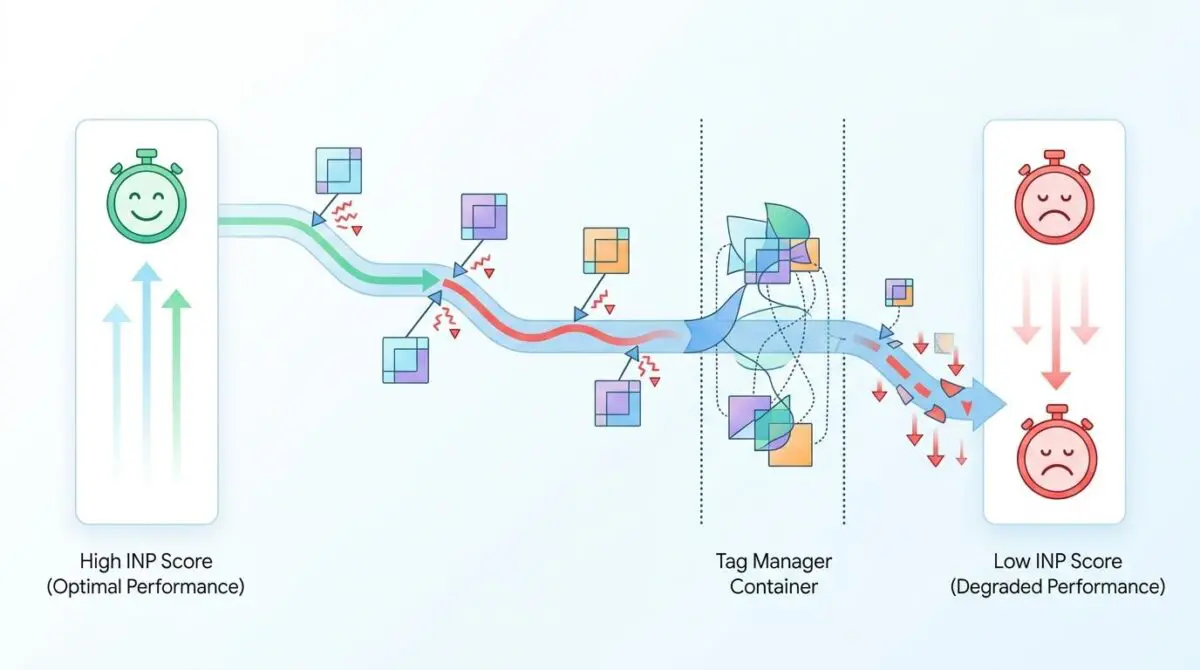
When a Tag Manager container is overloaded with marketing pixels, the browser’s main thread becomes heavily congested. Heavy JavaScript execution tasks monopolize the CPU, resulting in severe input delay and processing duration spikes.
The browser must finish executing complex tracking logic before it can acknowledge user input. This bottleneck prevents the UI from updating and rendering visual feedback.
The result is a perceived frozen state that severely penalizes the site’s performance profile in Google Search Console. Symptoms include high Total Blocking Time (TBT) in Lighthouse audits and long task bars exceeding 50ms in the Chrome DevTools Performance panel.
Real-user monitoring (RUM) tools like the CrUX Dashboard will flag these URLs as poor or needing improvement. High input delay metrics in CrUX are the definitive indicator that main-thread contention is occurring during live user sessions.
Diagnostic Checkpoints and Root Causes
This error is usually a desynchronization in the execution stack between client-side rendering pathways and third-party script payloads. Identifying the exact layer of contention is critical for resolution.
Diagnostic Checkpoints
Main-Thread Execution Contention
Synchronous marketing scripts saturate browser main-thread execution.
Redundant DOM Event Listeners
Multiple pixel listeners inflate event processing duration overhead.
Third-Party Script Piggybacking
Nested script waterfalls interrupt user interactions dynamically.
CPU-Intensive Hydration Conflicts
Pixel DOM scanning clashes with JS framework hydration.
Server and Framework Conflicts
Understanding how complex tracking setups can slow down your website requires analyzing the execution environment. Marketing pixels often execute long-running synchronous JavaScript tasks during the browser’s critical rendering path.
When multiple pixels fire simultaneously, they saturate the main thread entirely. In WordPress environments, plugins like Insert Headers and Footers or GTM4WP often lack script sequencing.
This causes all scripts to fire simultaneously at the wp_head hook, maximizing contention during early page load. Furthermore, each marketing pixel typically attaches its own event listeners to the entire document or specific UI elements.
This results in massive event handler overhead where a single user click triggers a cascade of redundant function calls. Heavy WordPress builders like Elementor or Divi already attach numerous listeners for complex animations.
Adding GTM pixels on top of these creates a listener storm that overwhelms the CPU on lower-end mobile devices. Modern pixels often perform auto-track features that scan the DOM for metadata.
If GTM fires these scripts while a framework like React or Vue in a headless WP setup is performing hydration, CPU usage hits maximum capacity. The frontend JS framework and the GTM marketing scripts actively compete for the same execution window during the initial render.
Many marketing pixels also utilize container-within-a-container logic, where one script dynamically injects five more. In WordPress, aggressive object caching or page caching can sometimes serve stale GTM snippets that trigger deprecated pixels.
This leads to unoptimized script execution loops and unpredictable execution waterfalls.
Engineering Resolution Roadmap
Resolving this requires strict control over when and how third-party scripts execute. We must decouple marketing tracking from the critical rendering path.
Engineering Resolution Roadmap
Implement Yielding to the Main Thread
Refactor GTM custom HTML tags to use ‘scheduler.yield()’ (for modern browsers) or ‘setTimeout(fn, 0)’ to break long tasks into smaller chunks. This allows the browser to process pending user inputs between pixel executions.
Transition to GTM Server-Side (SSG)
Move the processing logic for Facebook CAPI, GA4, and TikTok pixels from the client browser to a Google Cloud or AWS instance. This reduces the client-side JS payload and eliminates main-thread blocking entirely.
Utilize requestIdleCallback for Non-Critical Pixels
Wrap marketing pixel initialization scripts in ‘window.requestIdleCallback()’. This ensures pixels only fire when the browser is idle and not processing user interactions.
Optimize GTM Trigger Logic
Switch from ‘All Pages’ triggers to ‘Window Loaded’ or ‘Consent Initialization’ triggers for non-essential pixels. Use RegEx to limit pixel firing only to high-intent pages rather than globally.
Optimizing Execution Sequencing
Moving the processing logic for Facebook CAPI, GA4, and TikTok pixels to a Google Cloud or AWS instance is the optimal architectural shift. This transition to GTM Server-Side reduces the client-side JS payload and eliminates main-thread blocking entirely.
For scripts that must remain on the client, wrapping initialization scripts in window.requestIdleCallback() is mandatory. This ensures non-critical pixels only fire when the browser is idle and not processing user interactions.
Furthermore, engineers must optimize GTM trigger logic to prevent global execution. Switching from All Pages triggers to Window Loaded or Consent Initialization triggers restricts non-essential pixels.
Resolution Execution: Yielding to the Main Thread
We must address the execution sequence directly by breaking up long tasks by yielding to the main thread. Refactoring GTM custom HTML tags to use modern scheduling APIs prevents main-thread lockup.
Fixing via JavaScript
Implementing a yielding mechanism allows the browser to pause pixel execution and handle pending user interactions. The following snippet utilizes the modern scheduler API with a fallback to setTimeout to break tasks into smaller chunks.
function yieldToMain() {
  return new Promise(resolve => {
    if ('scheduler' in window && 'yield' in scheduler) {
      scheduler.yield().then(resolve);
    } else {
      setTimeout(resolve, 0);
    }
  });
}

async function initMarketingPixels() {
  // Load Pixel A
  loadPixel('FB_PIXEL_ID');
  await yieldToMain(); // Yield to allow user interaction

  // Load Pixel B
  loadPixel('GA4_ID');
  await yieldToMain();
}
Validation Protocol & Edge Cases
After deploying the revised execution logic, immediate verification across multiple environments is mandatory. Relying solely on lab data will obscure real-world interaction bottlenecks.
Validation Protocol
- Monitor real-time INP scores using the Chrome DevTools Web Vitals extension.
- Execute a Google Search Console Live Test to identify rendering errors.
- Audit DevTools Performance tab to ensure GTM tasks stay under 50ms.
- Verify Cache-Control: private headers via curl to prevent edge-caching conflicts.
Handling Edge Cases
In high-traffic WooCommerce environments, Cloudflare Early Hints or Edge Workers might pre-fetch the GTM container before consent is processed. This can result in a double fire anomaly where pixels execute once during the pre-fetch phase and again upon legitimate page load.
This doubles the main-thread execution time and causes catastrophic INP degradation that is entirely invisible to standard lab tests. Engineers must run curl -I to verify that GTM scripts are served with Cache-Control: private headers.
This prevents aggressive edge-caching conflicts from overriding local execution logic.
Autonomous Monitoring & Prevention
Establish a strict performance budget for third-party scripts where no single vendor can exceed 100ms of total blocking time. Implement continuous monitoring using the web-vitals JS library to log real-user INP data directly to an analytics endpoint.
Conduct weekly GTM audits to prune zombie tags that are no longer tied to active marketing campaigns. Andres SEO Expert recommends integrating these performance checks into automated CI/CD pipelines.
Utilizing advanced automation platforms like Make.com alongside custom API alerts ensures enterprise-level entity integrity. Proactive log analysis will catch pixel bloat before it impacts search visibility.
Conclusion
Resolving INP degradation demands a rigorous approach to main-thread management and script orchestration. By enforcing yielding mechanisms and migrating to server-side processing, you secure both performance metrics and user experience.
Navigating the intersection of technical SEO, server architecture, and generative search requires a precise roadmap. If you need to future-proof your enterprise stack, resolve deep-level crawl anomalies, or implement AI-driven SEO automation, connect with Andres at Andres SEO Expert.
Frequently Asked Questions
How does Google Tag Manager affect Interaction to Next Paint (INP)?
Google Tag Manager can negatively impact INP by executing heavy JavaScript tasks on the browser’s main thread. When unoptimized marketing pixels fire simultaneously, they create main-thread congestion, causing severe input delay and preventing the UI from responding quickly to user interactions.
What are the primary causes of main-thread congestion from tracking pixels?
The primary causes include synchronous script execution that monopolizes the CPU, redundant DOM event listeners that inflate processing duration, and CPU-intensive DOM scanning for metadata which often clashes with framework hydration processes.
How can I resolve INP degradation caused by third-party scripts?
Resolution involves implementing yielding mechanisms using the scheduler.yield() API or setTimeout to break up long tasks. Additionally, utilizing requestIdleCallback for non-critical pixels ensures they only fire when the browser is not processing user input.
What is the benefit of GTM Server-Side tagging for SEO?
GTM Server-Side tagging moves the processing logic of marketing pixels from the client’s browser to a cloud server. This reduces the client-side JavaScript payload, eliminates main-thread blocking, and improves Core Web Vitals, which are critical for AI-driven ranking models.
Why do WordPress builders like Elementor worsen interaction latency?
Heavy WordPress builders already attach numerous event listeners for animations and UI features. When combined with GTM tracking pixels, they create a ‘listener storm’ where a single click triggers redundant function calls, overwhelming the CPU on mobile devices.
How can I verify if GTM is causing performance bottlenecks?
You can verify bottlenecks by auditing the Chrome DevTools Performance panel for tasks exceeding 50ms, monitoring real-user INP metrics via the CrUX Dashboard, and checking for high Total Blocking Time (TBT) in Lighthouse reports.