Key Points
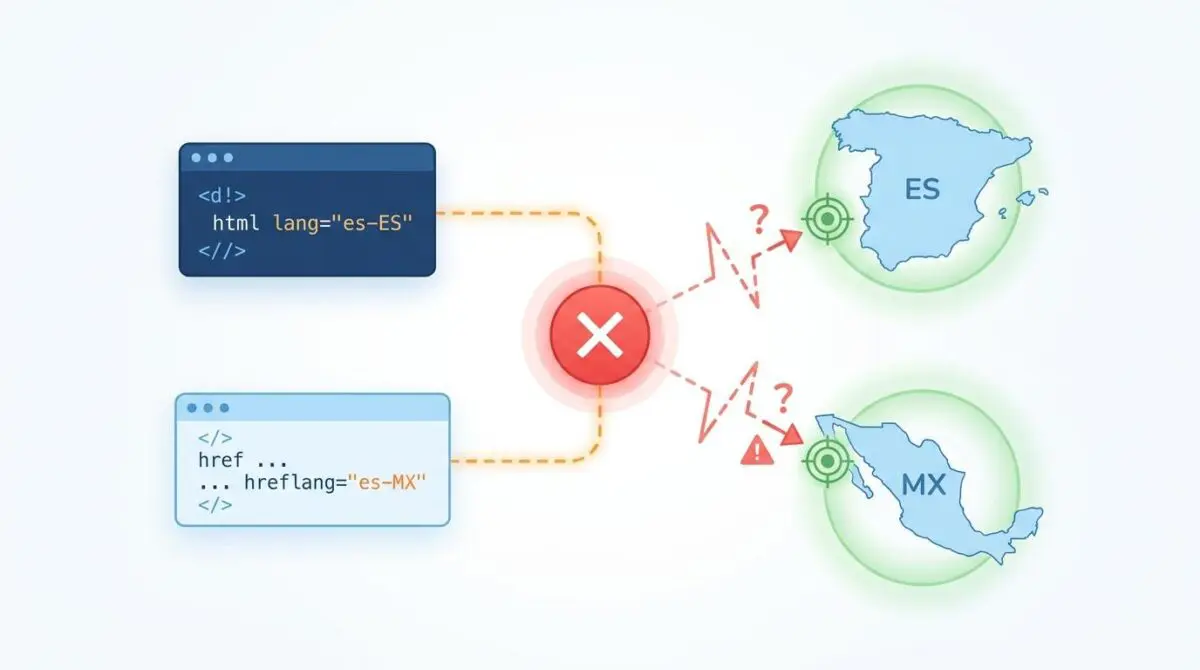
- Signal Contradiction: Hardcoded HTML lang attributes override dynamic hreflang declarations, causing Googlebot to ignore localized metadata entirely.
- Edge Layer Conflicts: Stale object cache keys and aggressive CDN Content-Language headers create transport-level contradictions against document-level signals.
- GEO Impact: Unresolved mismatches trigger “Locale Hallucination” in AI search models, severely degrading cross-border Generative Engine Optimization.
Table of Contents
The Core Conflict: HTML Lang vs. Hreflang Signals
Recent technical SEO audits reveal that nearly a quarter of enterprise multilingual websites suffer from conflicting language signals. This systemic failure often leads to a noticeable drop in cross-border organic visibility. When search engines encounter this friction, they default to defensive heuristics.
The core issue is an HTML lang and hreflang signal mismatch. This happens when a webpage’s root HTML language attribute contradicts the localized intent specified in hreflang links or HTTP headers. The resulting signal noise forces crawlers to abandon explicit metadata and rely on algorithmic guesswork.
By modern standards, this discrepancy is the primary trigger for ignored hreflang tags in Google Search Console. Search engines now heavily prioritize document-level signals over external sitemap or link-level declarations. The impact on your crawl budget is immediately destructive.
Googlebot often initiates redundant re-crawls to verify if the contradiction is a transient rendering error or a permanent configuration fault. In the context of Generative Engine Optimization, these conflicting signals are catastrophic. Modern AI-driven search models use the HTML lang attribute as a top-level filter for retrieval-augmented generation.
A mismatch leads to locale hallucination, where a generative engine summarizes content for the wrong regional audience. It may also exclude the URL entirely from localized AI Overviews because the technical identity of the document is deemed unreliable.
Diagnostic Checkpoints and Root Causes
This error is fundamentally a desynchronization within your server stack. Resolving it requires isolating the specific layer where the document-level attributes diverge from the localization engine.
Diagnostic Checkpoints
Hardcoded Language Attributes in Theme Templates
Static HTML lang tags override dynamic multilingual plugin signals.
Translation Plugin Hook Execution Failure
Priority filter conflicts prevent correct locale attribute injection.
Edge-Layer Header Contradictions
Server-level transport headers conflict with document-level language declarations.
Object Cache Persistence of Language Tags
Non-varying cache keys serve stale language attributes to crawlers.
Theme and Plugin Layer
At the application layer, developers often hardcode language attributes directly into base template files. When a translation plugin attempts to dynamically switch the language, the root attribute remains static. This creates a direct conflict with the dynamic hreflang tags injected into the document head.
Furthermore, translation plugins rely on filtering the language attributes hook. If a theme clears the filter stack or calls the tag before the translation plugin initializes, the default locale is served. This is one of the most common hreflang errors encountered in custom WordPress builds.
Edge and Cache Layer
Infrastructure layers also introduce severe contradictions. Edge servers or CDNs may be configured to serve a Content-Language HTTP header based on the server’s default locale. If the HTML document contains a different lang attribute, Googlebot encounters a protocol-level contradiction.
Object caching systems like Redis can also persist these errors. If the HTML lang attribute for a specific page is cached under a generic key, all subsequent localized crawlers receive the wrong attribute. This directly results in mismatched hreflang and HTML lang declarations being flagged in GSC.
The Engineering Resolution Roadmap
Realigning your localization signals requires a systematic update across your application and caching layers. The following roadmap outlines the exact protocol to synchronize your tags.
Engineering Resolution Roadmap
Audit and Dynamicize the HTML Tag
Open your WordPress theme’s ‘header.php’ file. Ensure the opening <html> tag uses the ‘language_attributes()’ function. Change <html lang=’en’> to <html <?php language_attributes(); ?>> to allow WordPress to dynamically output the correct lang and dir attributes based on the current page’s locale.
Synchronize SEO Plugin and Translation Engine
Navigate to your SEO plugin (e.g., RankMath or Yoast) settings. Ensure ‘Hreflang’ support is enabled and that it is pulling the locale directly from your translation plugin (WPML/Polylang). In WPML, go to ‘Languages’ > ‘Site Languages’ and verify that the ‘HTML lang’ column matches the ‘Hreflang’ column exactly.
Cleanse Edge and Object Caching
Flush your Object Cache (Redis/Memcached) and Purge your CDN (Cloudflare/Fastly). If using Cloudflare, create a Cache Rule to ‘Bypass Cache’ for the ‘language_attributes’ filter or ensure your ‘Vary’ header includes ‘Accept-Language’ if doing server-side detection.
Validate via GSC Live Test
Submit the affected URL to the Google Search Console ‘URL Inspection’ tool and click ‘Test Live URL’. View the ‘Tested Page’ > ‘HTML’ tab. Search for the ‘<html’ tag to confirm the lang attribute matches the ‘hreflang’ links also present in the source.
Auditing the root HTML tag ensures that your CMS can dynamically output the correct language and direction attributes. Hardcoded strings must be replaced with dynamic function calls that respond to the current page’s locale.
Synchronizing your SEO plugin with your translation engine guarantees that both systems pull from the same localization database. This eliminates the risk of the SEO plugin generating an English hreflang tag while the translation engine serves French content.
Finally, cleansing the edge and object caching layers ensures that your corrected signals are actually delivered to the crawler. Cache keys must be varied based on the language parameter to prevent stale document delivery.
Resolution Execution: Dynamic Code Injection
To enforce strict synchronization between the HTML lang attribute and the active locale, you must hook into the WordPress core rendering pipeline. This prevents rogue themes from overriding the signal.
By utilizing a high-priority filter, we can intercept the output and force the attribute to match the translation engine’s current state. The following implementation demonstrates this for environments utilizing Polylang or WPML.
add_filter('language_attributes', function($output) { // Force the HTML lang attribute to match the current Polylang/WPML locale // This prevents theme overrides from breaking the signal. if (function_exists('pll_current_language')) { $lang = pll_current_language('locale'); $output = sprintf('lang="%s"', esc_attr($lang)); } return $output; }, 20);Deploy this filter via a must-use plugin or your child theme’s functions file. Ensure the priority is set to 20 or higher to execute after standard theme filters have run.
Validation Protocol and Edge Cases
Once the code is deployed, immediate validation is required to ensure the signal mismatch is resolved. Relying solely on GSC reporting will introduce a multi-day delay in your feedback loop.
Validation Protocol
- Execute curl -v and confirm ‘Content-Language’ HTTP header matches target locale.
- Confirm <html> tag in the source code contains the correct lang=”XX-YY” attribute.
- Verify <link rel=”alternate” hreflang=”XX-YY”> tags match the HTML lang declaration.
- Check ‘Detected Language’ in Rich Result Test for final engine interpretation.
A high-complexity edge case occurs when using Cloudflare Edge Workers for localized content injection, such as A/B testing or Geo-IP redirection. The Edge Worker might modify the hreflang links in the head to point to a new regional URL.
However, if the worker fails to use an HTML Rewriter to update the root HTML tag’s lang attribute, a critical failure occurs. This results in the origin server serving the default language while the edge layer serves localized hreflang tags.
This creates a shadow contradiction. It remains completely invisible to the origin server logs but is fully present to Googlebot during the crawl phase. Always validate the final rendered DOM via a headless client to catch edge-layer manipulations.
Autonomous Monitoring and Prevention
Manual audits are insufficient for enterprise environments with dynamic localization. You must implement continuous integration tests to prevent regression. Automated tests using a headless browser like Playwright should crawl localized URLs daily.
These scripts must assert that the lang attribute of the root element strictly matches the self-referencing hreflang link. Any divergence should immediately fail the build or trigger an engineering alert.
Additionally, utilize log analysis tools like Logz.io or Splunk to monitor for 406 Not Acceptable errors. Spikes in international Googlebot crawl activity often indicate underlying signal confusion.
At Andres SEO Expert, we engineer custom API pipelines to monitor entity integrity autonomously. By integrating Make.com with your server logs, we can detect and resolve crawl anomalies before they impact your organic visibility.
Conclusion
Resolving an HTML lang and hreflang signal mismatch is a critical requirement for international search visibility. By eliminating hardcoded attributes, synchronizing your translation plugins, and varying your cache keys, you restore entity integrity.
Consistent, uncontradicted signals ensure that crawlers and generative AI models confidently index your localized content. Execute the validation protocols rigorously to confirm your server stack is aligned.
Navigating the intersection of technical SEO, server architecture, and generative search requires a precise roadmap. If you need to future-proof your enterprise stack, resolve deep-level crawl anomalies, or implement AI-driven SEO automation, connect with Andres at Andres SEO Expert.
Frequently Asked Questions
What is an HTML lang and hreflang signal mismatch?
A signal mismatch occurs when a webpage’s root HTML language attribute contradicts the localized intent specified in hreflang link attributes or HTTP headers. This friction forces search engines to abandon explicit metadata and rely on algorithmic guesswork, often resulting in decreased cross-border visibility.
Why is Google Search Console ignoring my hreflang tags?
Google typically reports “Hreflang tags ignored” when document-level signals contradict link-level declarations. If your root HTML lang attribute identifies the page as one language while your hreflang tags specify another, search engines prioritize the document-level tag and treat the hreflang data as unreliable configuration faults.
How does language attribute conflict affect AI Overviews and GEO?
In Generative Engine Optimization (GEO), conflicting signals cause “Locale Hallucination,” where AI models summarize content for the wrong regional audience. It can also lead to total exclusion from localized AI Overviews because the technical identity of the document is deemed unreliable for retrieval-augmented generation.
How do I fix a hardcoded HTML lang attribute in WordPress?
To resolve this, edit your theme’s header.php file and replace static attributes like ‘lang=”en”‘ with the dynamic ‘language_attributes()’ function. You can further ensure synchronization by applying a high-priority filter to the ‘language_attributes’ hook to force the output to match your translation engine’s active locale.
Can server caching and CDNs cause international SEO errors?
Yes, infrastructure layers can introduce severe contradictions. If an object cache like Redis persists a language tag under a generic key, or if an edge layer like Cloudflare serves a default Content-Language header that differs from the document’s lang attribute, crawlers will detect a signal mismatch.
How do I validate if my HTML lang and hreflang tags are synchronized?
Validation requires checking the final rendered DOM via a Google Search Console Live Test or a headless browser audit. You should also use terminal commands like ‘curl -v’ to confirm the ‘Content-Language’ HTTP header matches the source code’s HTML lang attribute and that both align with the self-referencing hreflang link.