Key Points
- Identify hidden Byte Order Marks (BOM) and non-standard character sets causing immediate GSC ingestion rejections.
- Standardize line ending sequences to Unix (LF) and purge invisible Unicode control characters introduced by rich text editors.
- Implement CLI-based validation protocols and pre-upload automation scripts to ensure strict 7-bit ASCII or UTF-8 compliance.
Table of Contents
The Core Conflict: Ingestion Rejection
According to a technical SEO audit study by Ahrefs, approximately 25% of disavow files contain formatting errors. Character encoding mismatches remain the primary reason for Google Search Console rejection in enterprise-scale backlink cleanups.
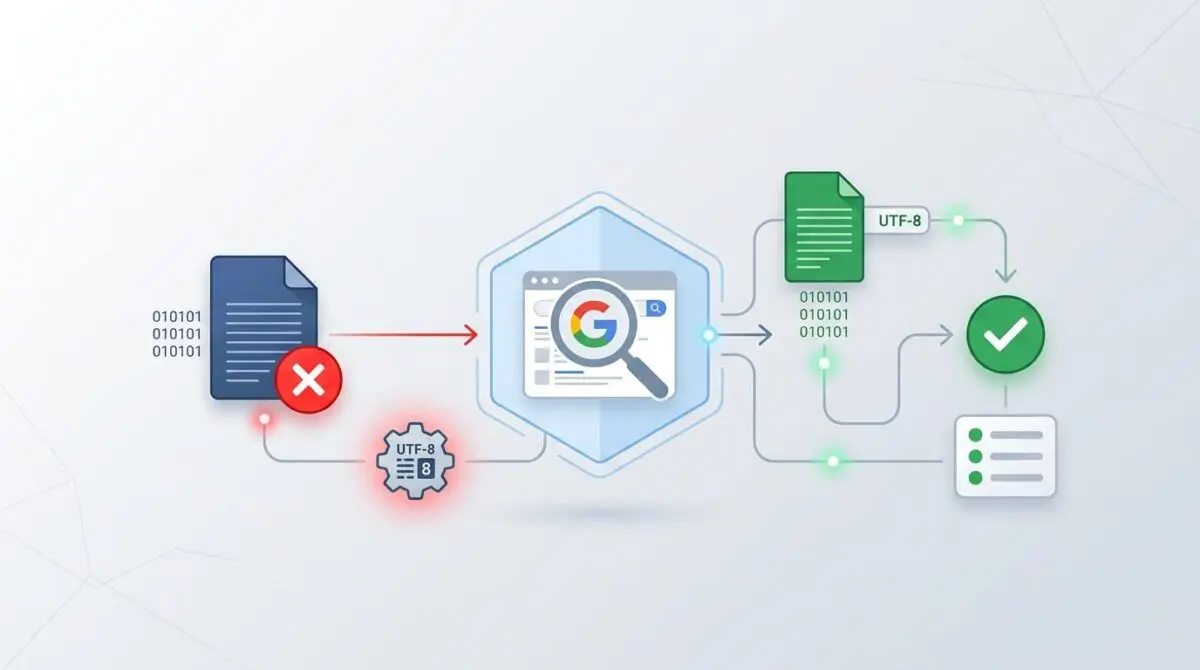
The Disavow File UTF-8 Encoding Validation error occurs when the Google Search Console (GSC) Disavow Tool rejects a submitted text file. This ingestion failure happens because the file contains non-standard character sets, hidden Byte Order Marks, or rich-text formatting.
Google’s ingestion pipeline strictly requires a plain text file encoded in 7-bit ASCII or UTF-8 without a BOM. Any deviation, such as UTF-16 or Windows-1252, triggers a hard rejection at the server level.
This rejection prevents the search engine from ignoring toxic backlinks. Consequently, this failure stalls site recovery from manual actions or algorithmic devaluations.
From a technical SEO perspective, failure to maintain a valid disavow file negatively impacts the Signal-to-Noise ratio. Googlebot relies heavily on this ratio for Generative Engine Optimization.
If the disavow file is rejected, Crawl Budget is wasted on processing low-quality inbound links that should have been suppressed. The search engine’s rendering engine then associates the site with toxic neighborhoods.
Ultimately, this degrades the site’s authority score in large language model training sets and traditional search indices.
Diagnostic Checkpoints: Identifying the Desynchronization
Resolving this error requires understanding the desynchronization within your technology stack. The issue typically originates at the server layer, the edge network, or within the CMS architecture.
Diagnostic Checkpoints
Byte Order Mark (BOM) Inclusion
Remove hidden 3-byte sequences causing GSC upload failure.
Excel-to-TXT Encoding Shift
Avoid Windows-1252/UTF-16 encoding defaults from spreadsheets.
Invisible Unicode Control Characters
Purge non-printing zero-width characters from rich text.
Incompatible Line Ending Sequences
Standardize mixed line endings to prevent binary interpretation.
WordPress plugins that allow for disavow file editing within the dashboard often cause these encoding shifts. Older versions of SEO frameworks may save the file using the server’s default PHP internal encoding.
This internal encoding frequently defaults to UTF-8 with BOM. Furthermore, when SEOs export toxic link lists from Excel, the application frequently defaults to Windows-1252 or UTF-16 Little Endian.
Content managers also inadvertently inject CSS-related formatting characters into the raw text stream. Copy-pasting domains from rich-text documents introduces non-printing characters like Zero Width Spaces.
The Engineering Resolution Roadmap
Correcting the byte stream requires a systematic approach to file sanitization. You must strip hidden characters and enforce strict encoding standards.
Engineering Resolution Roadmap
Sanitize and Strip BOM
Open the disavow.txt file in a specialized code editor like VS Code, Sublime Text, or Notepad++. In Notepad++, go to ‘Encoding’ in the top menu and select ‘Convert to UTF-8 (without BOM)’. In VS Code, click ‘UTF-8’ in the bottom status bar and select ‘Save with Encoding’.
Remove Rich Formatting
Use a regex-based search to identify non-ASCII characters. Use the find-and-replace string [^\x00-\x7F]+ to locate and remove any non-standard symbols or hidden characters introduced by rich text editors.
Force LF Line Endings
Standardize the file to Unix (LF) line endings. In VS Code, this is done via the ‘End of Line’ selector in the status bar (change CRLF to LF). This ensures maximum compatibility across Google’s Linux-based ingestion servers.
Final Verification via CLI
Run the command file -I disavow.txt in a terminal. The output must strictly read text/plain; charset=utf-8 or us-ascii. If it shows charset=binary or utf-16, the file is still corrupted.
Standard Windows editors often prepend a hidden 3-byte sequence to indicate UTF-8. Google’s parser treats these hidden bytes as illegal characters.
This causes an immediate upload failure in the Google Search Console dashboard. Mixed line endings between macOS and Windows environments further compound the issue.
Files using the legacy CR format can occasionally cause the UTF-8 validator to misinterpret the byte stream as binary data. Standardizing to Unix LF line endings ensures maximum compatibility across Google’s Linux-based ingestion servers.
Technical Deep Dive: Resolution Execution
Executing the fix requires bypassing visual text editors and manipulating the file at the command line level. Reviewing the official documentation confirming the requirement for UTF-8 or 7-bit ASCII encoding for disavow files reveals strict ingestion parameters.
This aligns with a technical guide detailing common pitfalls in disavow file creation, including encoding and syntax errors. Engineers must ensure the file payload is completely sanitized before transmission.
Fixing via Command Line Interface (CLI)
You can rapidly sanitize a corrupted disavow file using standard Unix utilities. The following command sequence converts the file from Windows-1252 to UTF-8 and strips the BOM header.
Many system administrators rely on open source scripts and validators designed to sanitize disavow files before GSC submission to automate this step.
iconv -f WINDOWS-1252 -t UTF-8//TRANSLIT disavow_raw.txt -o disavow_fixed.txt && sed -i '1s/^\xef\xbb\xbf//' disavow_fixed.txtThe first part of the command translates the character set while transliterating incompatible characters. The second part uses a stream editor to target the first line and remove the exact hex sequence for the BOM.
Validation Protocol and Edge Cases
Deploying the sanitized file without verification risks triggering another ingestion failure. You must validate the file headers and byte structure locally.
Validation Protocol
- Run the file through a ‘hex editor’ to ensure the first three bytes are NOT 0xEF, 0xBB, 0xBF.
- Use the ‘file’ command in Terminal (macOS/Linux): file -I disavow.txt to verify charset.
- Monitor Chrome DevTools Network tab during mock upload to ensure ‘text/plain’ Content-Type.
- Verify syntax compliance for domain:example.com or direct URL entry formatting.
Server-side configurations can also introduce edge case failures. If the file is being served via a URL for auditing, log files may show a 406 Not Acceptable error.
This happens if the server incorrectly serves the text file as an application/octet-stream payload. It must be served strictly as text/plain with a utf-8 charset definition.
A rare conflict occurs when using a Headless WordPress setup where the disavow file is served via a Node.js middleware. If the middleware is configured with a global charset of UTF-16, it will re-encode the text file on-the-fly.
This results in the file being valid on the server but invalid upon reaching the user’s browser. Always verify the final payload using Chrome DevTools.
Autonomous Monitoring and Prevention
Manual file sanitization is not scalable for enterprise SEO operations. You must implement a pre-upload automation script using Python or Bash.
This script should check for the presence of a BOM and automatically convert any non-UTF-8 file to the correct format. Using version control for disavow files is also critical.
Git allows you to track encoding changes and prevent invisible characters from being committed via automated SEO plugin updates. Advanced automation pipelines are the ultimate way to monitor entity integrity at the enterprise level.
Partnering with Andres SEO Expert ensures your architecture remains resilient against these silent ingestion failures. We build custom API alerts and log analysis pipelines to catch encoding shifts before they impact Googlebot.
Conclusion
Resolving the Disavow File UTF-8 Encoding Validation error requires precise command-line execution and strict adherence to Google’s parsing rules. Eliminating hidden byte sequences and standardizing character sets restores your crawl budget efficiency immediately.
Navigating the intersection of technical SEO, server architecture, and generative search requires a precise roadmap. If you need to future-proof your enterprise stack, resolve deep-level crawl anomalies, or implement AI-driven SEO automation, connect with Andres at Andres SEO Expert.