Key Points
- PDF Document Canonicalization requires injecting Link rel=canonical HTTP headers directly at the server level, as binary files lack HTML structure for standard meta tags.
- Misconfigured WordPress attachment settings and XML sitemaps often expose .pdf files to Googlebot, causing search engines to bypass the intended HTML landing pages.
- Validation requires executing terminal commands like curl -I to ensure CDN edge caches, such as Cloudflare, are not stripping origin headers before they reach crawlers.
Table of Contents
The Core Conflict: PDF Indexing Anomalies
A recent technical SEO study by Ahrefs indicates that PDF files account for approximately 12% of total indexed documents on some corporate domains, often outranking their corresponding HTML landing pages when proper HTTP headers are absent.
This phenomenon stems from a fundamental misunderstanding of PDF Document Canonicalization and Indexing.
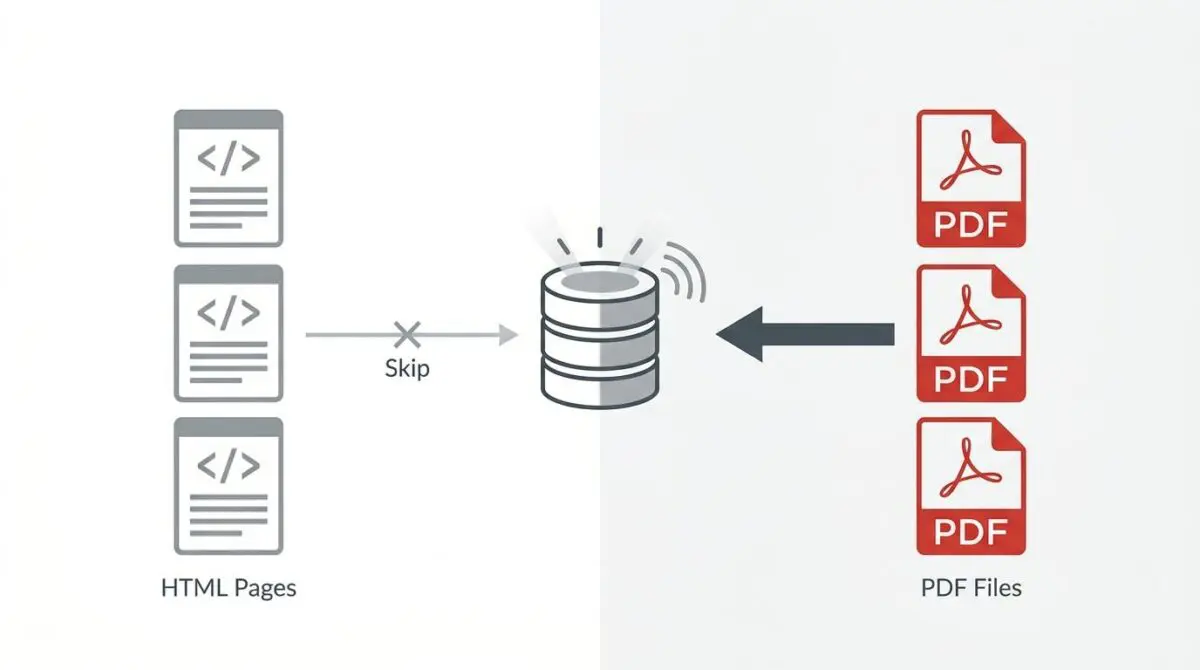
When Googlebot crawls a PDF, it treats the binary document as a standalone resource.
Because PDFs often contain high keyword density and easily parsable structured text, search engines may prioritize them over the intended HTML landing page.
This leads to a catastrophic loss of conversion tracking, as users land on a raw file rather than a tracked navigation funnel.
Furthermore, this significantly impacts crawl budget.
Googlebot wastes valuable resources indexing binary files instead of higher-value HTML routes.
In the era of Generative Engine Optimization (GEO), indexed PDFs are frequently used as direct citations in AI-generated overviews, entirely bypassing your site’s intended user journey.
Diagnostic Checkpoints for Binary Indexing
This indexing error is usually caused by a deep desynchronization in your server stack.
When Search Console reports high impressions for URLs ending in .pdf, the underlying architecture is failing to pass explicit directives.
Diagnostic Checkpoints
Missing Link rel=canonical HTTP Header
PDF HTTP headers lack essential Link rel=canonical declarations.
Attachment Page Indexing Conflict
Redirects prioritize binary files without setting proper noindex.
Inclusion in XML Sitemaps
Sitemaps signal crawlers to index attachments over landing pages.
Absence of X-Robots-Tag
Missing X-Robots-Tag enables unintended binary file indexing.
At the server layer, default configurations rarely inject HTTP headers for media library items.
Without specific NGINX or Apache rules, uploaded PDFs are served bare, leaving them vulnerable to independent indexing.
At the WordPress layer, plugins often redirect attachment URLs directly to the binary file.
If the server does not handle the canonicalization of that destination PDF, the file becomes the primary indexed entity.
The Engineering Resolution Roadmap
Resolving this requires moving beyond standard on-page SEO into server-level directives.
Because PDFs do not have an HTML head section, standard meta tags are completely useless.
Engineering Resolution Roadmap
Implement Server-Level Canonical Headers
Modify the NGINX configuration or .htaccess file to inject a Link header specifically for PDF files. This tells Google that the PDF is a copy of the landing page.
Configure X-Robots-Tag for Media
If the PDF should not be indexed at all, add ‘Header set X-Robots-Tag “noindex, nofollow”‘ inside a <FilesMatch> block for .pdf extensions in your server config.
Audit and Filter XML Sitemaps
Go to SEO Plugin Settings (e.g., RankMath > Sitemap Settings) and ensure ‘Attachments’ or ‘Media’ is toggled to ‘Off’. Regenerate the sitemap and ping Google.
Internal Link rel=”nofollow” Adjustment
Update templates or page builders to ensure that direct links to PDF files on HTML pages include a rel=’nofollow’ attribute to reduce crawl priority.
To fully understand the mechanics behind step one, you must review Google’s official guidelines for canonicalizing non-HTML files.
This documentation confirms that HTTP response headers are the only valid method for consolidating binary file signals.
If your goal is complete exclusion rather than canonicalization, you must rely on technical specifications for implementing the X-Robots-Tag header.
Combining these directives ensures that search engines either attribute the PDF’s value to the parent page or drop the file entirely.
For a broader perspective on why these files pose such a threat, review Ahrefs’ analysis of PDF indexing risks and best practices.
Mastering these server-side responses is non-negotiable for enterprise technical SEO.
Executing Server-Level Canonicalization
Implementing the fix requires direct modification of your server configuration.
You must inject the appropriate HTTP headers explicitly for files terminating in the .pdf extension.
This process intercepts the request before it reaches the WordPress application layer.
Fixing via NGINX Configuration
For high-performance stacks running NGINX, you will define a location block targeting PDF assets.
This block appends both the canonical Link header and the X-Robots-Tag to the server response.
location ~* \.pdf$ { add_header Link "<$scheme://$http_host$uri_without_pdf>; rel='canonical'"; add_header X-Robots-Tag "noindex, nofollow"; }Ensure you reload the NGINX service after applying these changes to prevent configuration syntax errors from taking down the site.
Validation Protocol and Edge Cases
Once the server configuration is deployed, immediate validation is required.
You cannot rely on third-party crawlers to verify HTTP headers instantly.
Validation Protocol
- Execute ‘curl -I’ command for the specific PDF URL.
- Verify ‘Link’ and ‘X-Robots-Tag’ headers in the output.
- Use Google Search Console URL Inspection for Live Testing.
- Confirm ‘Excluded by noindex’ or correct user-declared canonical.
Be aware of critical edge cases in Headless WordPress architectures using Cloudflare.
Edge Workers might be configured to cache static assets aggressively.
If the Link header is added to the NGINX origin but the PDF is already cached at the Edge, Googlebot will continue to see the stale, header-less version.
This persists until the Edge cache is manually purged or the TTL expires.
Furthermore, some CDN providers strip Link headers by default to reduce payload size, requiring explicit whitelisting in your CDN dashboard.
Autonomous Monitoring and Prevention
Fixing the immediate indexing anomaly is only the first phase.
You must establish an automated log analysis pipeline using tools like the ELK Stack or Screaming Frog Log File Analyser.
This allows you to continuously monitor Googlebot GET requests targeting your .pdf files.
Use CI/CD hooks to ensure your .htaccess or NGINX configurations are not overwritten during routine deployments.
At Andres SEO Expert, we mandate a strict media policy where all PDFs are mapped to a canonical HTML URL within a central redirect manager.
By treating binary files with the same architectural rigor as HTML documents, you eliminate crawl budget waste permanently.
Conclusion
PDF indexing anomalies represent a critical failure in server-level entity management.
By implementing explicit HTTP response headers, you reclaim control over your crawl budget and conversion funnels.
Ensure your sitemaps remain clean and your edge caching layers respect origin directives.
Navigating the intersection of technical SEO, server architecture, and generative search requires a precise roadmap. If you need to future-proof your enterprise stack, resolve deep-level crawl anomalies, or implement AI-driven SEO automation, connect with Andres at Andres SEO Expert.