



Key Points
- Synchronize WooCommerce display prices with JSON-LD schema using the woocommerce_structured_data_product filter to prevent dynamic cart mismatches.
- Implement cache bypass rules in NGINX or Apache specifically for the Googlebot-Shopping user agent to eliminate stale edge-cached HTML deliveries.
- Transition from static XML product feeds to the real-time Google Content API to reduce the time delta between database updates and Merchant Center validation.
Table of Contents
The Core Conflict: Price Mismatches in E-Commerce
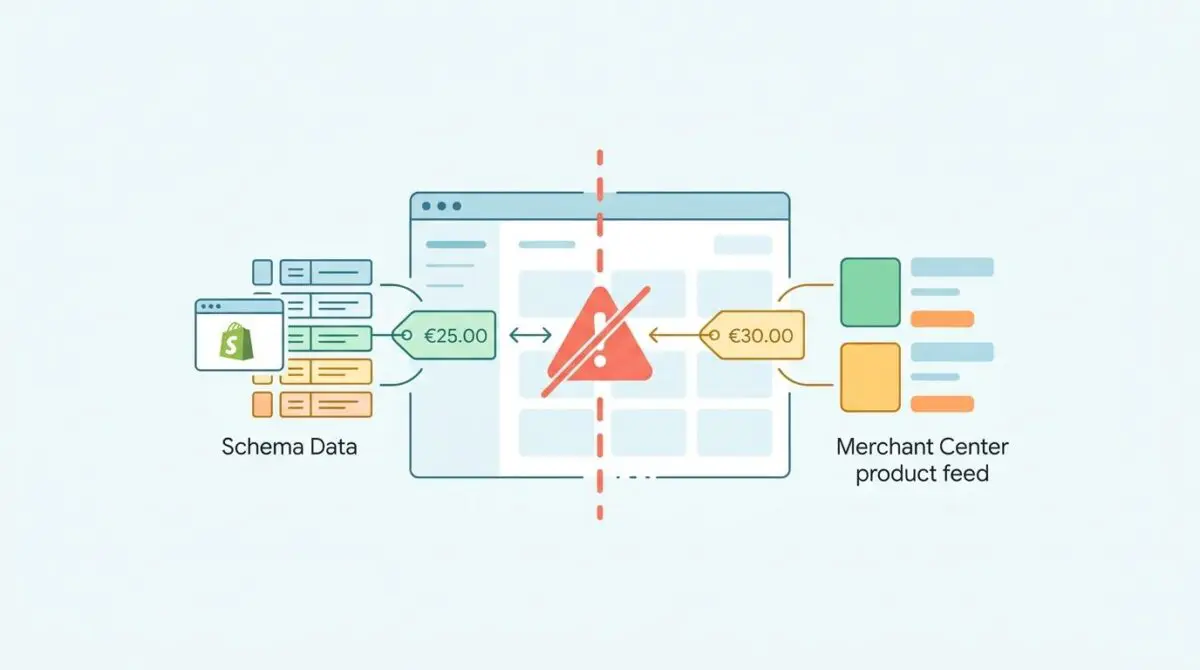
According to recent Google Search Central data, over 24% of automated e-commerce account suspensions stem from pricing inconsistencies. These errors are frequently caused by client-side JavaScript rendering and stale edge-cached schema data.
This critical error is known as Product Data Mismatch (Price). It triggers immediate Google Merchant Center (GMC) violations. The mismatch occurs when the price attribute in your product feed, the JSON-LD structured data, and the final DOM-rendered price fail to align perfectly.
In the era of Generative Engine Optimization (GEO), this discrepancy is fatal. Googlebot-Shopping interprets inconsistent pricing data as a severe lack of merchant reliability. Consequently, your products are stripped from AI-driven shopping carousels and generative search comparisons.
Server logs typically reveal a distinct pattern of Googlebot-Shopping visits followed by an instant API rejection in Merchant Center. This happens because the dynamically injected price via JavaScript diverges from the initial HTML payload.
Diagnostic Checkpoints: Identifying the Desynchronization
Fixing this error requires pinpointing exactly where the desynchronization occurs within your stack. The conflict usually resides at the server layer, the edge caching layer, or within the CMS plugin architecture.
Diagnostic Checkpoints
Asynchronous JavaScript Price Updates
Schema captured before dynamic scripts finish updating the DOM.
Aggressive Edge Caching (Object/Full-Page)
Stale HTML cache serves outdated prices against fresh APIs.
Tax Inclusion Logic Inconsistency
Schema net price conflicts with JavaScript-rendered tax inclusion.
Multi-Currency Geo-IP Mismatches
Geo-targeted currency fails to align with target feed currency.
Root Causes Expanded
Asynchronous JavaScript often creates a race condition during Googlebot’s rendering process. The crawler captures the static JSON-LD price before dynamic scripts finish updating the DOM. This leaves the structured data stale while the visible price reflects the dynamic injection.
Aggressive edge caching at the CDN level exacerbates this issue significantly. Varnish or Cloudflare may serve a cached HTML document containing outdated schema. Meanwhile, the shopping cart relies on an uncached API endpoint to display the current price, triggering a validation failure.
Tax inclusion logic and multi-currency setups introduce further complexities. If your server-side schema outputs a net price but the frontend JavaScript renders a tax-inclusive figure, Google flags the inconsistency.
Similarly, Geo-IP plugins that alter frontend currency without hooking into the schema generation will fail validation crawls. Googlebot-Shopping requires absolute parity across all data points.
The Engineering Resolution Roadmap
Resolving a Product Data Mismatch (Price) requires synchronizing your database, structured data, and frontend rendering logic. You must completely eliminate the latency between price updates and schema generation.
Engineering Resolution Roadmap
Synchronize Feed and Schema via Content API
Switch from static XML feeds to the Google Content API for WordPress. This ensures that any price change in the WooCommerce database is pushed to Merchant Center in real-time, reducing the window for mismatch detection.
Hook into WooCommerce Schema Filter
Add a PHP filter to ‘woocommerce_structured_data_product’ to ensure the ‘price’ and ‘priceCurrency’ fields are pulled from the ‘get_display_price()’ method, which accounts for taxes and active discounts, rather than the raw database price.
Configure Cache Bypass for Googlebot-Shopping
Modify the .htaccess or NGINX config to bypass the page cache when the User-Agent matches ‘Googlebot-Shopping’. This ensures the bot always sees the most current price and schema directly from the origin server.
Implement priceValidUntil and Availability Schema
Update the JSON-LD to include the ‘priceValidUntil’ property. This signals to Google when a sale price ends, preventing mismatches if the bot crawls shortly after a promotion expires.
Deep Technical Context
Migrating to the Content API ensures your WooCommerce database pushes real-time updates directly to Merchant Center. This bypasses the inherent delays of static XML feed generation.
By reducing the time delta between a price change and Google’s awareness, you minimize the risk of price mismatches between your product data and landing pages.
At the server level, bypassing the page cache for Googlebot-Shopping is non-negotiable. Modifying your NGINX or Apache configuration ensures the crawler always receives the un-cached, origin-server response. This guarantees the JSON-LD matches the live database state.
Furthermore, implementing the priceValidUntil property is a critical defensive measure. This structured data attribute explicitly tells Google when a promotional price expires. It acts as a safeguard, preventing mismatch flags if the bot crawls the URL immediately after a flash sale concludes.
Resolution Execution: Fixing via WooCommerce Filter
To permanently resolve the discrepancy in a WordPress environment, you must intercept the schema generation process. Default SEO plugins often pull the raw database price, ignoring frontend tax calculations or dynamic discounts.
You can correct this by hooking into the native WooCommerce structured data filter. This forces the JSON-LD output to utilize the exact display price function that renders the frontend cart value.
By implementing this filter, you ensure absolute parity between the hidden metadata and the visible DOM.
add_filter( 'woocommerce_structured_data_product', 'sync_schema_with_dynamic_price', 10, 2 ); function sync_schema_with_dynamic_price( $markup, $product ) { $markup['offers'][0]['price'] = wc_get_price_to_display( $product ); $markup['offers'][0]['priceCurrency'] = get_woocommerce_currency(); $markup['offers'][0]['priceValidUntil'] = date( 'Y-12-31', strtotime( '+1 year' ) ); return $markup; }Validation Protocol & Edge Cases
After deploying the server and code adjustments, you must rigorously validate the data pipeline. Relying solely on the Merchant Center dashboard can result in delayed feedback and prolonged suspensions.
Validation Protocol
- Run Google’s ‘Rich Results Test’ to verify current JSON-LD.
- Execute curl command using ‘Googlebot-Shopping’ UA for raw HTML.
- Force immediate re-validation via Merchant Center Diagnostics fetch.
Handling Headless Architecture Edge Cases
Modern headless WordPress setups present unique challenges for price synchronization. If your React frontend uses local state to apply a first-time user discount, the DOM price will instantly deviate from the backend JSON-LD.
Because Googlebot now executes high-level JavaScript, it processes this client-side discount and detects the mismatch immediately.
In these scenarios, your backend schema is technically correct for a standard user, but the crawler experiences the localized state change. To mitigate this, you must configure your frontend application to dynamically update the JSON-LD script block in tandem with the React state changes.
Additionally, you should enable automatic improvements to update product prices using structured data within Merchant Center as a fallback mechanism.
Autonomous Monitoring & Prevention
Manual validation is insufficient for enterprise-grade e-commerce platforms. To prevent future suspensions, you must implement a pre-flight schema validator within your CI/CD pipeline. This ensures no code deployment inadvertently breaks the price parity logic.
Server-side log analysis is equally critical for maintaining entity integrity. By actively monitoring the Googlebot-Shopping user agent, you can detect crawl anomalies in real-time.
If the bot encounters a 403 or 429 HTTP status code on your cart fragments or pricing APIs, immediate intervention is required to prevent a verification failure.
- Pre-Flight Validators: Integrate schema checks directly into your deployment pipeline.
- Log Analysis: Monitor Googlebot-Shopping for unexpected 403 or 429 status codes.
- API Alerts: Trigger instant notifications when dynamic cart endpoints fail to respond.
Deploying advanced automation tools transforms your SEO strategy from reactive to proactive. Andres SEO Expert utilizes these exact methodologies to monitor entity integrity autonomously. This ensures your server architecture remains flawlessly synchronized with Google’s rendering engine.
Conclusion
Resolving a Product Data Mismatch (Price) is fundamentally an exercise in data synchronization across your entire stack. By aligning your backend database, edge caching rules, and frontend rendering logic, you eliminate the race conditions that trigger Merchant Center suspensions.
Navigating the intersection of technical SEO, server architecture, and generative search requires a precise roadmap. If you need to future-proof your enterprise stack, resolve deep-level crawl anomalies, or implement AI-driven SEO automation, connect with Andres at Andres SEO Expert.
Frequently Asked Questions
What causes a Product Data Mismatch (Price) error in Google Merchant Center?
This error occurs when the price attribute in your product feed, the JSON-LD structured data on your landing page, and the final price rendered in the browser (DOM) do not align. Key drivers include asynchronous JavaScript updates, stale edge caching at the CDN level, and inconsistent tax inclusion logic between the backend and frontend.
How does client-side JavaScript rendering impact pricing for GEO?
In Generative Engine Optimization (GEO), Googlebot-Shopping may capture static schema data before client-side scripts, like currency converters, finish updating the price. This discrepancy leads Google to view the merchant as unreliable, resulting in products being stripped from AI-driven shopping carousels and SGE comparisons.
Why is it necessary to bypass page caching for Googlebot-Shopping?
Bypassing the page cache ensures that the crawler always receives the live, un-cached HTML payload directly from the origin server. This prevents the bot from seeing stale pricing data stored in edge caches like Varnish or Cloudflare, which often conflicts with real-time API data used for checkout.
How can I synchronize WooCommerce price schema with live frontend prices?
To fix this, you should hook into the ‘woocommerce_structured_data_product’ filter. This allows you to force the JSON-LD output to use the ‘wc_get_price_to_display’ function, ensuring the metadata accounts for taxes and dynamic discounts exactly as they appear to the user.
What is the purpose of the priceValidUntil schema property?
The priceValidUntil property explicitly tells Google when a promotional or sale price is set to expire. Including this in your structured data acts as a safeguard, preventing mismatch flags if Googlebot-Shopping crawls a page immediately after a limited-time offer has ended.
How do headless e-commerce setups manage price mismatches for AI crawlers?
In headless architectures, the frontend must be configured to update the JSON-LD script block dynamically whenever the UI state changes (such as applying a first-time user discount). Developers should also enable automatic improvements in Merchant Center to allow Google to update prices using structured data as a fallback.