Executive Summary
- Transition from PHP-based template hierarchies to HTML-based block templates and template parts.
- Centralized configuration via the theme.json file for managing global styles, settings, and block constraints.
- Significant reduction in server-side processing and CSS bloat, leading to optimized Core Web Vitals and TTFB.
What is Block Themes?
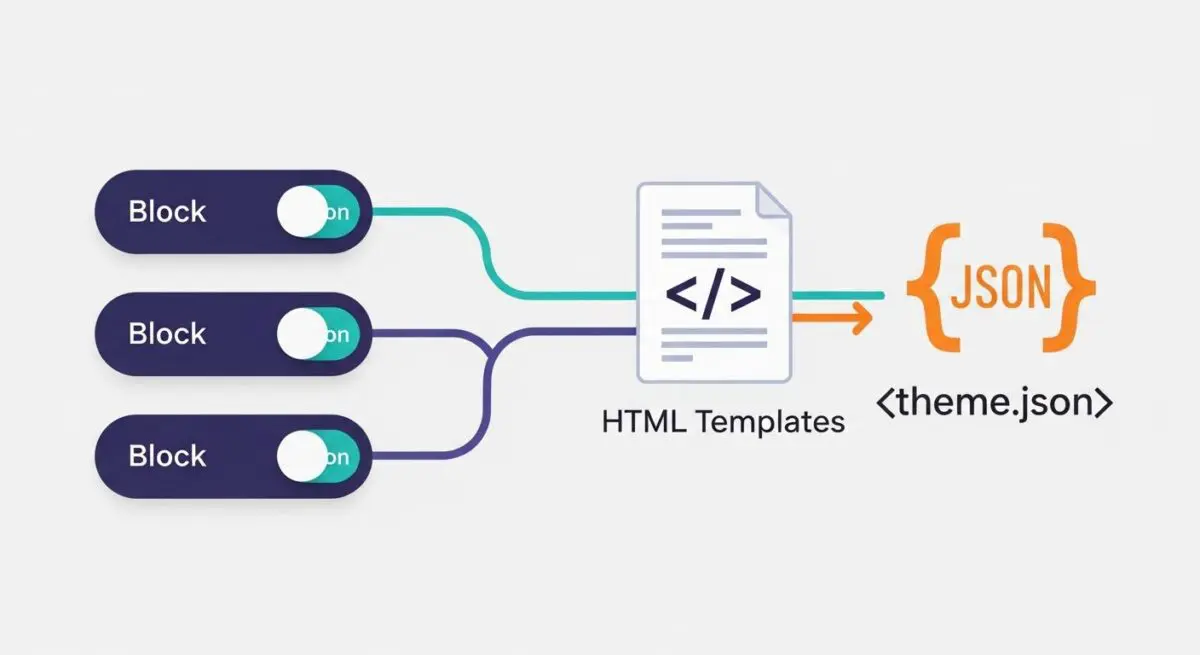
Block themes represent a fundamental shift in WordPress theme architecture, moving away from the traditional PHP-based template hierarchy toward a system composed entirely of blocks. Unlike classic themes that rely on header.php, footer.php, and complex PHP logic to render layouts, block themes utilize HTML files located in the /templates and /parts directories. These files contain block markup that the WordPress engine parses and renders, enabling Full Site Editing (FSE) capabilities across the entire document object model (DOM).
At the core of a block theme is the theme.json configuration file. This file acts as a centralized authority for the theme’s design system, defining color palettes, typography, layout constraints, and block-specific settings. By standardizing how styles are declared, block themes allow the WordPress core to handle CSS generation and optimization, ensuring that only the necessary styles for the blocks present on a page are enqueued. This architectural evolution decouples the design layer from the logic layer, facilitating a more modular and scalable approach to enterprise web development.
The Real-World Analogy
Think of a traditional WordPress theme like a custom-built house where the plumbing and electrical wiring are permanently embedded within the concrete walls; changing the layout of a room requires a contractor to physically tear down structures and rewrite the blueprints. In contrast, a block theme is like a high-end modular office system. Every wall, desk, and light fixture is a self-contained unit that fits into a universal grid. You can move a conference room (the header) or a workstation (a sidebar) instantly because the underlying infrastructure is designed to support modularity without needing to re-engineer the foundation of the building.
How Block Themes Impacts Server Performance & Speed Engineering?
Block themes significantly enhance server performance by reducing the computational overhead required to render a page. In classic themes, the server must execute numerous PHP functions and database queries to assemble the final HTML output. Block themes minimize this execution time by using static HTML templates with block delimiters, which are processed more efficiently by the WordPress block parser. This leads to a marked improvement in Time to First Byte (TTFB).
From a front-end engineering perspective, block themes address the issue of render-blocking resources. Through the theme.json engine, WordPress can generate granular, atomic CSS. Instead of loading a massive, monolithic stylesheet for the entire site, the system only delivers the specific CSS required for the blocks rendered on the current URI. This optimization reduces the total page weight and improves the Largest Contentful Paint (LCP) metric, as the browser spends less time parsing unused CSS rules.
Best Practices & Implementation
- Centralize Styles in theme.json: Avoid hardcoding styles in CSS files; use the theme.json file to define the global style hierarchy and ensure design consistency across the block editor and front-end.
- Leverage Block Patterns: Create pre-defined block patterns to provide users with complex, performant layouts that adhere to the brand’s design system without requiring custom code.
- Minimize Custom PHP: Shift logic from template files to block variations or custom blocks to maintain compatibility with the Site Editor and future WordPress core updates.
- Optimize Asset Loading: Use the wp_enqueue_block_style function to load CSS only when a specific block is present on the page, further reducing the critical rendering path.
Common Mistakes to Avoid
One frequent error is attempting to use classic theme hooks (like wp_head or wp_footer) within HTML block templates, which can lead to unexpected rendering behavior. Another common mistake is neglecting the theme.json schema, resulting in a fragmented editing experience where the block editor settings do not match the front-end output. Finally, many developers over-complicate block themes by enqueuing unnecessary third-party libraries that replicate functionality already built into the WordPress core block system.
Conclusion
Block themes represent the future of WordPress architecture, offering a modular, high-performance framework that streamlines both development and server-side execution. By adopting a block-first approach, enterprise organizations can achieve superior scalability and optimized Core Web Vitals.