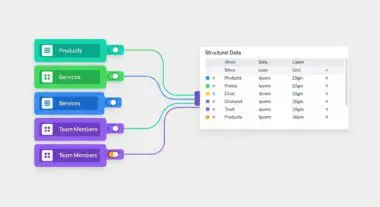
Executive Summary
- WP All Import facilitates complex XML and CSV data ingestion through a granular mapping engine compatible with custom post types and ACF.
- The plugin utilizes iterative processing to manage server resource consumption, preventing PHP timeout errors during large-scale database operations.
- Strategic implementation requires optimization of database indexing and server-side execution limits to maintain high-availability performance.
What is WP All Import?
WP All Import is a sophisticated data migration and synchronization engine designed for the WordPress ecosystem. It enables technical teams to ingest structured data from XML, CSV, and Excel files into the WordPress database with high precision. Unlike standard import tools, it provides a comprehensive interface for mapping external data points to native WordPress fields, taxonomies, and third-party metadata structures such as Advanced Custom Fields (ACF).
At its core, the plugin functions by parsing external data streams and executing programmatic database inserts and updates via the WordPress API. It is engineered to handle massive datasets by breaking the import process into manageable chunks, thereby circumventing common server-side constraints like PHP execution timeouts and memory exhaustion. This makes it an essential tool for enterprise-level catalog management, real estate listings, and automated e-commerce synchronization.
The Real-World Analogy
Imagine an automated industrial sorting facility designed to stock a massive library. Instead of librarians manually cataloging every single book one by one—which is slow and prone to human error—WP All Import acts as a high-speed conveyor system. It reads the barcode on every incoming package, identifies exactly which shelf and section it belongs to, and places it there instantly. If a book is already on the shelf but has a new cover, the system simply replaces the old one, ensuring the library remains perfectly organized without ever closing its doors to the public.
How WP All Import Impacts Server Performance & Speed Engineering?
The primary impact of WP All Import on server architecture involves intensive I/O operations and CPU utilization during the ingestion phase. Large-scale imports trigger frequent writes to the wp_posts, wp_postmeta, and wp_terms tables. Without proper server-side optimization, these operations can lead to database table locking and increased Time to First Byte (TTFB) for front-end users. Furthermore, the plugin’s ability to download and process external images during import can saturate server bandwidth and deplete available disk space if not monitored.
From a speed engineering perspective, the plugin utilizes a background processing model that relies on the WordPress Cron or server-level system crons. Efficient implementation requires a high-performance hosting environment with optimized PHP-FPM configurations and sufficient memory_limit allocations. To mitigate performance degradation, developers often utilize the plugin’s Rapid Add-On or disable specific action hooks that trigger during post-creation to reduce the computational overhead per record.
Best Practices & Implementation
- Enable Iterative Processing: Configure the import speed to process data in smaller batches, such as 20 records per iteration, to prevent exceeding the server’s PHP max_execution_time.
- Optimize Database Indexing: Ensure that the database is hosted on NVMe SSD storage and that custom meta keys used for lookups are properly indexed to accelerate the update logic.
- Bypass Heavy Hooks: Use the wp_all_import_is_post_to_create filter to disable resource-heavy plugins, such as SEO suites or image optimizers, during the import process to maximize throughput.
- Utilize Server-Side Cron: Replace the default WP-Cron with a real system cron job to ensure the import process remains consistent and does not rely on front-end traffic triggers.
Common Mistakes to Avoid
A frequent error is failing to define a unique identifier correctly, which results in massive database bloat through duplicate record creation. Another common oversight is running large imports on shared hosting environments without adjusting the max_input_vars or PHP memory settings, leading to partial data corruption. Finally, many users neglect to clear the object cache or CDN edge cache after a bulk import, causing the front-end to display stale data despite successful database updates.
Conclusion
WP All Import is a powerful architectural tool for data-driven WordPress sites, provided it is paired with robust server resources and optimized database configurations. Proper management of its ingestion cycles is critical for maintaining enterprise-level scalability and performance.