Executive Summary
- Utilizes an event-driven, asynchronous architecture to handle thousands of concurrent connections with minimal hardware resource consumption.
- Features native server-level caching via the LSCache module, which communicates directly with WordPress to bypass expensive PHP execution.
- Provides out-of-the-box support for modern web protocols including HTTP/3, QUIC, and TLS 1.3 for superior mobile and edge performance.
What is OpenLiteSpeed?
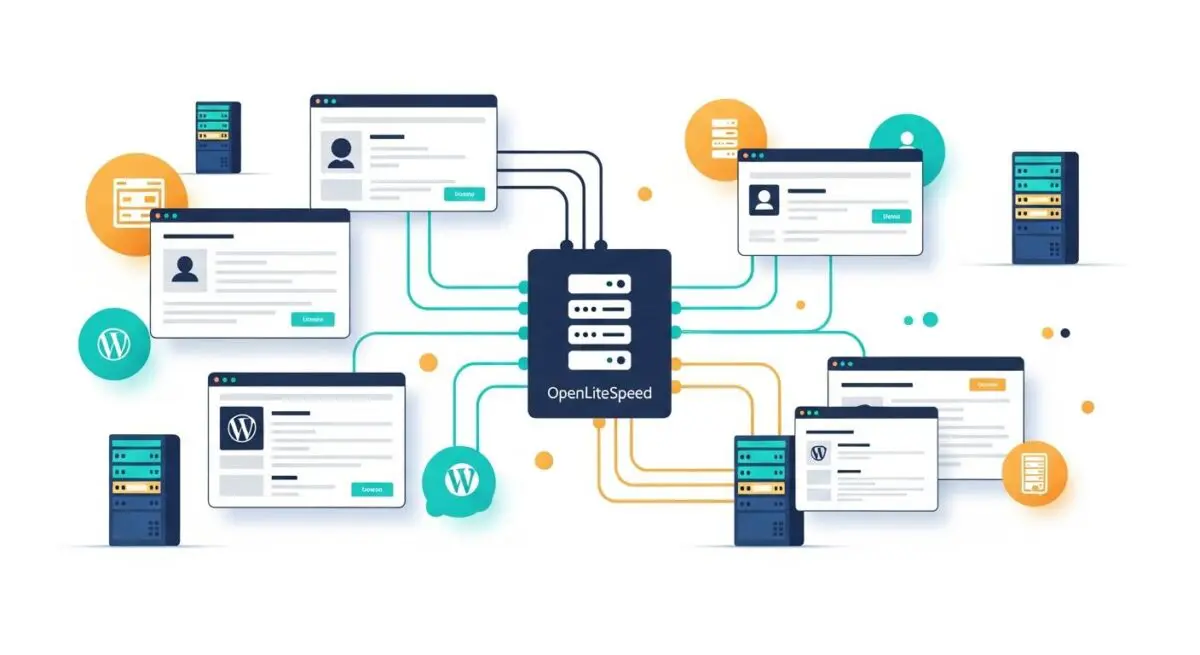
OpenLiteSpeed (OLS) is the open-source edition of the LiteSpeed Web Server (LSWS) enterprise software. It is a high-performance, event-driven HTTP server designed to handle high-concurrency environments with extreme efficiency. Unlike traditional process-based servers like Apache, which create a new process or thread for every connection, OpenLiteSpeed uses a non-blocking architecture. This allows it to manage thousands of simultaneous users using only a fraction of the CPU and RAM required by legacy server technologies.
In the context of WordPress CMS architecture, OpenLiteSpeed is specifically engineered to optimize dynamic content delivery. It incorporates a proprietary PHP engine, known as LSPHP (LiteSpeed PHP), which is significantly faster than standard PHP-FPM implementations. Furthermore, it supports a subset of Apache .htaccess rules, allowing developers to maintain familiar configuration workflows while benefiting from the speed of a modern, asynchronous engine.
The Real-World Analogy
Imagine a massive international airport terminal. A traditional server (Apache) is like a security checkpoint where every single passenger must wait for one specific officer to manually check their passport before the next person can move forward; if one passenger has an issue, the entire line stalls. OpenLiteSpeed is like a state-of-the-art automated biometric gate system. Thousands of passengers can scan their credentials simultaneously at dozens of kiosks. The system processes everyone in parallel, and because it is automated and event-driven, the “staff” (server resources) only intervene when a specific action is triggered, ensuring the flow of traffic never grinds to a halt even during peak holiday travel.
How OpenLiteSpeed Impacts Server Performance & Speed Engineering?
OpenLiteSpeed fundamentally alters the request-response lifecycle for WordPress. By utilizing the LSCache module, the server can store entire rendered HTML pages in its memory or disk cache. When a visitor requests a page, OpenLiteSpeed serves the static version directly from the server level, completely bypassing the WordPress core, the database, and the PHP engine. This results in a near-instantaneous Time to First Byte (TTFB).
From a speed engineering perspective, OpenLiteSpeed’s support for HTTP/3 and QUIC is critical. These protocols reduce the handshake overhead required to establish a secure connection, which is particularly beneficial for mobile users on high-latency networks. Additionally, OpenLiteSpeed handles SSL/TLS encryption more efficiently than Nginx or Apache, reducing the computational cost of securing a high-traffic WordPress site. The integration of Edge Side Includes (ESI) also allows for the caching of partially dynamic pages, enabling high performance even on complex e-commerce or membership sites.
Best Practices & Implementation
- Deploy the LiteSpeed Cache Plugin: Always pair the server with the official WordPress LSCache plugin to enable precise cache purging and image optimization features.
- Optimize LSPHP External Apps: Configure the PHP process mode to “ProcessGroup” to ensure better resource isolation and faster execution of WordPress scripts.
- Enable QUIC and HTTP/3: Ensure the UDP port 443 is open in your firewall to allow the server to utilize the QUIC protocol for reduced latency.
- Implement Object Caching: Use OpenLiteSpeed in conjunction with Redis or Memcached to offload database query results, further reducing the load on the MySQL/MariaDB instance.
- Monitor Rewrite Rules: Remember that OpenLiteSpeed requires a graceful restart to recognize changes made to the .htaccess file, unlike the Enterprise version.
Common Mistakes to Avoid
A frequent error is running OpenLiteSpeed alongside other caching plugins like WP Rocket or W3 Total Cache. These often conflict with the server-level LSCache engine, leading to redundant processing and potential cache corruption. Another common mistake is failing to configure the server’s internal cache directory on a high-speed NVMe drive, which can bottleneck the performance gains of server-level caching. Finally, many administrators forget to open the necessary UDP ports, effectively disabling HTTP/3 and forcing the server to fall back to slower HTTP/2 protocols.
Conclusion
OpenLiteSpeed represents a paradigm shift in WordPress hosting, offering enterprise-grade event-driven performance and native caching capabilities. By implementing OLS, agencies can achieve superior Core Web Vitals and handle massive traffic spikes without the overhead of traditional server architectures.