Key Points
- Linux-based servers treat URL character casing as literal unique identifiers, causing 200 OK responses for multiple variants.
- Implement server-level NGINX or Apache rewrite rules to force lowercase normalization and consolidate PageRank.
- Enforce self-referential canonicals at the application layer to prevent Search Engine Protocol Desynchronization.
Table of Contents
The Core Conflict: URL Casing and Index Bloat
According to Google Search Central, failing to manage duplicate content and canonicalization can lead to a significant waste of crawl budget, where Googlebot may spend up to 40% of its resources on redundant URLs in large-scale environments. The Duplicate without user-selected canonical error is a prime example of this inefficiency. It occurs when a search engine discovers multiple URLs that serve identical content but lack a user-defined rel=”canonical” tag.
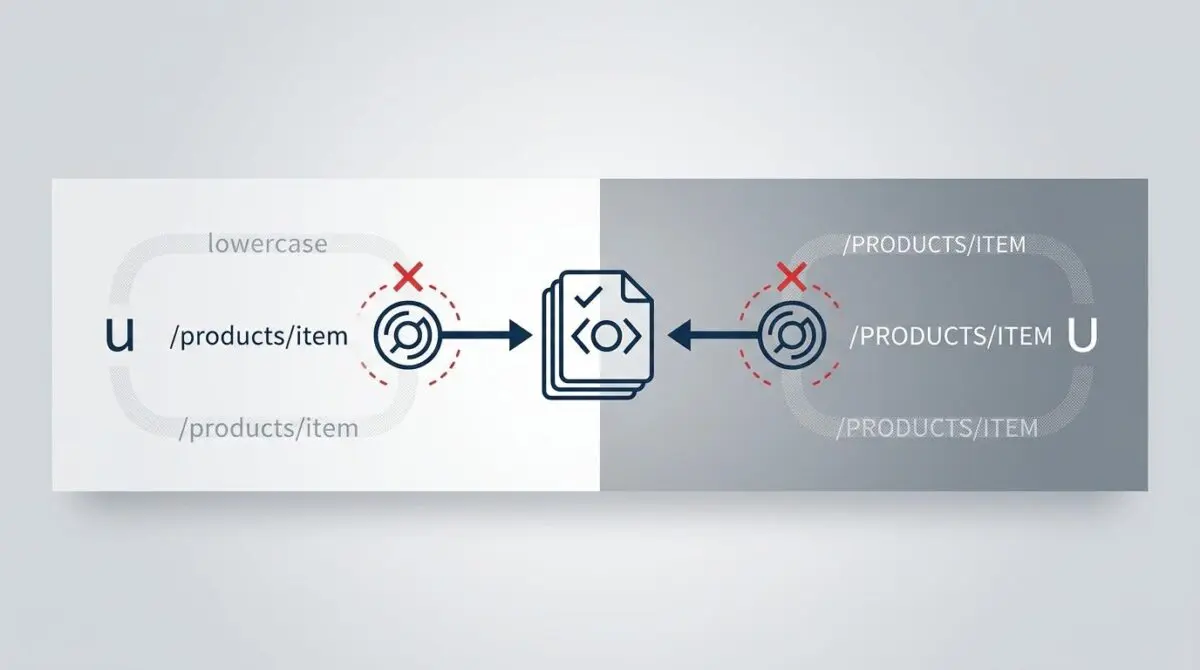
In the context of URL casing anomalies, the search engine treats paths like /About and /about as distinct entities. Because standard Linux-based web servers are case-sensitive by default, they often return a 200 OK status for both variations. This results in severe index bloat and fragmented PageRank across multiple URL strings.
Diagnostic Checkpoints for Casing Anomalies
This canonicalization error usually stems from a desynchronization within your server stack. When the application layer fails to normalize incoming requests, search bots are forced to guess the primary version of a page.
Diagnostic Checkpoints
Case-Sensitive Server Architecture
Linux file systems treat path casing as literal unique IDs.
Mixed-Case Internal Linking
Links with mixed casing are crawled as unique entities.
Search Engine Protocol Desync
Metadata variations lead to indexation of non-canonical casing.
Lack of Global Normalization Rules
Middleware absence allows processing of arbitrary string casing.
Root Causes Analysis
Standard Linux environments utilizing ext4 file systems treat character casing as a literal part of the file path. Unless NGINX or Apache is explicitly configured to normalize these requests, the server treats mixed-case variations as entirely different objects. This prevents the server from triggering an automatic 404 Not Found or a 301 redirect.
Furthermore, this issue is exacerbated by mixed-case internal linking. If your site navigation links to a capitalized directory, but a blog post links to the lowercase version, Googlebot crawls both. Without strict middleware normalization, these paths process arbitrary string casing and multiply your crawl footprint.
Engineering Resolution Roadmap
To eliminate the duplicate casing error, you must implement a strict normalization protocol across your infrastructure. This requires intervention at both the server layer and the application database.
Engineering Resolution Roadmap
Identify All Case Variations
Export the ‘Duplicate without user-selected canonical’ report from GSC. Filter the spreadsheet by ‘URL’ to find patterns where only character casing differs. Use a tool like Screaming Frog to crawl the site and identify where these mixed-case links are originating.
Implement Server-Level Lowercase Redirection
Modify the .htaccess (Apache) or nginx.conf to intercept any request containing uppercase characters and 301 redirect it to the lowercase version. This ensures that only one URL version is ever reachable by crawlers.
Enforce Self-Referential Canonicals
Configure your WordPress SEO plugin (e.g., RankMath) to always lowercase the canonical URL tag. Ensure that the ‘rel=canonical’ in the <head> section uses the exact lowercase slug defined in the WordPress database, regardless of the URL used to access the page.
Update Internal Link Structure
Perform a ‘Search and Replace’ on the WordPress database (wp_posts table) to convert any hardcoded mixed-case internal links to lowercase. This prevents Googlebot from discovering the duplicate paths at the source.
Technical Context for Resolution
The objective here is to specify the authoritative version of your content at the edge. By forcing a global lowercase rule, you eliminate the possibility of bots discovering mixed-case variants.
Additionally, enforcing a self-referential canonical tag ensures that even if a bot accesses a parameterized or capitalized URL, the HTML output directs it back to the lowercase standard. This dual-layered approach is critical for maintaining entity integrity.
Resolution Execution: Server-Level Normalization
Executing this fix requires modifying your server configuration files to handle string transformation. You must intercept incoming requests and apply a lowercase conversion before the application layer processes the route.
Fixing via Apache
If you are running an Apache environment, you can utilize the RewriteMap directive. This allows you to intercept any request containing uppercase characters and map them to their lowercase equivalents.
You must define the map in your virtual host configuration, and then apply the rule in your .htaccess file. This guarantees that crawlers only ever encounter the normalized path.
RewriteEngine On
RewriteMap lc int:tolower
RewriteCond %{REQUEST_URI} [A-Z]
RewriteRule (.*) ${lc:$1} [R=301,L]
Validation Protocol & Edge Cases
After deploying server-level redirects, immediate validation is required to ensure the routing logic behaves as expected. You must confirm that the server intercepts the request before the application layer attempts to render the page.
Validation Protocol
- Execute curl -I in terminal to verify 301 redirects for uppercase paths.
- Inspect Chrome DevTools Network tab for correct Location header mapping.
- Run GSC Live Test to confirm user-declared canonical matches lowercase.
Headless Architecture Edge Cases
Standard validation protocols might fail in complex decoupled environments. In some Headless WordPress setups using Next.js or Nuxt, the frontend framework may utilize case-sensitive routing.
If the decoupled API returns a mixed-case slug but the frontend expects lowercase, the system might enter a redirect loop. Ensure your frontend routing logic perfectly mirrors the lowercase enforcement applied at your origin server. Failing to do so will result in a waste of crawl budget as bots get trapped in infinite loops.
Autonomous Monitoring & Prevention
Preventing casing regressions requires proactive, automated monitoring. Implement a CI/CD pipeline check or utilize a broken link checker with regex support to flag any internal links containing uppercase characters before they deploy.
Regularly auditing your Google Search Console Crawl Stats report ensures that bots are not wasting resources on non-canonical URL strings. At Andres SEO Expert, we recommend deploying advanced automation pipelines using Make.com and custom API alerts.
This level of autonomous log analysis allows enterprise teams to monitor entity integrity in real-time. Catching a lowercase normalization failure at the edge before Googlebot flags it is the ultimate standard for technical SEO operations.
Conclusion
Resolving canonical anomalies requires strict alignment between your server architecture and application logic. By enforcing global lowercase normalization, you eliminate index bloat and consolidate ranking signals effectively.
Navigating the intersection of technical SEO, server architecture, and generative search requires a precise roadmap. If you need to future-proof your enterprise stack, resolve deep-level crawl anomalies, or implement AI-driven SEO automation, connect with Andres at Andres SEO Expert.
Frequently Asked Questions
What is the “Duplicate without user-selected canonical” error?
This error occurs when Google discovers multiple URLs with identical content but lacks a user-defined rel=”canonical” tag to identify the primary version. In the context of URL casing, this often happens when paths like /About and /about are both accessible, causing search engines to treat them as separate, duplicate pages.
How does URL casing affect crawl budget and SEO?
URL casing anomalies can lead to significant index bloat and fragmented PageRank. According to Google Search Central, failing to manage these duplicate URLs can waste up to 40% of crawl budget, as Googlebot spends resources indexing redundant versions of the same page rather than discovering new content.
Why does my server allow both uppercase and lowercase URLs?
Most standard Linux-based web servers use file systems like ext4 that are case-sensitive by default. Unless explicitly configured via NGINX or Apache middleware to normalize requests, the server treats character casing as a literal part of the file path, returning a 200 OK status for all case variations.
How can I fix case-sensitive URL issues on an Apache server?
You can resolve casing issues on Apache by utilizing the RewriteMap directive in your virtual host configuration. By defining a map using the “int:tolower” function and applying a 301 redirect rule in your .htaccess file, you can automatically force all incoming requests to their lowercase equivalents.
Should canonical tags always be lowercase?
Yes. To maintain entity integrity, you should configure your CMS or SEO plugin to always output lowercase self-referential canonical tags. This ensures that even if a bot accesses a mixed-case URL, the HTML instructs search engines to prioritize the lowercase standard as the authoritative version.
What are the risks of URL casing in headless WordPress architectures?
In headless environments like Next.js or Nuxt, frontend routing logic may conflict with backend API slugs. If the decoupled API provides mixed-case slugs but the frontend enforces lowercase redirection, it can create infinite redirect loops that trap crawlers and severely damage crawl efficiency.