Executive Summary
- Polylang utilizes core WordPress taxonomies to manage multilingual content, avoiding the database bloat associated with custom SQL tables.
- The architecture supports high-performance internationalization through native WP_Query integration and compatibility with persistent object caching.
- Implementation requires strategic configuration of URL structures and synchronization of metadata to maintain SEO integrity across global locales.
What is Polylang?
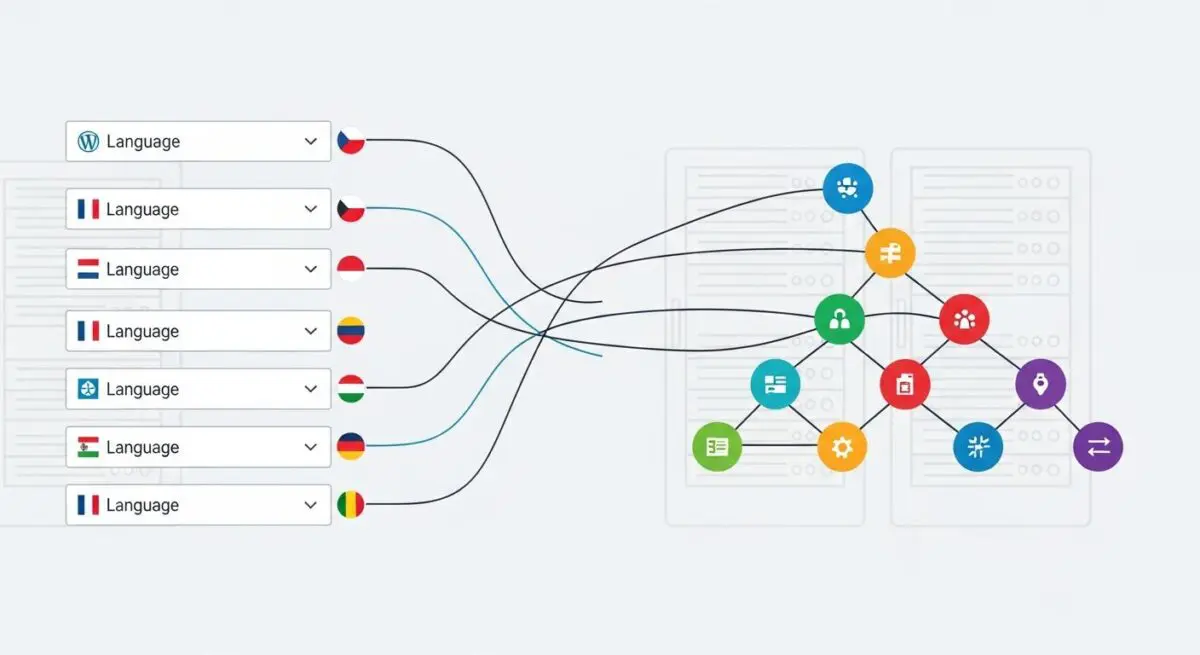
Polylang is a high-performance multilingual content management plugin for WordPress that enables the creation of localized sites without the overhead of a multisite network. Unlike other solutions that create custom database tables, Polylang leverages the native WordPress taxonomy system. It assigns a hidden ‘language’ taxonomy to every post, page, and custom post type, and utilizes a ‘post_translations’ taxonomy to link related content across different locales. This architectural choice ensures that the plugin remains lightweight and highly compatible with the core WordPress ecosystem.
From a technical standpoint, Polylang manages the frontend display by filtering the main WP_Query based on the detected or requested language. It supports various URL structures, including subdirectories (example.com/en/), subdomains (en.example.com), and multiple domains (example.fr). For developers, it provides a robust API (pll_ functions) and integrates with the WordPress REST API, allowing for the retrieval of localized content in headless or decoupled environments. It also handles the synchronization of metadata, featured images, and taxonomies across translated versions of a post, ensuring data consistency across the database.
The Real-World Analogy
Imagine a massive international library where every book is stored on the same set of shelves. Instead of building separate rooms for every language—which would require massive construction and complex navigation—the librarian simply places a colored sticker on the spine of every book (the language taxonomy) and keeps a master index card that lists which books are translations of each other (the translation registry). When a visitor walks in and asks for ‘English,’ the librarian simply hands them a pair of glasses that filters out everything except the books with blue stickers. The library remains efficient, the structure doesn’t change, and finding a translated version is as simple as checking the index card.
How Polylang Impacts Server Performance & Speed Engineering?
Polylang is generally considered one of the most performant multilingual plugins because it avoids complex SQL JOIN operations on custom tables. By using standard taxonomies, Polylang allows the database to utilize existing indexes on the wp_term_relationships and wp_term_taxonomy tables. This makes it highly compatible with persistent object caching solutions like Redis or Memcached, as taxonomy data is frequently cached by the WordPress core.
However, performance implications arise during the rewrite_rules generation. Polylang adds significant complexity to the URL routing logic, which can increase the size of the rewrite_rules option in the wp_options table. On high-traffic enterprise sites, this can lead to slight increases in PHP execution time during the routing phase if not properly managed. Furthermore, because Polylang filters nearly every query to ensure the correct language is displayed, developers must be cautious with custom WP_Query instances, ensuring they pass the lang parameter to prevent unnecessary database scanning or incorrect result sets.
Best Practices & Implementation
- Implement Persistent Object Caching: Use Redis or Memcached to cache taxonomy terms and translation links, reducing the frequency of database lookups for language-specific content.
- Optimize Metadata Synchronization: Only synchronize essential custom fields (ACF) between translations to prevent unnecessary database writes and keep the
wp_postmetatable lean. - Server-Level Redirects: Configure Nginx or Apache to handle language-based redirects at the server level rather than relying on PHP-based detection to improve Time to First Byte (TTFB).
- Use pll_get_post for Programmatic Access: When building custom themes, always use the
pll_get_post()function to retrieve the correct translation ID, ensuring compatibility with Polylang’s internal registry. - Pre-compile String Translations: For high-performance environments, use traditional .mo and .po files for theme strings instead of the Polylang String Translation UI to avoid additional database queries.
Common Mistakes to Avoid
A frequent error is failing to correctly configure the ‘Hide URL language information for default language’ setting, which can lead to duplicate content issues if the canonical tags are not properly managed. Another common mistake is neglecting to synchronize custom taxonomies, resulting in ‘404 Not Found’ errors when users attempt to switch languages on a category or tag archive page. Finally, developers often overlook the impact of Polylang on the REST API; failing to enable the ‘language’ filter in API requests can result in mixed-language JSON payloads, breaking frontend application logic.
Conclusion
Polylang offers a technically elegant, taxonomy-driven approach to WordPress internationalization that prioritizes database efficiency and core compatibility. By adhering to best practices in caching and metadata management, architects can deploy scalable, multilingual enterprise solutions with minimal impact on server resources.