Executive Summary
- WP-Sweep utilizes native WordPress delete functions instead of direct SQL queries to maintain data integrity and trigger necessary hooks.
- The tool significantly reduces database bloat by purging orphaned metadata, revisions, and expired transients, leading to faster query execution.
- Implementation via WP-CLI allows for automated, server-side database maintenance essential for high-scale enterprise WordPress deployments.
What is WP-Sweep?
WP-Sweep is a specialized database optimization utility for the WordPress ecosystem, engineered to identify and eliminate redundant, orphaned, and bloated data within the MySQL or MariaDB environment. Unlike many generic database cleanup plugins that execute direct DELETE SQL statements, WP-Sweep is architected to leverage native WordPress API functions, such as wp_delete_post_revision() and delete_post_meta(). This methodology ensures that all associated hooks, filters, and cleanup routines defined by the core software or active plugins are correctly triggered, preventing the creation of orphaned data fragments that often result from direct database manipulation.
From a technical perspective, WP-Sweep targets several specific areas of database overhead. These include post revisions, auto-drafts, deleted comments, spam comments, and unapproved comments. Furthermore, it addresses the often-overlooked accumulation of orphaned metadata—entries in the wp_postmeta, wp_commentmeta, wp_usermeta, and wp_termmeta tables that no longer reference a valid parent object. By systematically pruning these records, WP-Sweep reduces the physical size of the database files and optimizes the indexing structure, which is critical for maintaining performance as a site scales in complexity and content volume.
The Real-World Analogy
Imagine a massive corporate archive facility where every time a contract is edited, a full physical copy of the previous version is kept in the same folder. Over years of operation, the filing cabinets become so stuffed with outdated drafts that finding the current, legally binding document takes hours instead of seconds. WP-Sweep acts as a professional, certified archivist who doesn’t just throw papers in the trash; they follow the company’s strict disposal protocols to ensure that every cross-reference in the master index is also updated or removed. This ensures the archive remains lean and searchable without accidentally leaving behind confusing references to documents that no longer exist.
How WP-Sweep Impacts Server Performance & Speed Engineering?
The impact of WP-Sweep on server performance is primarily observed in the reduction of database I/O wait times and memory consumption. In a standard WordPress request lifecycle, the database is frequently the primary bottleneck. As tables like wp_options and wp_postmeta grow into the hundreds of megabytes, the database engine must work harder to traverse indexes and retrieve results. By purging expired transients and redundant metadata, WP-Sweep reduces the number of rows the engine must scan, which directly lowers the Time to First Byte (TTFB).
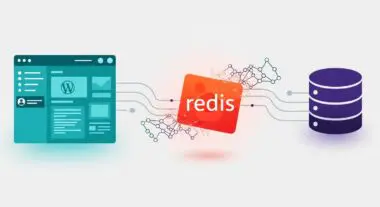
Furthermore, WP-Sweep facilitates the optimization of table overhead. In storage engines like InnoDB, deleting rows does not immediately shrink the physical file size on the disk; instead, it creates “holes” or fragmentation. WP-Sweep includes an optimization feature that executes the OPTIMIZE TABLE command, which defragments the tables and reclaims unused space. This is particularly beneficial for managed WordPress hosting environments where disk I/O throughput is a metered resource. A smaller, defragmented database requires fewer CPU cycles for backups, faster migration times, and more efficient caching by tools like Redis or Memcached, as the object cache does not become saturated with useless, transient data.
Best Practices & Implementation
- Staging Environment Validation: Always execute WP-Sweep on a staging clone before applying changes to production. This allows developers to verify that the removal of specific metadata or revisions does not negatively impact custom business logic or third-party integrations.
- WP-CLI Integration: For enterprise-level maintenance, utilize the WP-CLI command wp sweep. This allows for automated database maintenance via system-level CRON jobs, bypassing the overhead of the WordPress admin dashboard and allowing for execution during low-traffic windows.
- Selective Sweeping: Rather than using the “Sweep All” function immediately, analyze the individual counts for revisions and transients. This granular approach allows administrators to retain necessary historical data while purging truly redundant entries like duplicated term relationships.
- Pre-Optimization Backups: Ensure a full SQL dump is performed immediately prior to sweeping. While WP-Sweep uses native functions, the bulk deletion of thousands of rows is a high-impact operation that necessitates a robust recovery point.
Common Mistakes to Avoid
One frequent error is the failure to distinguish between “Auto-drafts” and “Revisions.” Deleting auto-drafts can result in the loss of currently active, unsaved work if an editor is mid-session. Another common mistake is running the optimization process during peak traffic hours. Although WP-Sweep is efficient, the underlying OPTIMIZE TABLE command can cause table locking or temporary spikes in disk I/O, which may lead to 504 Gateway Timeout errors on high-traffic sites. Finally, many users neglect to address the root cause of the bloat; if a plugin is generating thousands of transients daily, WP-Sweep should be viewed as a maintenance tool, not a permanent fix for poor code architecture.
Conclusion
WP-Sweep is an essential component of a professional WordPress maintenance stack, providing a safe and architecturally sound method for database optimization. By adhering to native WordPress protocols, it ensures long-term database health and contributes significantly to server-side performance efficiency.