Executive Summary
- Remote Procedure Call (RPC) is a protocol that allows WordPress to execute subroutines on remote servers, facilitating external management and cross-platform integration.
- The legacy XML-RPC implementation in WordPress core presents significant security risks, including DDoS amplification and brute-force vulnerabilities via the system.multicall method.
- Modern WordPress engineering prioritizes the REST API over traditional RPC to improve performance, reduce server-side overhead, and enhance security through granular authentication.
What is Remote Procedure Call?
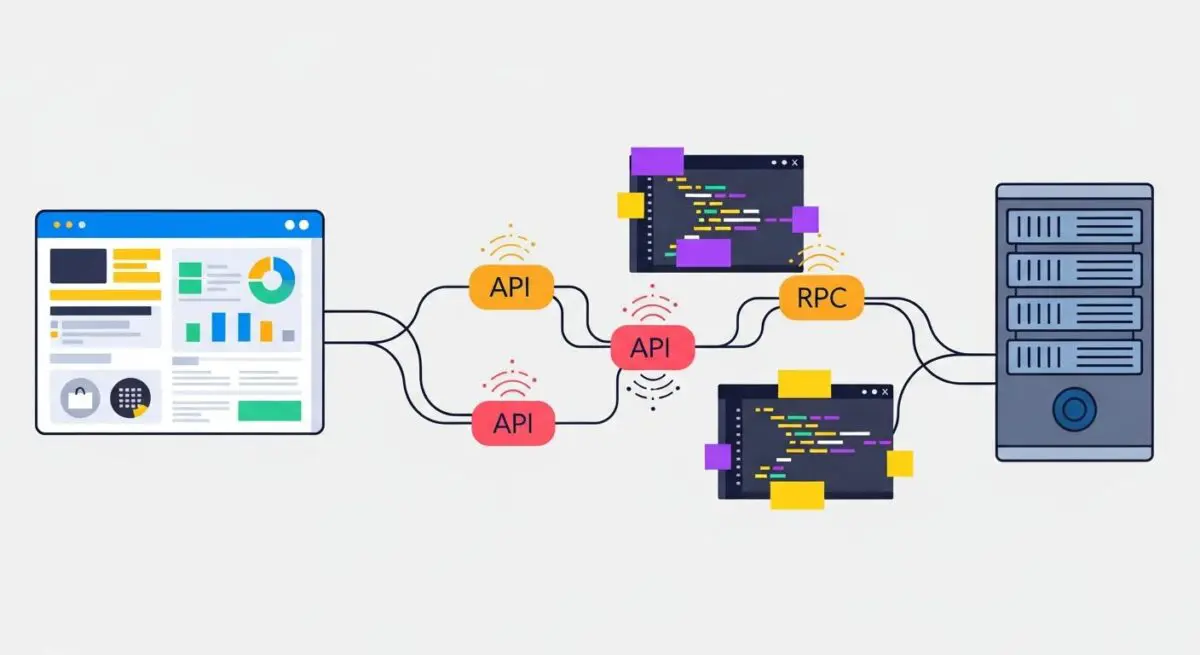
A Remote Procedure Call (RPC) is a sophisticated inter-process communication (IPC) technique that allows a computer program to cause a subroutine or procedure to execute in a different address space, typically on a remote server, without the programmer explicitly coding the details for this remote interaction. In the context of WordPress architecture, RPC has historically been the primary mechanism for enabling external applications—such as mobile apps, desktop blogging clients, and remote management tools—to interact with the WordPress core database and file system. This is achieved by abstracting the network layer, allowing the client to invoke functions as if they were local to the application.
Technically, the RPC process involves several stages: serialization, transmission, and execution. When a client initiates an RPC, the local environment suspends execution and packs the procedure parameters into a message format—traditionally XML in the case of WordPress. This message is transmitted over the network via HTTP to the server-side endpoint, which in WordPress is the xmlrpc.php file. The server then unpacks the message, identifies the requested procedure (such as wp.getPosts or metaWeblog.newPost), executes it within the WordPress environment, and returns the serialized result to the client. This allows for a distributed computing environment where the WordPress site acts as a service provider for various remote consumers.
Within the WordPress ecosystem, the IXR (Incutio XML-RPC) library has been the engine behind these operations since the early versions of the CMS. While it provided essential connectivity in the pre-REST API era, it operates as a monolithic gateway. Every request to xmlrpc.php requires a full bootstrap of the WordPress core, including the loading of all active plugins and themes, which can lead to significant resource consumption on the host server, especially under high-frequency request loads.
The Real-World Analogy
To understand Remote Procedure Call, imagine a business owner using a high-end concierge service at a luxury hotel. The owner (the client) picks up the phone and asks the concierge (the RPC protocol) to arrange a private dinner at a specific restaurant. The owner does not need to know which software the concierge uses to book the table, how the restaurant’s kitchen manages its inventory, or the specific route the driver will take to deliver the confirmation. The owner simply makes the request, and the concierge handles the “remote” execution of the task across different departments and external vendors, returning only the final confirmation (the result). In WordPress, RPC allows the site to “outsource” tasks or receive instructions from external sources without the external source needing to understand the internal PHP logic or database schema of the server.
How Remote Procedure Call Impacts Server Performance & Speed Engineering?
The implementation of RPC, specifically via the xmlrpc.php endpoint, has profound implications for server performance and speed engineering. From a resource perspective, RPC requests are often more expensive than standard GET requests for static content. Each call triggers a PHP process that must initialize the entire WordPress stack. In enterprise environments, a surge in RPC traffic can quickly saturate PHP-FPM worker pools, leading to increased Time to First Byte (TTFB) and potential 504 Gateway Timeout errors for legitimate site visitors.
One of the most critical performance bottlenecks associated with WordPress RPC is the system.multicall method. This feature allows a single HTTP request to wrap dozens or even hundreds of individual commands. While intended for efficiency in bulk operations, it is frequently exploited by malicious actors to perform brute-force attacks. By packing hundreds of password attempts into a single RPC call, attackers can bypass standard login rate limits that only monitor the wp-login.php page. This results in massive CPU spikes as the server attempts to process hundreds of authentication checks and database queries simultaneously, severely degrading the performance of the hosting environment.
Furthermore, the XML format used by legacy RPC is inherently more verbose and computationally expensive to parse than modern JSON. The server must utilize the libxml2 library to decode the incoming payload, which consumes more memory and CPU cycles than the native JSON decoding used by the REST API. For high-performance speed engineering, reducing the reliance on XML-RPC is a priority, as it allows for more efficient resource allocation and better utilization of server-side caching mechanisms, such as object caching via Redis or Memcached, which are more natively integrated with the REST API’s data structures.
Best Practices & Implementation
- Disable XML-RPC for Enhanced Security: If your WordPress deployment does not require Jetpack, the WordPress mobile app, or remote publishing, it is a best practice to disable the
xmlrpc.phpendpoint entirely. This can be achieved by addingadd_filter('xmlrpc_enabled', '__return_false');to a functional plugin or by using server-level rules in.htaccessor Nginx configuration to return a 403 Forbidden status for any requests to that file. - Leverage the WordPress REST API: Transition all custom integrations and remote applications to the WordPress REST API. The REST API is more performant, supports modern authentication methods like Application Passwords and OAuth, and provides a more granular permission model, ensuring that remote calls only access the specific data they require.
- Implement Edge-Level Filtering: Use a Web Application Firewall (WAF) such as Cloudflare or Sucuri to filter RPC traffic at the edge. By blocking or rate-limiting
xmlrpc.phpat the network perimeter, you prevent malicious requests from ever reaching your origin server, thereby preserving CPU and RAM for legitimate user traffic and improving overall site stability. - Monitor RPC Logs: Regularly audit your server access logs for high volumes of POST requests to
xmlrpc.php. Sudden spikes often indicate a brute-force attempt or a DDoS amplification attack. Tools like Fail2Ban can be configured to automatically jail IP addresses that exhibit suspicious RPC behavior.
Common Mistakes to Avoid
A frequent error among WordPress administrators is assuming that a security plugin alone provides sufficient protection against RPC-based attacks. While many plugins can block XML-RPC, the request still reaches the PHP level, consuming resources before it is denied. The most efficient way to handle unwanted RPC traffic is at the server or WAF level. Another common mistake is failing to realize that certain popular plugins, like Jetpack, rely on XML-RPC for communication with their parent servers. Disabling it without a proper transition plan can break essential site functionality, such as automated social sharing or site monitoring.
Conclusion
Remote Procedure Call is a foundational element of distributed WordPress architecture, yet its legacy XML-RPC implementation poses significant performance and security challenges for modern web environments. By understanding its mechanics and transitioning toward the REST API, developers can ensure a more secure, scalable, and high-performing WordPress ecosystem.