Executive Summary
- WP-CLI enables direct server-side interaction with the WordPress core, bypassing the overhead of the PHP-FPM and Nginx/Apache web server stack for administrative tasks.
- It facilitates complex database operations, such as global search-and-replace and serialized data handling, with significantly higher reliability than browser-based plugins.
- The tool is foundational for DevOps workflows, allowing for automated deployments, plugin management, and core updates via CI/CD pipelines.
What is WP-CLI?
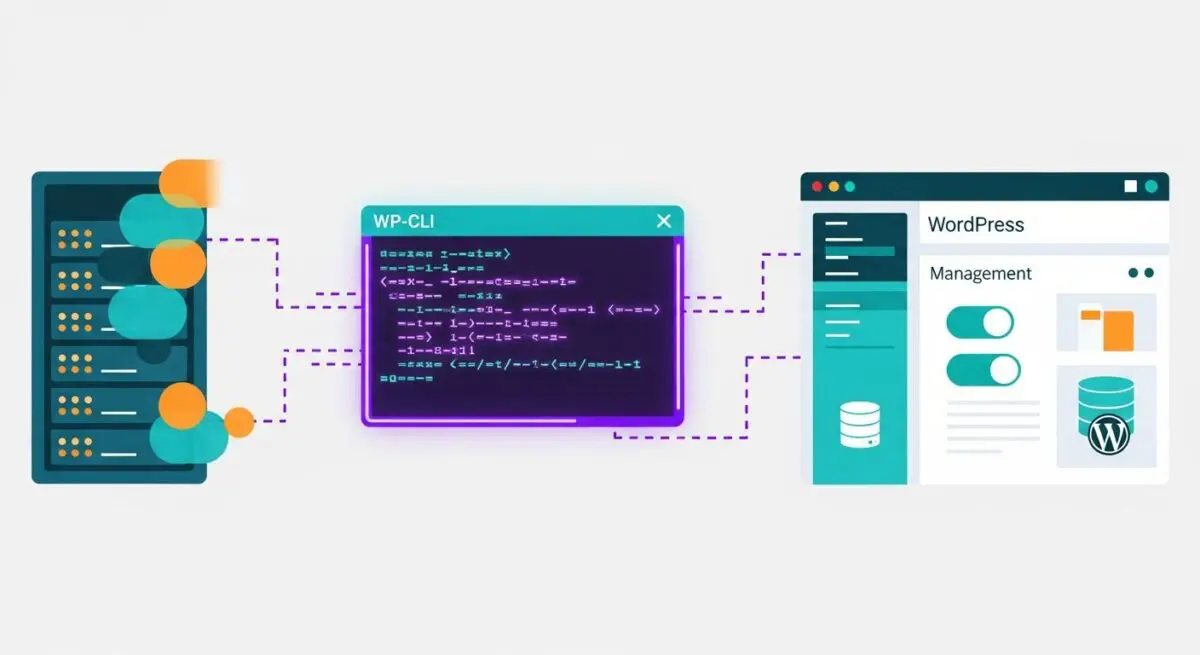
WP-CLI (WordPress Command Line Interface) is the official command-line tool for managing WordPress installations. It provides a comprehensive set of commands to perform actions typically handled via the WordPress Administrative Dashboard, such as updating plugins, configuring multisite installations, and managing database records. Built on PHP, it operates independently of the web server (Nginx or Apache), interacting directly with the WordPress core files and the MySQL/MariaDB database through the command-line environment.
At its architectural core, WP-CLI loads the WordPress environment without initializing the full HTTP request-response lifecycle. This allows developers to execute administrative tasks with minimal memory overhead and maximum execution speed. It supports custom command registration, enabling developers to extend its functionality to handle proprietary business logic or complex data migrations within enterprise-scale environments.
The Real-World Analogy
Imagine a large skyscraper with a sophisticated elevator system. Using the WordPress Dashboard is like being a passenger who must wait for the elevator, stop at every floor, and interact with a touch-screen interface to reach the maintenance room. WP-CLI is like having a master key to the building’s service tunnels and mechanical shafts. It allows a technician to bypass the lobby and elevators entirely, going straight to the electrical panel or plumbing valves to make instant adjustments without the friction of the public-facing infrastructure.
How WP-CLI Impacts Server Performance & Speed Engineering?
WP-CLI significantly enhances server performance by offloading resource-intensive tasks from the web server to the command line. When performing bulk operations—such as regenerating thousands of image thumbnails or migrating database tables—doing so via a browser often leads to PHP timeouts, memory exhaustion, and increased TTFB (Time to First Byte) for actual site visitors. WP-CLI executes these processes in the background, ensuring that the web server’s worker processes remain available to serve user traffic.
Furthermore, WP-CLI is instrumental in speed engineering through its ability to manage the WordPress Object Cache and Transients API directly. Engineers can flush caches or pre-warm specific data sets via cron jobs, ensuring that the application layer is optimized before a user even requests a page. By automating core and plugin updates through WP-CLI, organizations can maintain a lean, secure, and high-performing codebase without the manual overhead that often leads to technical debt.
Best Practices & Implementation
- Automate Database Migrations: Use the
wp search-replacecommand for domain migrations to ensure that serialized data is handled correctly, preventing broken plugin configurations. - Implement Least Privilege: Never run WP-CLI as the root user. Always execute commands as the web user (e.g., www-data) to maintain proper file permissions and security hardening.
- Optimize Cron Execution: Disable the default WP-Cron (spawned on page load) and replace it with a system-level crontab entry using
wp cron event run --due-nowfor more predictable server resource allocation. - Scripted Deployments: Integrate WP-CLI into CI/CD pipelines to automate the activation of themes and plugins across staging and production environments, ensuring parity.
Common Mistakes to Avoid
A frequent error is performing global database operations without a prior backup; while WP-CLI is powerful, an incorrect search-replace string can corrupt the entire database in seconds. Another common mistake is failing to specify the --path parameter in multi-tenant or non-standard directory structures, which can lead to commands being executed against the wrong WordPress instance.
Conclusion
WP-CLI is an indispensable tool for enterprise WordPress architecture, providing the precision and automation required for high-availability environments. Its ability to bypass HTTP overhead makes it the primary choice for performance-oriented developers and system administrators.