Executive Summary
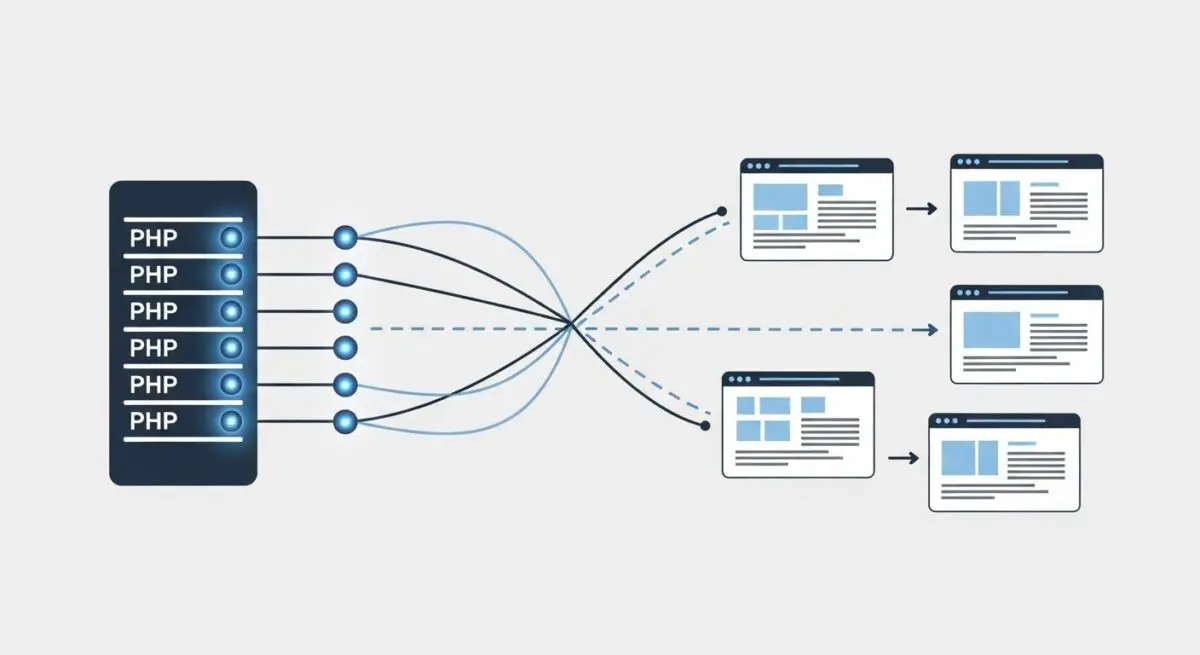
- PHP workers are individual background processes responsible for executing PHP code and generating dynamic HTML for WordPress requests.
- The number of available workers determines a server’s concurrency limit; once all workers are occupied, additional requests are queued, leading to increased Time to First Byte (TTFB).
- Optimization involves balancing worker count with available CPU and RAM resources while maximizing page caching to bypass PHP execution entirely.
What is PHP Workers?
In the context of WordPress architecture, PHP workers are background processes that execute PHP code to generate dynamic content. When a visitor requests a page that is not currently cached, the web server (typically Nginx or Apache) passes that request to a PHP worker. This process involves the worker executing the WordPress core, active plugins, and theme files, querying the database, and finally returning the generated HTML to the user’s browser.
PHP workers operate within the PHP-FPM (FastCGI Process Manager) environment. Each worker can only handle one request at a time. Therefore, the total number of PHP workers allocated to a hosting environment dictates the maximum number of simultaneous dynamic requests the site can process. If all workers are busy, subsequent requests are placed in a queue, which significantly increases latency and can eventually lead to 504 Gateway Timeout errors if the queue exceeds the server’s timeout threshold.
The Real-World Analogy
Imagine a busy restaurant kitchen where the PHP workers are the line cooks. Each cook can only prepare one dish at a time. When a customer (a website visitor) orders a meal (a dynamic page request), a cook must dedicate their full attention to preparing that specific order. If you have four cooks and four orders come in simultaneously, everyone is busy. If a fifth customer arrives, they must wait in the lobby until one of the cooks finishes their current dish. If the kitchen is understaffed (too few PHP workers) or the dishes are overly complex (unoptimized code), the wait time for every customer increases, regardless of how fast the front-of-house staff (the web server) might be.
How PHP Workers Impacts Server Performance & Speed Engineering?
PHP workers are the primary bottleneck for high-traffic WordPress sites, particularly those with heavy dynamic components like WooCommerce, membership portals, or complex search queries. Unlike static assets (images, CSS, JS) which are served directly by the web server with minimal overhead, dynamic requests require significant CPU and RAM resources for each worker. Efficient speed engineering focuses on reducing the “workload” per worker and minimizing the frequency with which they are called.
When a server runs out of available PHP workers, the Time to First Byte (TTFB) spikes. This occurs because the request is sitting idle in a buffer. From a performance standpoint, increasing the number of workers is not always the solution; each worker consumes a portion of the server’s RAM. If you allocate more workers than the server’s hardware can support, the system will resort to disk swapping, which degrades performance across the entire stack. Proper optimization involves a synergy between hardware allocation and software-level caching layers like Redis or Object Cache Pro to reduce database load and execution time.
Best Practices & Implementation
- Implement Robust Page Caching: Use server-level caching (Nginx FastCGI Cache or Varnish) to serve static HTML versions of pages, bypassing PHP workers for the majority of traffic.
- Optimize Database Queries: Use tools like Query Monitor to identify slow SQL queries that keep PHP workers occupied longer than necessary.
- Utilize Object Caching: Deploy Redis or Memcached to store frequent database query results in memory, reducing the computational load on each PHP worker.
- Monitor Worker Usage: Regularly check PHP-FPM status logs to determine if your site is consistently hitting its worker limit, which indicates a need for either code optimization or a hardware upgrade.
- Offload Background Tasks: Use a server-level CRON job instead of the default wp-cron.php to ensure background tasks do not consume PHP workers during peak traffic periods.
Common Mistakes to Avoid
A frequent error is the assumption that more PHP workers automatically equate to a faster website. In reality, adding workers to a server with insufficient CPU or RAM leads to resource contention and system instability. Another common mistake is failing to distinguish between static and dynamic traffic; site owners often upgrade their hosting plan to get more workers when the actual issue is a lack of effective page caching for content that should be static.
Conclusion
PHP workers are the engine of WordPress dynamic processing, and their efficient management is critical for maintaining low latency and high concurrency. Architects must balance worker allocation with hardware resources and aggressive caching strategies to ensure optimal enterprise-grade performance.