Key Points
- Stale Sitelink Cluster Indexing is caused by a synchronization lag between the primary web index and the lower-frequency sitelink processing cluster.
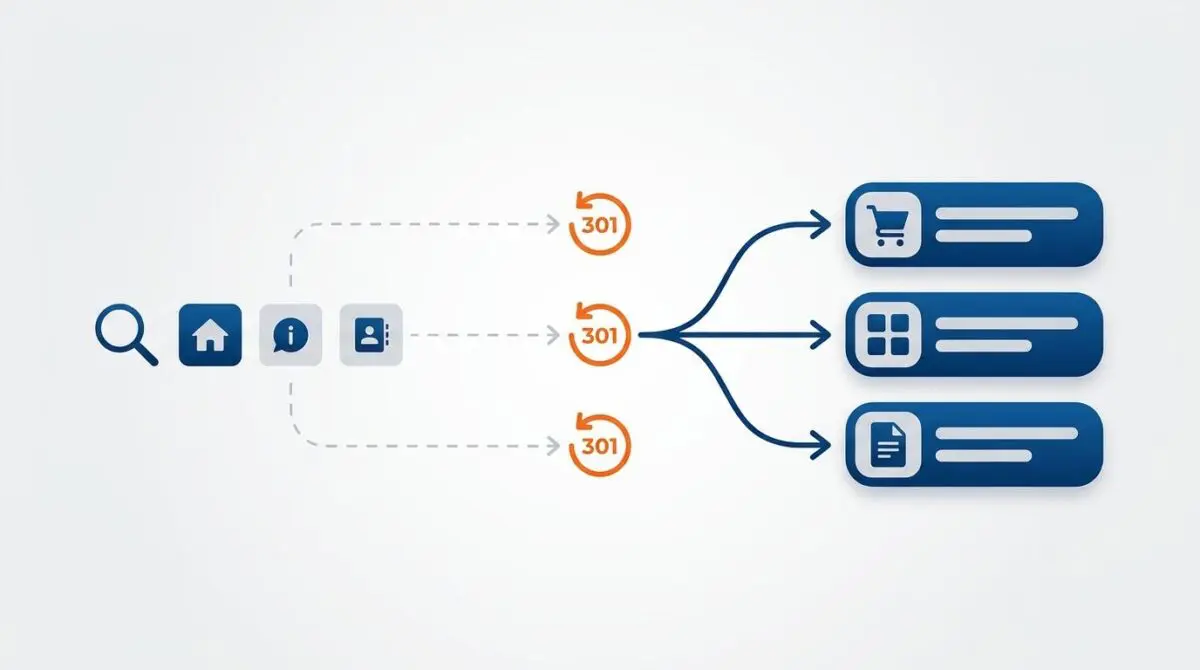
- Hardcoded database links and stale JSON-LD SiteNavigationElement schema can override 301 redirect instructions, forcing Googlebot to retain legacy URLs.
- Resolution requires executing global database search-and-replace operations alongside aggressive flushing of edge caches and XML sitemap transients.
Table of Contents
The Core Conflict: Stale Sitelink Clusters
According to data from the HTTP Archive, approximately 15% of all 301 redirects on the web are chains or stale signals that lead to delayed SERP metadata updates. Crucially, sitelink clusters take up to 4x longer to refresh than primary index entries.
This delay is exactly what triggers Stale Sitelink Cluster Indexing. It occurs when Google’s algorithmic sitelink generation system retains legacy URLs in its UI layer, despite those URLs returning a 301 Permanent Redirect status at the protocol layer.
Sitelinks are governed by a separate, lower-frequency processing cluster than the primary web index. This architecture creates a synchronization lag between your server’s actual status and its representation in Search Engine Results Pages (SERPs).
From a technical SEO perspective, this creates a double-hop user experience and fragments link equity. In the context of Generative Engine Optimization (GEO), outdated sitelinks confuse Large Language Models (LLMs) that use site structure for source attribution.
This desynchronization can easily lead to hallucinated or broken citations in AI-generated overviews. You will typically spot this when Google Search Console’s Internal Links report lists redirected URLs as high-frequency targets.
Furthermore, your server logs will show Googlebot hitting old URLs with a Referer header originating from google.com.
Diagnostic Checkpoints and Root Causes
Resolving this error requires understanding that it is fundamentally a desynchronization issue across your tech stack. Googlebot is receiving conflicting signals between your HTTP headers and your on-page data.
Diagnostic Checkpoints
Internal Link Signal Inconsistency
Hardcoded database links override redirect instructions.
XML Sitemap Latency and Cache
Stale XML sitemap transients prevent freshness signals.
Stale SiteNavigationElement Schema
Stale JSON-LD schema prioritizes outdated site navigation.
Edge/CDN Buffer Persistence
Aggressive CDN caching serves stale HTML structure.
Server and Database Layer
The most common culprit lies within the database itself. Googlebot relies heavily on the density and anchor text of internal links to determine sitelink candidacy.
If your site’s database or template files still contain hardcoded links to pre-redirect URLs, Google perceives the old URL as a primary navigation node. This internal link density overrides the 301 instruction in the sitelink cluster logic.
In WordPress environments, themes often harbor hardcoded navigation links in header.php or footer.php files. Gutenberg blocks can also retain old slugs, creating persistent zombie links that confuse crawlers.
Edge and Caching Layer
Beyond the database, XML sitemap latency and aggressive edge caching frequently block freshness signals. If your XML sitemap index still lists redirected URLs, the sitelink algorithm lacks the trigger required to purge the old cluster.
Content Delivery Networks (CDNs) like Cloudflare or Varnish can exacerbate this if they cache 301 responses or stale HTML. When Cache-Control headers are too aggressive, Googlebot receives a cached version of the site structure that predates your redirect implementation.
Engineering Resolution Roadmap
To force a sitelink cluster refresh, we must systematically eliminate all legacy URL signals across the database, schema, and sitemap layers. This ensures Googlebot processes a unified, conflict-free site structure.
Engineering Resolution Roadmap
Execute Global Database Search-and-Replace
Use WP-CLI to replace all instances of the old URL with the new URL: ‘wp search-replace “https://old.com/path” “https://new.com/path” –all-tables’. This ensures all internal links in post_content and metadata are updated.
Flush SEO Plugin Transients and Sitemaps
Navigate to the SEO plugin settings (e.g., Rank Math > General Settings > Edit Sitemap) and toggle the ‘Links per sitemap’ to force a cache rebuild. Verify the new XML output in the browser to ensure no 301 URLs remain.
Update Site Navigation Schema
Verify the JSON-LD output using the Rich Results Test. If old URLs appear in SiteNavigationElement, manually update the WordPress Menu (Appearance > Menus) to use ‘Custom Links’ pointing to the absolute new URLs.
Force Recrawl via GSC API or URL Inspection
Submit the homepage URL for ‘Request Indexing’ in Google Search Console. For enterprise sites, use the Google Indexing API to push a ‘URL_UPDATED’ notification for the homepage and the redirected URLs simultaneously.
Executing this roadmap requires precision. You must first ensure that your internal link architecture reflects the new URL paths seamlessly across all templates.
For a deeper understanding of how Google automates these clusters, review the official documentation explaining how sitelinks are automated and the importance of clear navigation signals.
Additionally, ensuring your JSON-LD structured data is updated is critical. Stale SiteNavigationElement schema provides a high-confidence signal that contradicts your 301 redirects, forcing the algorithm to retain the old cluster.
Executing the Database Fix
To resolve the internal link signal inconsistency, you must perform a global search-and-replace on your database. This is the most effective way to eliminate hardcoded zombie links.
Using WP-CLI is recommended for WordPress environments, but direct SQL queries are often necessary for custom stacks. Ensure you back up your database before executing these commands.
The following SQL snippet demonstrates how to update internal links within post content and metadata tables.
UPDATE wp_posts SET post_content = REPLACE(post_content, 'https://old-link.com', 'https://new-link.com'); UPDATE wp_postmeta SET meta_value = REPLACE(meta_value, 'https://old-link.com', 'https://new-link.com');After updating the database, you must flush all SEO plugin transients and object caches. This forces the generation of a fresh XML sitemap and ensures that updated schema markup is delivered to the crawler.
Validation Protocol and Edge Cases
Once the resolution steps are deployed, you must actively validate the signal consolidation. Do not assume the cache has cleared simply because the database was updated.
Validation Protocol
- Verify 301 header status using ‘curl -I’ for all legacy URLs.
- Audit ‘Detected Items’ in GSC Live Test for updated Schema URLs.
- Perform ‘site:’ search in Incognito to confirm visual cluster updates.
- Confirm ‘Refresh’ purpose for old URLs in GSC Crawl Stats.
Begin by using command-line tools to verify HTTP headers. Ensure a strict 301 status is returned for all legacy URLs without any intermediary 302 hops.
Next, utilize the Live Test feature in Google Search Console on your homepage. Check the Detected Items section to confirm that the updated Schema URLs are being parsed correctly.
You must also be aware of edge cases, particularly when utilizing Cloudflare Edge Workers to manage redirects. If the Worker logic redirects the user but fails to update the HTML payload fetched by the bot, Googlebot will continue to see the old URL in the response body.
This creates a permanent sitelink desynchronization. The HTTP header reports a redirect, but the edge-cached HTML contradicts it.
Autonomous Monitoring and Prevention
Preventing stale sitelink indexing requires shifting from reactive troubleshooting to proactive entity monitoring. Implementing a pre-migration audit pipeline is essential for modern server architectures.
This pipeline should automatically check for hardcoded URLs in the codebase before any deployment. Furthermore, automated log analysis using tools like the ELK Stack can monitor Googlebot’s hit frequency on 301 URLs in real-time.
If crawler hits on legacy URLs persist after 30 days, you can automate a Request Indexing trigger via the Indexing API. Andres SEO Expert leverages these advanced automation pipelines to ensure enterprise entity integrity remains uncompromised.
By integrating Make.com pipelines with your server logs, you can detect crawl anomalies before they manifest in SERPs. This proactive approach protects your crawl budget and ensures AI search visibility remains accurate.
Conclusion
Resolving stale sitelink cluster indexing demands a rigorous approach to signal synchronization across your entire stack. By aligning your database, schema, and edge caching layers, you force the sitelink algorithm to recognize the new URL architecture.
Navigating the intersection of technical SEO, server architecture, and generative search requires a precise roadmap. If you need to future-proof your enterprise stack, resolve deep-level crawl anomalies, or implement AI-driven SEO automation, connect with Andres at Andres SEO Expert.