Key Points
- Identify Ghost Redirects: Utilize cURL to simulate Googlebot user-agents, bypassing browser caches to expose conditional 3xx HTTP headers.
- Synchronize URL Structures: Enforce absolute parity across XML sitemaps, internal links, and canonical tags to prevent trailing slash and protocol mismatches.
- Override Bot-Specific Logic: Intercept and neutralize aggressive mobile-optimization plugins or edge-caching rules that trap crawlers in endless redirect loops.
Table of Contents
The Core Conflict: Phantom Redirects
According to a technical SEO study by Ahrefs, approximately 20.4% of top-ranking pages have redirect issues that cause a discrepancy between the intended URL and the indexed URL, directly impacting crawl efficiency.
When you encounter a Page with redirect status for a URL that seemingly does not redirect in a standard browser, you are facing a severe desynchronization between your server infrastructure and Googlebot.
This error indicates that the crawler encountered a 3xx HTTP response sequence, preventing your initial URL from being indexed. It forces Googlebot to perform multiple round-trips to resolve a single content piece.
In Generative Engine Optimization, these phantom redirects fragment the critical context provided to LLM-based crawlers. Source attribution links to an intermediate or incorrect canonical version, weakening your entity authority and relevance in synthesized AI answers.
Diagnosing this requires shifting away from front-end browser testing and diving directly into raw server logs and HTTP header responses.
Diagnostic Checkpoints
This error is fundamentally a communication breakdown across your technical stack.
Diagnostic Checkpoints
Inconsistent Trailing Slashes
Slash inconsistency between server rules and internal links.
HTTP to HTTPS Protocol Mismatch
Force-redirecting legacy insecure protocol to secure HTTPS.
Conditional User-Agent Redirects
Redirects triggered specifically by the Googlebot user-agent string.
Stale Edge or Object Cache
Intermediate caches serving outdated 301 HTTP response headers.
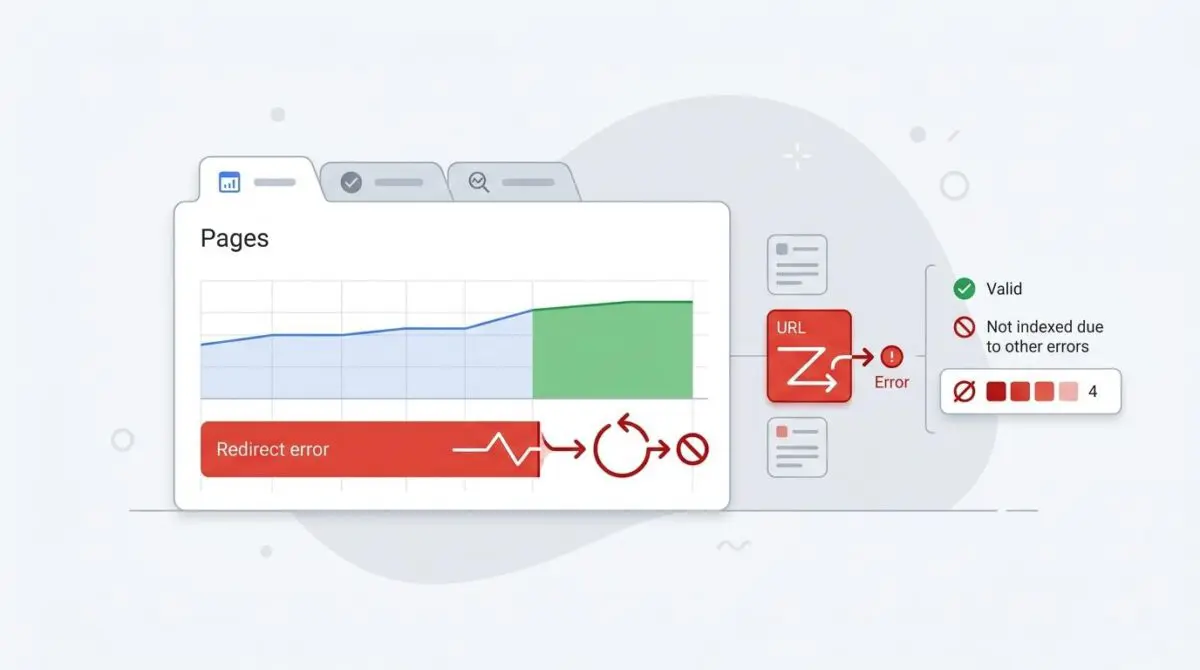
This discrepancy manifests clearly in the Indexing report under the ‘Why pages aren’t indexed’ section.
When inspecting raw server logs, you will observe 301 Permanent or 302 Found HTTP status codes associated specifically with Googlebot IP addresses. Meanwhile, a standard browser request from a residential IP returns a clean 200 OK status.
The root cause is typically a desynchronization spanning from the server layer to the edge CDN or the WordPress application itself. Trailing slash inconsistencies are prime offenders, especially when Nginx enforces a strict slash policy while the WordPress XML sitemap omits it.
Furthermore, conditional user-agent redirects often trigger this anomaly. Mobile-optimization plugins or application firewalls may intercept the Googlebot user-agent string, forcing a localized or mobile-specific URL path.
Stale edge caches further complicate the diagnostic process. A redirect may have been removed at the origin server, but an intermediate layer like Cloudflare or Redis continues to serve the cached Location header directly to Googlebot.
The Engineering Resolution Roadmap
Executing this resolution roadmap requires precision and a systematic approach to your server configuration.
Engineering Resolution Roadmap
Identify the Redirect Source via cURL
Run a terminal command to see headers as Googlebot: ‘curl -I -L -A “Mozilla/5.0 (compatible; Googlebot/2.1; +http://www.google.com/bot.html)” [URL]’. Check for ‘Location:’ headers and the HTTP status code.
Normalize URL Structure in WordPress
Navigate to ‘Settings > Permalinks’ and ensure the structure matches your sitemap. Use a plugin like ‘Better Search Replace’ to update all internal ‘http://’ links to ‘https://’ across the ‘wp_posts’ and ‘wp_postmeta’ tables.
Audit Rewrite Rules and Plugins
Inspect the .htaccess (Apache) or nginx.conf file for manual rewrite rules. Disable redirect-management plugins (e.g., ‘Redirection’) temporarily to see if the status reverts to 200 OK in the GSC ‘Live Test’.
Purge Infrastructure Cache
Flush the WordPress site cache, then purge the CDN cache (Cloudflare/Fastly) specifically for the affected URLs. In Cloudflare, use ‘Purge by URL’ to ensure the edge nodes are fetching fresh headers from the origin.
You must isolate the exact layer where the 3xx header is generated to prevent cascading failures.
By utilizing cURL, you bypass browser caching entirely and simulate the exact request headers used by Google’s rendering engine. This reveals whether the redirect originates from an application-level plugin, an Nginx rewrite rule, or an edge worker.
Normalizing the URL structure in WordPress is equally critical to maintaining entity integrity. You must ensure absolute parity between your XML sitemap, internal links, and the canonical tags rendered in the Document Object Model.
If left unresolved, these redirect chains continuously waste server resources, consuming limited crawl resources that should be allocated to indexing fresh, high-value content.
Purging the infrastructure cache is the final mandatory step in this phase. You must explicitly clear the edge cache and object cache to force the CDN to fetch the updated 200 OK headers from the origin server.
Resolution Execution: Overriding Bot Logic
In many WordPress environments, conditional user-agent logic is the hidden culprit behind phantom redirects.
When legacy plugins attempt to serve dynamic mobile content, they often inadvertently trap Googlebot in a 302 redirect loop. The server detects the bot signature and forces a mobile-specific path that contradicts the canonical tag.
To override this destructive behavior, you must hook directly into the WordPress template redirect sequence. By intercepting the request early in the load order, you can neutralize conflicting mobile redirect logic specifically for Googlebot.
Fixing via WordPress Functions
Inject the following PHP implementation into your core functionality plugin or child theme.
add_action('template_redirect', function() { if (isset($_SERVER['HTTP_USER_AGENT']) && strpos($_SERVER['HTTP_USER_AGENT'], 'Googlebot') !== false) { // Logic to prevent specific mobile redirects for Googlebot to avoid GSC flags remove_action('wp_head', 'adjacent_posts_rel_link_wp_head', 10); }}, 1);This code ensures that Googlebot receives the exact same 200 OK status code as a standard desktop user. It forces the server to bypass aggressive theme-level redirect rules that fragment your crawl budget.
Always test this implementation on a staging environment before deploying to production. Incorrectly hooking into the template redirect action can cause fatal errors if your theme relies heavily on custom routing logic.
Validation Protocol and Edge Cases
After deploying the fix, immediate validation is mandatory to confirm the resolution.
Validation Protocol
- Use the Google Search Console ‘URL Inspection’ tool and click ‘Test Live URL’ to verify availability.
- Use Chrome DevTools Network tab with ‘Disable Cache’ to identify 301/302 status codes.
- Use the ‘Rich Result Test’ tool to confirm the final rendered URL matches the destination.
Relying solely on the GSC dashboard is insufficient, as the indexing reports operate on a delayed aggregation cycle. You must force a live fetch to guarantee the bot sees the updated 200 OK header.
Headless WordPress architectures introduce highly complex edge cases. When utilizing a Next.js or Nuxt.js frontend, the frontend router may possess its own redirect logic within its configuration files.
Even if the WordPress backend returns a 200 OK for the REST API or GraphQL call, the frontend middleware might detect a canonical mismatch. It then issues a 301 to Googlebot based on its own routing rules.
This creates a ghost redirect that is completely invisible within the WordPress dashboard. Resolving this requires auditing your Next.js config files and ensuring frontend routing rules perfectly mirror the backend permalink structure.
Autonomous Monitoring and Prevention
To prevent recurrence, enterprise architectures require continuous entity integrity monitoring.
Relying on manual GSC audits leaves your crawl budget vulnerable to sudden infrastructure regressions. You must implement a pre-publishing sitemap validation script in your CI/CD pipeline.
This ensures all URLs return a 200 status before deployment to the production environment. Periodically running automated log file analysis catches 3xx responses for Googlebot before they aggregate in Google’s indexing systems.
Utilizing platforms like Make.com alongside custom API alerts allows you to detect these anomalies in real-time. At Andres SEO Expert, we engineer these autonomous monitoring pipelines to safeguard your technical foundation against silent regressions.
Conclusion
Resolving phantom redirect errors requires a deep understanding of HTTP headers, caching layers, and bot-specific routing logic.
By applying this rigorous diagnostic framework, you restore crawl efficiency and secure your entity’s standing in modern AI-driven search models. Precision at the server level dictates visibility at the search level.
Navigating the intersection of technical SEO, server architecture, and generative search requires a precise roadmap. If you need to future-proof your enterprise stack, resolve deep-level crawl anomalies, or implement AI-driven SEO automation, connect with Andres at Andres SEO Expert.
Frequently Asked Questions
What causes the “Page with redirect” error in Google Search Console for URLs that seem fine in a browser?
This occurs when your server or CDN issues a 301 or 302 redirect specifically to the Googlebot user-agent while serving a 200 OK status to standard browsers. Common causes include inconsistent trailing slash rules, HTTP-to-HTTPS mismatches, and conditional user-agent logic in mobile optimization plugins.
How can I diagnose phantom redirects using a cURL command?
You can simulate Googlebot by running the terminal command: curl -I -L -A "Mozilla/5.0 (compatible; Googlebot/2.1; +http://www.google.com/bot.html)" [URL]. This command allows you to see the exact HTTP status codes and Location headers the crawler receives, effectively bypassing browser-level caching and local DNS overrides.
Why are phantom redirects harmful for Generative Engine Optimization (GEO)?
Phantom redirects fragment the context provided to LLM-based crawlers. When source attribution links to an intermediate or incorrect canonical version, it weakens your entity authority and relevance, which can reduce your site’s visibility in AI-synthesized answers and search results.
How do I fix WordPress-specific bot redirects at the server level?
To resolve these issues, you must normalize your URL structure in permalink settings, update internal links to HTTPS using tools like ‘Better Search Replace’, and potentially hook into the ‘template_redirect’ action to override aggressive mobile-redirect logic specifically for the Googlebot user-agent.
Can a CDN like Cloudflare cause persistent redirect issues for Googlebot?
Yes. If a redirect rule was previously in place, a CDN’s edge cache may continue to serve the outdated 301 or 302 header to Googlebot even after you have removed the rule at the origin server. A manual purge of the specific URL cache at the CDN level is required to fix this.
Do headless WordPress architectures like Next.js introduce unique redirect errors?
Yes. In headless setups, the frontend router often has its own redirect logic. Even if the WordPress backend returns a 200 OK status, the frontend middleware may trigger a 301 redirect if the requested path does not perfectly match the frontend’s canonical routing rules.