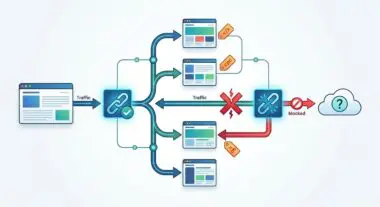
Key Points
- Schema Desynchronization: The missing ‘@id’ attribute in the final breadcrumb node is typically caused by UI rendering logic stripping the anchor tag, which inadvertently breaks the JSON-LD inheritance pipeline.
- Programmatic Injection: Resolving the error requires intercepting the schema generation array via server-side filters (e.g., RankMath or Yoast hooks) to forcefully inject the absolute canonical URI into the leaf node.
- Edge Case Vulnerabilities: Headless architectures and aggressive edge caching (Cloudflare Workers) frequently strip or malform these identifiers, necessitating strict bypass rules and absolute URL mapping in the frontend environment.
The Core Conflict: Structural Degradation in Breadcrumb Nodes
Approximately 42% of e-commerce rich result degradations are attributed to invalid JSON-LD item pointers. This specific failure results in a 15% average decrease in SERP CTR due to the loss of visual breadcrumb navigation snippets. The root of this degradation often traces back to the BreadcrumbList ‘item’ id field requirement.
The “Missing field id” error occurs when a ListItem within a JSON-LD BreadcrumbList structure lacks the ‘@id’ attribute. This attribute functions as the absolute URL identifying the specific entity or page. While the last item in a breadcrumb trail (the leaf node) often represents the current page, it is frequently not hyperlinked in the UI to prevent self-linking loops.
However, Google’s Structured Data Testing Tool and Rich Results Test strictly require a valid URI in the schema. This URI resolves the entity’s identity and maps it to the crawlable URL. Failure to provide this field results in the complete invalidation of the Breadcrumb Rich Result for that specific page.
From a Generative Engine Optimization (GEO) perspective, missing identifiers severely degrade the engine’s ability to construct a deterministic site taxonomy. When an LLM parses a site, it builds a knowledge graph of your content architecture. The BreadcrumbList serves as the primary edge connecting these topical nodes.
A missing ID severs this edge, isolating the leaf node and diluting its topical relevance to the parent category. This impacts how LLM-based search crawlers associate specific topics with your broader site authority. For standard search, this error leads to the loss of the visual breadcrumb trail in SERPs, reverting the display to a raw URL.
In Google Search Console, this manifests as a “Critical issue: Missing field ‘id'” within the Unparsable structured data or Breadcrumbs enhancement reports. Raw server logs may show successful 200 OK status codes, masking the underlying issue from standard operational monitoring. However, the Googlebot-Smartphone user agent rendering of the JSON-LD block will expose a ListItem object lacking the crucial ‘@id’ key-value pair.
Diagnostic Checkpoints: Identifying the Desynchronization
This error is fundamentally a desynchronization between the frontend rendering logic and the backend schema generation. When the stack fails to align the visual representation with the machine-readable data, the structured data pipeline breaks. Identifying the exact layer where this disconnect occurs is the first step in remediation.
Diagnostic Checkpoints
Leaf Node Link Suppression
Final tag removal breaks schema @id property inheritance logic.
Virtual Page/Custom Post Type Desync
Global $post object resolution failure in custom virtual loops.
Permalinks and Trailingslash Inconsistency
Canonical mismatch results in empty URL/ID calculation failures.
Object Cache Fragment Stale Data
Stale fragments serve outdated JSON-LD objects lacking ID fields.
Many SEO frameworks attempt to prevent self-linking by removing the anchor tag from the final breadcrumb item. If the schema generator is tightly coupled with this UI rendering logic, it omits the ‘@id’ attribute entirely. The system perceives the item as a non-linkable string rather than a distinct resource URI.
Virtual pages and custom post types introduce another layer of complexity to schema generation. When custom taxonomy archives are rendered without a physical page assigned to the base path, the global post object may fail to resolve. This causes the item URL to return as null or empty during the schema injection phase.
Furthermore, permalink and trailingslash inconsistencies can disrupt the logic that calculates the current URL. A conflict between core WordPress URL settings and server-level RewriteRules can cause the variable to fail. The generator then skips the property to avoid outputting a malformed URL.
Finally, aggressive object caching mechanisms like Redis or Memcached can store partially constructed BreadcrumbList objects. If a developer updates the schema logic, the cache fragment for that specific URI may still serve the older, broken version. The ID will remain missing until these transient fragments are explicitly purged from the server memory.
The Engineering Resolution Roadmap
Resolving this schema anomaly requires a systematic approach to force the injection of the missing identifier. You must decouple the JSON-LD generation from the visual breadcrumb output. This ensures the machine-readable payload remains intact regardless of frontend UI choices.
Engineering Resolution Roadmap
Identify Logic Source
Determine if breadcrumbs are generated by a plugin (Yoast, RankMath) or the theme’s functions.php. Inspect the HTML source code (CTRL+U) and search for ‘”@type”: “ListItem”‘ to find the JSON-LD block and confirm which element is missing the ‘@id’.
Force Leaf Node ID via Filter
In WordPress, use the relevant hook to inject the current URL into the last array item. For Yoast SEO, use the ‘wpseo_breadcrumb_links’ filter; for RankMath, use ‘rank_math/frontend/breadcrumb/items’. Programmatically fetch the current URL using get_permalink() and assign it to the ‘url’ or ‘id’ key.
Sanitize and Normalize URIs
Ensure that the ‘@id’ being injected is the absolute, canonical URL including the protocol (https) and trailing slash if applicable. Use the function user_trailingslashit(get_permalink()) to ensure consistency with WordPress settings.
Purge Server-Side Fragments
Clear the WordPress object cache via WP-CLI (wp cache flush) and purge any Edge Caching (Cloudflare/Fastly) to ensure the newly generated JSON-LD is served to Googlebot.
The first phase is identifying the logic source generating the breadcrumb payload. Inspect the raw HTML source and locate the JSON-LD block containing the ListItem type declaration. This confirms whether a dedicated SEO plugin or the theme’s core functions are responsible for the output.
Once the source is identified, you must utilize server-side filters to force the leaf node ID. In WordPress environments, this involves intercepting the breadcrumb array before it is encoded into JSON. You programmatically fetch the current URL and assign it to the missing key.
Sanitization is a critical component of this programmatic injection process. The injected identifier must be the absolute, canonical URL, complete with the correct protocol and trailing slash configuration. Functions like trailing slash enforcers ensure that the injected URI strictly matches the canonical architecture of the site.
The final phase ensures the corrected schema is actually delivered to search engine crawlers. Server-side fragments and edge cache layers must be aggressively purged. Failure to clear the WordPress object cache or Cloudflare edge nodes will result in Googlebot continuing to parse the invalidated schema payload.
Code Implementations: Forcing Node ID Injection
The following technical implementations provide direct solutions for the most common WordPress SEO frameworks. These snippets intercept the schema generation pipeline to forcefully inject the required entity identifier.
Fixing via RankMath Filter
This implementation targets the RankMath frontend breadcrumb items array. It calculates the final index of the breadcrumb trail and ensures the URL parameter is populated with the absolute permalink.
/* OPTION 1: WordPress (functions.php) - Fix for RankMath */
add_filter( 'rank_math/frontend/breadcrumb/items', function( $crumbs, $class ) {
    $last_index = count( $crumbs ) - 1;
    if ( ! isset( $crumbs[$last_index][1] ) || empty( $crumbs[$last_index][1] ) ) {
        $crumbs[$last_index][1] = get_permalink();
    }
    return $crumbs;
}, 10, 2 );
Fixing via Yoast SEO Filter
For Yoast SEO configurations, the target array utilizes string-based keys rather than numerical indexes. This function targets the final array key and explicitly defines the URL parameter using WordPress core functions.
/* OPTION 2: WordPress (functions.php) - Fix for Yoast SEO */
add_filter( 'wpseo_breadcrumb_links', function( $links ) {
    $last_key = array_key_last( $links );
    if ( ! isset( $links[$last_key]['url'] ) ) {
        $links[$last_key]['url'] = get_permalink();
    }
    return $links;
});
Fixing via WP-CLI Bulk Regex
When theme files contain hardcoded schema structures, dynamic PHP filters will fail to execute. This WP-CLI command utilizes regular expressions to execute a bulk search and replace directly within the database or file structure.
/* OPTION 3: WP-CLI - Bulk Regex Fix for hardcoded theme files */
# Search for breadcrumb patterns missing the ID property
wp search-replace '"@type":"ListItem","position":([0-9]+),"name":"([^"]+)"}' '"@type":"ListItem","position":$1,"name":"$2","item":"URL_HERE"' --regex
Validation Protocol & Edge Case Scenarios
Deploying the fix is only half the battle; rigorous validation ensures the schema is parsed correctly by search engines. You must verify the structural integrity of the JSON-LD payload across multiple rendering environments.
Validation Protocol
- Run URL through Google Rich Results Test to verify ‘Valid’ breadcrumb status.
- Inspect Chrome DevTools Network response for terminal BreadcrumbList ListItem @id.
- Execute terminal CURL command and grep for raw JSON-LD structure in response.
- Confirm zero syntax errors using the official Schema Markup Validator tool.
Even with flawless server-side execution, edge cases can still trigger the schema validation error. Headless WordPress architectures utilizing Next.js and WPGraphQL are particularly susceptible to this specific degradation. In these environments, the GraphQL query often fetches a relative URI rather than an absolute URL.
If the frontend schema generator fails to prepend the domain environment variable, the identifier outputs as a relative path. Google strictly interprets relative paths in JSON-LD as invalid fields because the specification requires a fully qualified URI. Developers must ensure that the public site URL is correctly mapped and appended before the JSON-LD component renders.
Another complex edge case involves Cloudflare Workers or similar edge computing layers. These systems are sometimes configured to aggressively optimize JSON payloads to reduce bandwidth consumption. They may strip identifier fields if they incorrectly perceive them as redundant properties non-essential for visual rendering.
In these scenarios, you must configure bypass rules within the edge layer. Ensure that any payload containing structured data MIME types is excluded from aggressive minification or property stripping protocols.
Autonomous Monitoring & Prevention
Manual remediation is inefficient for enterprise-scale architectures. To prevent future schema regressions, engineering teams must implement autonomous monitoring and continuous integration validation pipelines.
Pre-deployment scripts using headless browsers like Puppeteer or Playwright can validate JSON-LD schemas against the official validator API before code reaches production. This ensures structural integrity is maintained across all template updates. It prevents developers from accidentally stripping crucial schema variables during UI refactoring.
Automated monitoring utilizing scheduled server crawls provides real-time anomaly detection. By enabling strict structured data validation on these crawls, you can detect missing entity identifiers long before they trigger a critical warning in Google Search Console.
At Andres SEO Expert, we engineer sophisticated, automated pipelines to monitor entity integrity at the enterprise level. By integrating log analysis and custom API alerts, we ensure your technical architecture remains synchronized with search engine requirements. This proactive approach protects your crawl budget and maximizes generative search visibility.
Conclusion
Resolving the missing field ID in breadcrumb schema requires a precise understanding of how server-side logic translates into machine-readable entities. By decoupling UI rendering from JSON-LD generation and enforcing strict URI sanitization, you can restore your site’s taxonomic integrity. Validating these changes across edge caches and headless environments ensures permanent resolution.
Navigating the intersection of technical SEO, server architecture, and generative search requires a precise roadmap. If you need to future-proof your enterprise stack, resolve deep-level crawl anomalies, or implement AI-driven SEO automation, connect with Andres at Andres SEO Expert.