Key Points
- Crawl Budget Optimization: High server latency (TTFB) and unoptimized dynamic templates force Googlebot to defer crawling, requiring NGINX FastCGI or Object caching.
- Information Gain Thresholds: Programmatic SEO pages with high lexical overlap are flagged as low-priority, necessitating NLP-driven content uniqueness validation.
- Internal Link Architecture: Deep click depth and orphaned XML sitemap URLs reduce crawl priority, solved by implementing HTML hub-and-spoke linking structures.
What is the ‘Discovered – currently not indexed’ Error?
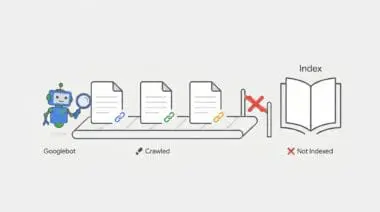
The ‘Discovered – currently not indexed’ status indicates that Googlebot has identified a URL but has not yet crawled it. This identification typically occurs via an XML sitemap or an internal link. The URL is placed in a secondary queue, creating a state of crawl deferral.
Google’s scheduler determines that crawling the page immediately would either exceed the site’s allocated Crawl Budget or provide low incremental value to the index. For programmatic SEO (pSEO), this represents a critical failure point. The volume of generated pages simply exceeds the domain’s perceived authority or the server’s ability to serve them efficiently.
In the context of Generative Engine Optimization (GEO), this status prevents content from being ingested into Large Language Model (LLM) training sets. It also blocks Retrieval-Augmented Generation (RAG) pipelines that power AI Overviews. If the content is not indexed, it effectively does not exist for generative search.
This leads to a total loss of visibility for high-volume, long-tail programmatic queries. This deferral often happens when the ‘Information Gain’ of the pSEO pages is perceived as too low compared to existing indexed content.
Symptom Validation
In Google Search Console, the ‘Page Indexing’ report will show a high volume of URLs under the ‘Discovered – currently not indexed’ status. Crucially, the ‘Last Crawled’ field for these URLs will display ‘N/A’. This confirms Google knows the URL exists but has refused to fetch it.
Server log analysis via an ELK stack or Grep will reveal zero entries for Googlebot IP ranges (66.249.x.x) hitting these specific URLs. This occurs despite the URLs being fully present and valid in your XML sitemap.
Additionally, the ‘Crawl Stats’ report in GSC may show a distinct plateau or decline in ‘Total crawl requests’. Meanwhile, ‘Discovery’ requests will remain disproportionately high, indicating a bottleneck between discovery and actual crawling.
Diagnostic Checkpoints: Identifying the Root Cause
This error is fundamentally a symptom of desynchronization within your technical stack. Googlebot wants to crawl your site, but server constraints or architectural flaws are forcing it to abandon the attempt.
Before changing code, we must isolate the specific layer causing the conflict. A strict troubleshooting mindset ensures we do not waste time fixing a server issue when the root cause is actually content quality.
Diagnostic Checkpoints
Crawl Budget Exhaustion via Request Latency
Optimize TTFB to prevent Googlebot crawl rate throttling.
Low Information Gain and Content Similarity
Increase lexical uniqueness to avoid low-quality indexing flags.
Internal Link Architecture Depth
Reduce URL click depth to increase crawl priority.
Crawl Budget Exhaustion via Request Latency
Googlebot limits its crawl rate based on a strict ‘Crawl Capacity Limit’. If the server’s Time to First Byte (TTFB) is high, or if it returns 5xx errors under load, Googlebot aggressively throttles the crawl. For pSEO, dynamic templates that are not cached create massive server overhead per request. This causes Google to deprioritize the discovery queue entirely to avoid crashing the origin server.
In WordPress environments, this often occurs when pSEO pages rely on heavy database queries or unoptimized ‘admin-ajax.php’ calls. If these are not cached at the Object level (Redis/Memcached) or Page level, it leads to rapid PHP-FPM worker saturation.
Low Information Gain and Content Similarity
Google’s ‘Crawl Demand’ is heavily driven by perceived quality and uniqueness. If programmatic logic produces pages with high lexical overlap, the indexing algorithm flags the cluster as low-priority. For example, changing only a city name in a 1,000-word article will leave those pages in the ‘Discovered’ state indefinitely.
This is commonly seen when using plugins like WP All Import or RankMath to generate thousands of location or category pages. These generated pages often share 95% of the same boilerplate HTML and schema markup, offering zero new value to the index.
Internal Link Architecture Depth
URLs found only in sitemaps but not via a crawlable HTML path are considered orphaned pages. These are automatically assigned a significantly lower ‘Crawl Priority’. If your pSEO pages are more than three to four clicks away from the root domain, they are frequently deferred by the scheduler.
This occurs when pSEO pages are excluded from the main navigation and exist solely in a flat XML sitemap. It also happens when the ‘Virtual Page’ logic of a custom plugin fails to register the URLs in the WordPress global rewrite object correctly.
Engineering Resolution Roadmap
Resolving this crawl deferral requires a systematic approach to server optimization and internal link restructuring. By addressing both performance and architecture, we can force Googlebot to re-evaluate the discovery queue.
Engineering Resolution Roadmap
Implement HTML Hub-and-Spoke Linking
Create ‘Hub’ pages that link to batches of 100-200 pSEO pages. Ensure these Hubs are linked from the footer or main navigation to pass PageRank and signal crawl priority to Googlebot.
Optimize Server Response with Static Fragment Caching
Use NGINX FastCGI Cache or a plugin like WP Rocket to serve pSEO pages as static HTML. Ensure TTFB is under 200ms. Use ‘curl -o /dev/null -s -w %{time_starttransfer} https://example.com/pseo-page’ to verify.
Deploy Google Indexing API (for specific use cases)
For JobPostings or BroadcastEvents, use the Google Indexing API. For general pSEO, use a script to send ‘URL_UPDATED’ notifications to the API endpoint to force a crawl of the discovery queue.
Prune and Consolidate
Identify pSEO pages with zero impressions over 90 days. Set them to ‘410 Gone’ or ‘noindex’ to reclaim crawl budget for higher-performing programmatic segments.
Implementing HTML Hub-and-Spoke linking flattens your site architecture. By creating dedicated hub pages that group 100-200 programmatic URLs, you drastically reduce click depth. Linking these hubs directly from the global footer passes essential PageRank and signals immediate crawl priority.
Optimizing server response times is non-negotiable for programmatic SEO at scale. Deploying NGINX FastCGI Cache allows your server to bypass PHP execution entirely, serving pSEO pages as static HTML. You must ensure your Time to First Byte (TTFB) remains consistently under 200ms to prevent Googlebot throttling.
Deploying the Google Indexing API provides a direct pipeline to Google’s crawl scheduler. While officially reserved for JobPostings and BroadcastEvents, it can be leveraged to send update notifications for programmatic queues. This forces Google to re-evaluate URLs stuck in the discovery phase.
Finally, aggressive pruning reclaims wasted crawl budget. Identify programmatic pages that have generated zero impressions over a 90-day period. Serve a ‘410 Gone’ status or apply a ‘noindex’ tag to these URLs, redirecting Googlebot’s attention to your high-performing segments.
The Code Fix
The following PHP snippet hooks into the WordPress publishing process to automatically ping the Google Indexing API. This code belongs in your theme’s functions.php file or a custom utility plugin. It resolves the crawl deferral by sending an immediate ‘URL_UPDATED’ payload to Google, bypassing the standard sitemap discovery delay.
add_action('publish_post', 'trigger_google_indexing_api', 10, 2);
function trigger_google_indexing_api($ID, $post) {
    if ($post->post_type !== 'pseo_custom_type') return;
    $url = get_permalink($ID);
    $client = new Google_Client();
    $client->setAuthConfig(ABSPATH . 'service-account-file.json');
    $client->addScope('https://www.googleapis.com/auth/indexing');
    $service = new Google_Service_Indexing($client);
    $urlNotification = new Google_Service_Indexing_UrlNotification();
    $urlNotification->setUrl($url);
    $urlNotification->setType('URL_UPDATED');
    $service->urlNotifications->publish($urlNotification);
}
Validation Protocol & Edge Cases
You must verify your server optimizations immediately without waiting for Googlebot’s next scheduled visit. Proactive validation ensures your architectural changes are actually visible to search engine crawlers.
Validation Protocol
- Execute GSC URL Inspection Live Test to isolate crawl priority issues.
- Verify server response via curl using Googlebot User-Agent for 403/429 errors.
- Audit GSC Crawl Stats Host Status for server connection failures.
A rare but critical edge case occurs when Cloudflare ‘Bot Management’ or ‘Super Bot Fight Mode’ is enabled with high sensitivity. The initial discovery request from Google is often a lightweight HEAD request, which passes without issue.
However, the subsequent full crawl request is challenged by a JavaScript or Managed Challenge. This happens because the sudden volume of pSEO requests mimics a malicious scraping attempt. As a result, Googlebot is silently blocked at the Edge layer.
This leaves the URL permanently stuck in the ‘Discovered’ state. The origin server never even logs the crawl attempt, making it invisible to standard server-side debugging. You must whitelist verified Googlebot ASNs in your Web Application Firewall (WAF) to resolve this.
How to Prevent Future Issues & Best Practices
Preventing crawl deferral requires continuous monitoring of your server’s interaction with search engine bots. Implement automated log file monitoring using tools like Logz.io or the Screaming Frog Log File Analyser. This allows you to track your ‘Crawl-to-Discovery’ ratio in real-time.
Establish a robust CI/CD pipeline for all programmatic SEO content deployments. This pipeline must validate ‘Information Gain’ scores using NLP libraries like Spacy or NLTK before publishing pages in bulk. Ensuring high lexical uniqueness prevents Google from flagging your clusters as low-quality.
As a best practice for maintaining the ‘Discovered – currently not indexed’ queue at zero, always scale your server resources before scaling your content. Never deploy thousands of programmatic pages without first confirming your caching layers and database query efficiencies are fully optimized.
Think of the ‘Discovered – currently not indexed’ status like handing a delivery driver a map to a thousand new houses, but failing to pave the roads. The driver knows exactly where the houses are (Discovery), but the muddy, impassable terrain (Server Latency and Poor Architecture) forces them to abandon the route and return to the depot.
Decoding Discovered – Currently Not Indexed: The Ghost in the Generative Machine
Technical debt within your indexing pipeline creates severe semantic noise that actively confuses generative response engines. When programmatic pages are discovered but ignored, they fracture your domain’s knowledge graph. This prevents LLMs like ChatGPT and Gemini from connecting your brand to specific, long-tail entities.
Retrieval-Augmented Generation (RAG) pipelines rely entirely on a synchronized, fully indexed database to pull real-time answers. If your content is stuck in a crawl deferral state, it is invisible to these AI-driven systems. Consequently, your brand is dropped from AI overviews, losing critical visibility in the new search landscape.
Manual audits of Google Search Console are dead. A clean, highly optimized technical stack is now vital for survival in generative search. Make.com serves as the mandatory orchestration layer for Enterprise SEO, allowing teams to build autonomous monitoring systems that react to crawl failures instantly.
To resolve this autonomously, we architect a Make.com pipeline triggered by a weekly Google Search Console API pull. The scenario extracts all URLs flagged with the ‘Discovered – currently not indexed’ status. It then routes these URLs through a Headless Browser module using ScrapingBee to render the DOM exactly as Googlebot sees it.
Next, the pipeline utilizes a cURL module to analyze the HTTP headers, specifically checking for TTFB spikes or unexpected 429 Too Many Requests errors. If the TTFB exceeds 300ms, Make.com triggers a WP-CLI command via SSH to flush the Redis object cache and rebuild the NGINX FastCGI transients.
Finally, the automation compiles the diagnostic data and pushes a formatted alert directly to a dedicated Slack channel. This proactive engineering ensures flawless entity integrity, keeping your programmatic architecture perfectly synchronized for the next generation of search.
Conclusion & Next Steps
Resolving the ‘Discovered – currently not indexed’ status is not just about fixing a report; it is about restoring the fundamental communication between your server and Google’s crawl scheduler. By optimizing your TTFB, enforcing strict information gain thresholds, and flattening your internal architecture, you eliminate the bottlenecks that cause crawl deferral.
Navigating the intersection of generative search and operational efficiency requires more than just tools—it requires a roadmap. If you’re ready to evolve your strategy through specialized SEO, GEO, Advanced Hosting Environments, or AI-driven automation, connect with Andres at Andres SEO Expert. Let’s build a future-proof foundation for your business together.